Please can you implement an option to allow insecure on local lan.
I have a samsung tv that no longer works pn plex due to the certificate issue.
I believe that’s there already.
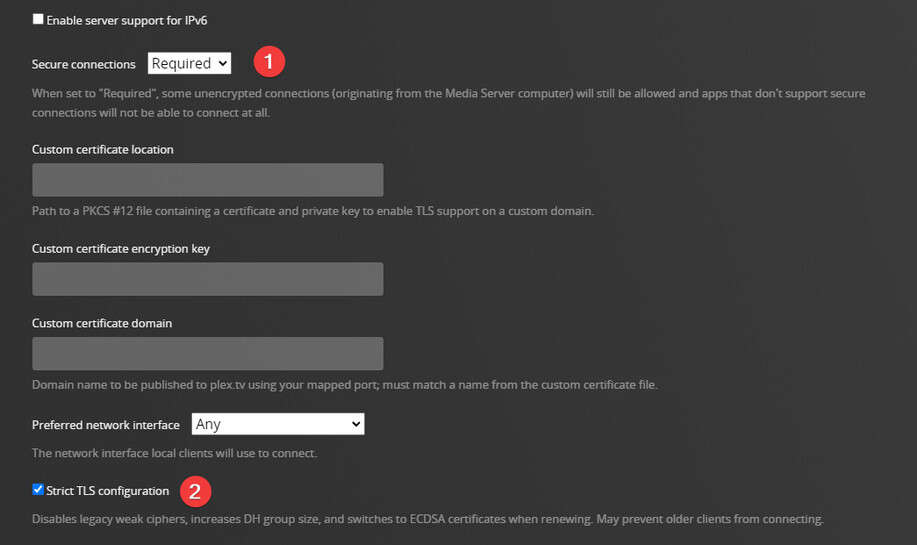
In your plex servers network settings set Secure connections to Preferred and then under List of IP addresses and networks that are allowed without auth add the ip of your TV or list of ips if you want a wider access on your local network without auth.
Plex server restart would be needed after making this change.
The relevant text:
Hi. Yes i am aware of the certificate issue with Tizen based tv’s.
I do not want to allow any insecure connections outside my network, Setting the server to preferred allows that.
I want a setting that will ignore local lan requests for secure connection.
Hope this gets picked up by PLEX.
A lot of the Tizen TV’s are not that old so it is quite a big issue.
Darren
Apologies replied to wrong msg
Setting the server to “prefer” authentication just means it can allow insecure connections. But you can then specify that only specific network IP addresses (or entire network range) that is allowed to connect insecurely. This would result in local clients being able to connect to the server without authentication, but no other clients anywhere else in the world can.
Huh ? Unless you mean access unauthenticated ?
I, uh, yeah I do. I guess I was thinking about how an unauthenticated connection was “insecure” in that there is no authentication, thus you are “unsure/insecure” about who is connected.
According to our system, you have a Sammy TV linked to your account from 2019
I personally run a Sammy 2018 TV with the same client you do, and can connect securely
So maybe a Samsung firmware upgrade?
Hi. i have tried setting to prefer and already have local lan allowed to connect without auth. This is not the same as securely.
with the above settings external users (outside Lan) can connect insecurely.
This is the problem. without auth means you can just use plex without logging in, it does not restrict insecure connections.
I have a 2019 Samsung (55ru7100)that is on the latest firmware (no more updates available).
this issue started this month.
Hi. I have just checked samsung site and there is a firmware update from august this year, it is a USB update only, not over the air. I will give this a go.
Thanks for all your input. I will get back once update done.
Hello . Just checked and the TV is on the latest version 1401.
Could you let me know what settings you have on plex app re network.
i have also added manual server ip.
Still wont connect unless i set server to preferred.
Thanks
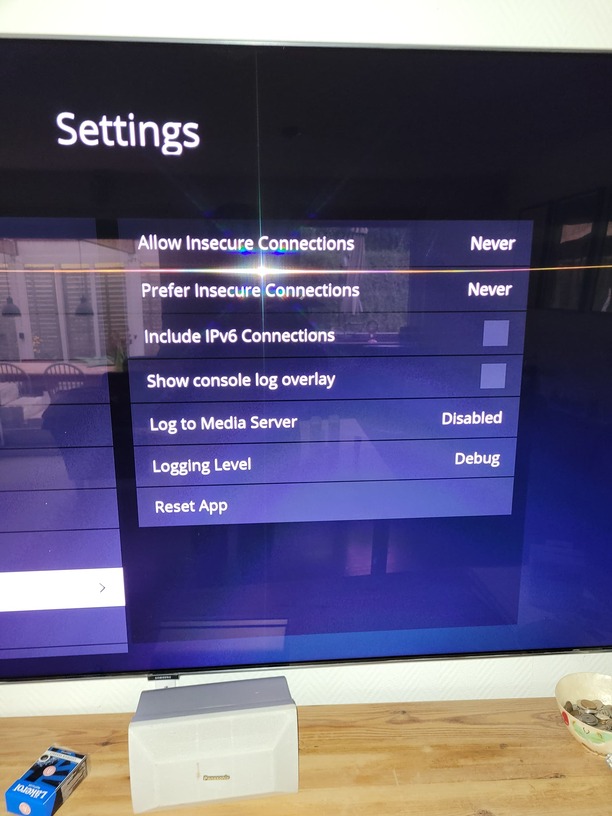

Hi. At first it played but was converting everything. this turned out to be that i had use relay set. After un checking this the videos do play. I have the same issue in the it is very slow in the ui so i dont think this is your QNAP, i wonder why it seems to prefer the relay over the local connection when it is enabled. i have never had issues with a slow ui. I have Plex running on win server 2012, 16GB ram and plex and all artwork/ DB’s are on an SSD, content on HDD’s. Something else that is new is that a load of content will not play due to “too many streams max 30” this is subtitles. But not sure why this has just started. if i remove subs then it does not have any issues.
Thanks for your help on this. At least it now works locally albeit slowly.
Then you most likely are transcoding.
Is this a 4K video perhaps?
yes it is 4k, which i know my server cannot cope with transcoding. However have not encountered this 30 stream limit in the past.
4 a start, read this:
The Samsung 30 stream limit has existed for quite some time (years).
If the file contains over 30 total streams, video + audio + subtitles, Plex Media Server must remux (direct stream) it to get below the limit.
When using the Plex Samsung app, if the media is direct streaming, enabling any subtitle results in a video transcode.
This is due to a limitation in the streaming protocol used between Plex Media Server and the TV. If Plex did not burn in the subtitles, they would slowly lose sync with the video and audio.
From what I recall from past threads, there is little Plex can do about this, as Samsung imposes the 30 stream limit and dictates what streaming protocols are used.
The solution is to remux the media using MKVToolNix or similar tools and remove any unnecessary audio and subtitle tracks.
Well, and adding to @FordGuy61 here…
If subs are srt’s they most likely triggers a transcode
Also, if the 4K media has a high bandwidth, and using the NIC in the Sammy, you are locked to 100Mb, which might not be enough!
And if so, look into using wireless
Thanks for the info.
