Server Version#: 1.41.2
Player Version#: 4.11.2
<If providing server logs please do NOT turn on verbose logging, only debug logging should be enabled>
Hi all. First post & I’m just trying to get my head around what I’m seeing.
I’m in the habit of tagging my albums & using the “album artist” field to keep things where I want them.
So, taking “Prince” as an example, the “Album Artist” field will say “Prince”, the date of the album would put them in chronological release order & the artist can be anything I like… Prince, Prince & The Revolution, Prince & The New Power Generation, The Artist Formerly Known As Prince, etc. etc. but they all sort together as a single set of albums under the collective name of Prince & in release order.
Now, I’m reading my library into Plex for the first time & it seems to be sorting them in a completely messed up order.
I have “Bob Marley” & “Bob Marley & The Wailers” as 2 separate artists, where in fact they’re all tagged not only with the Album Artist as Bob Marley & The Wailers but also, in this case, with the Artist as Bob Marley & The Wailers.
In other words, there are zero albums in my library where the artist is just Bob Marley.
This would imply that Plex itself is deciding what to call my albums rather than reading my tags, which is absolutely no use to me whatsoever.
Is this the case?
If so, can I switch it off so that Plex allows me to do the thinking in my own library?
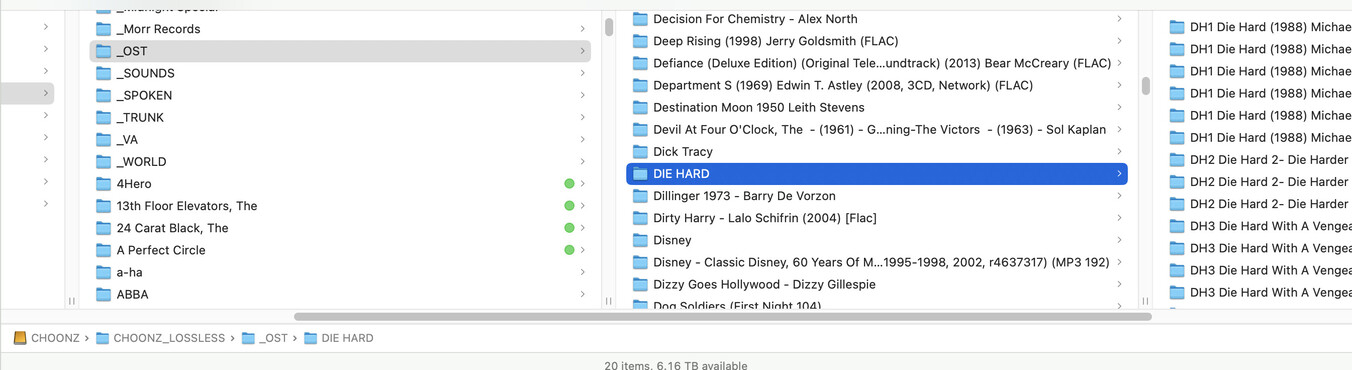
Everything’s immaculate. (At least I think it is ) But here’s a screenshot showing a random section of my folder hierarchy.
At the bottom you can see the route to the soundtracks folder (OST) which, along with a few others like “classical” I keep in separate folders.
From 4hero downwards, it’s artist folders.
As you can see in the right hand column, I use a “DH” number to keep the Die Hard soundtracks in the correct order. I dispense with this in the metatags because each album has the same “OST, Die Hard” Album Artist tag & a release date which should force the sort order. At least I’m hoping it will, once Plex has finished sorting itself out using my tags. I won’t know for a while as I have about 23,000 albums in my library, so I imagine it will take some time to load.
If every AlbumArtist tag in that OST folder is indeed filled with the same content, I don’t see any trouble.
What you want to do, before starting your scan on that massive library is this:
Settings - [server] - Library
Set “Analyze audio tracks for loudness” and “Analyze audio tracks for sonic features” to DISABLED for now.
In the properties of the library do NOT enable “Store track progress”. You will regret it.
It’s for audio books etc. only.
You want to enable “Popular Tracks”, as there are quite a few Plexamp features which depend on it.
While the scan is running, resist the urge to correct and edit issues you might notice. Wait with that until the scan is truly finished.
When I go into a folder I seem to get a mug shot at the top which I gather Plex refers to as a “poster”. Can I get rid of that? Also, can I get rid of the “similar artists” clutter at the bottom?
 ) But here’s a screenshot showing a random section of my folder hierarchy.