Server Version#: 1.16.6.1592
Player Version#: 7.21.0.12323 (Amazon Fire Stick 4K)
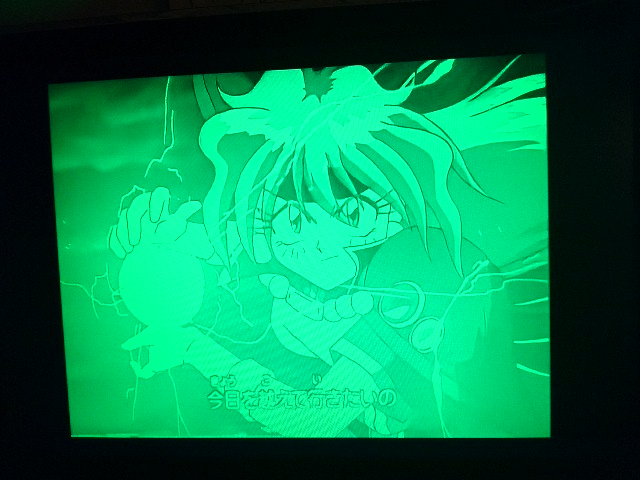
Some of the 10-bit h264 files I have actually play back on my Fire Stick directly, and that’s nice. But honestly most of them don’t. The symptoms are the video playing but everything blown-out in a monochome green version of the video instead of correct colors:
I don’t know if this is an issue with the client itself or the underlying ExoPlayer support for 10-bit. I don’t have issues with any of these files on Plex Media Player, and I don’t have issues when the file is being transcoded by the server of course.
I have a small test file (literally – it’s not taken from one of my files, it’s a test file made to test 10-bit support on PC video players), and that is also playing back in all-green. Is there someplace I can send that to have it analyzed or whatever to figure out the issue. I imagine if we can get that file playing back it would resolve most of my problems.
yes, profiles is more about complexity, levels are more about bitrate/resolution, the point being that fire devices tend to have lower limits than other devices.
The issues is a lack of implicit color description I think.
File A:
    Codec H264
    Bitrate 5004 kbps
    Language 日本語
    Bit Depth 10
    Chroma Location left
    Chroma Subsampling 4:2:0
    Color Primaries bt709
    Color Range tv
    Color Space bt709
    Color Trc bt709
    Frame Rate 23.976 fps
    Height 1080
    Level 5.0
    Profile high 10
    Ref Frames 6
    Scan Type progressive
    Width 1920
    Display Title 1080p (H.264 High 10)


The "Test File":
    Codec H264
    Bitrate 227 kbps
    Language English
    Bit Depth 10
    Chroma Location left
    Chroma Subsampling 4:2:0
    Frame Rate 23.976 fps
    Height 480
    Level 4.0
    Profile high 10
    Ref Frames 16
    Scan Type progressive
    Width 720
    Display Title 480p (H.264 High 10)


The file in my screenshot:
    Codec H264
    Bitrate 2122 kbps
    Bit Depth 10
    Chroma Location left
    Chroma Subsampling 4:2:0
    Frame Rate 23.976 fps
    Height 720
    Level 4.1
    Profile high 10
    Ref Frames 6
    Stream Identifier 1
    Width 960
    Display Title 720p (H.264 High 10)
The top file there is one of the 10-bit files that plays, the two below do not. The reason for this thread is how does PMP, (and VLC, and MXPlayer Pro – to throw another android app on there) manage to still play them back correctly?
The file that is playing back is a higher level than than two that aren’t.
The Fire Stick 4K supports up-to L5.2 – that’s not “low” by most device standards.
If the media is a higher level than the streaming device can handle, Plex is supposed to be transcoding it. So your whole “levels” point is a red herring.
Well considering the file in my example screenshot and the file I mentioned that plays fine have the same number of ref frames, I’m gonna go with “no”.
Part of the problem here is I cannot selectively turn on and off direct play for a given format. So I can’t allow my Fire Stick to play back 8-bit h.264 and HEVC while having it set to transcode all Hi10P to ensure no issues. I’ve seen some settings like this for audio formats on the Plex app on my LG TV, but not here. I can set the subtitles to always be burned in, which works as long as the content has some sort of soft-subs, but if it was native language audio or hard-subbed we’d have the same issue.
Player Version#: 7.25.1.14216 (Amazon Fire Stick 4K)
Mostly posting to bump this. New player, no change.
Here’s that test video I mentioned, btw. 10bitwhite.zip (277.1 KB)
 So your whole “levels” point is a red herring.
