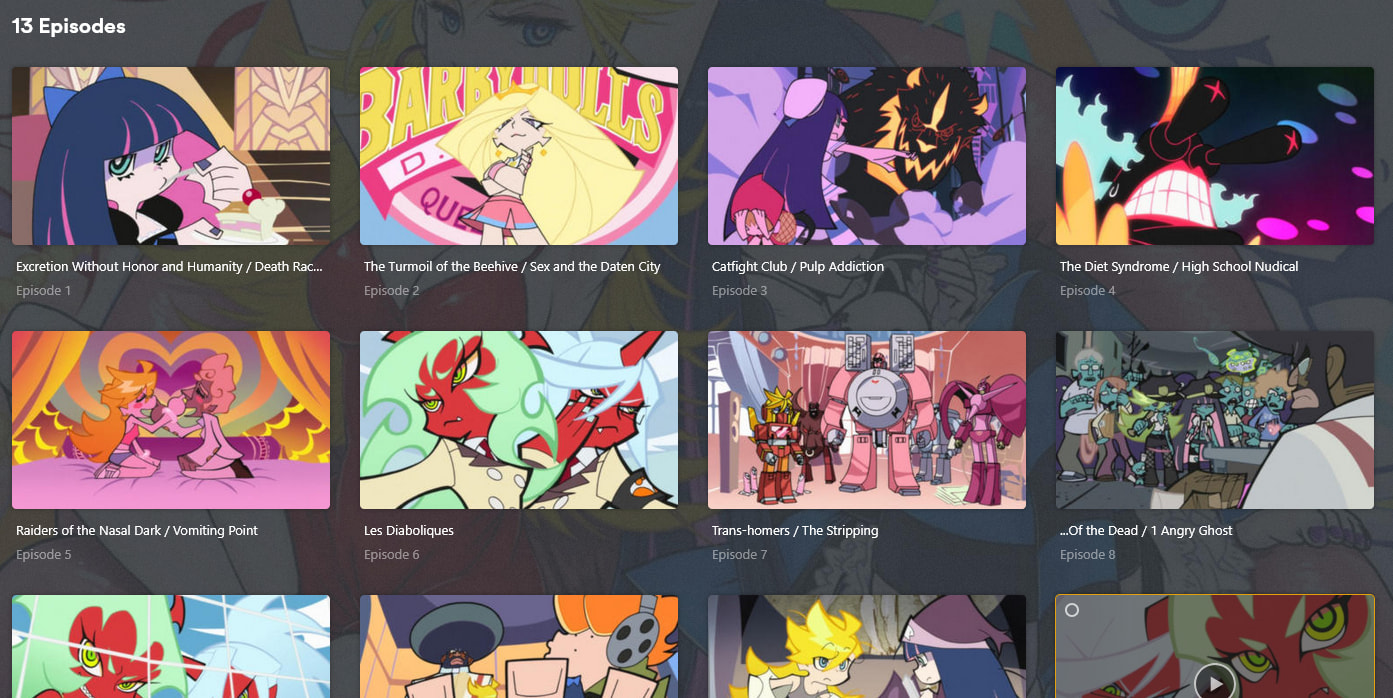
Plex Series is returning incorrect episode information for Panty & Stocking (2010) Season 01.
If I pick fix the search only gives me one option which is Panty & Stocking 2010. However, the episode information it loads is for New Panty & Stocking 2025 and it is pulling all the episode information for this season and not for the 2010 show that was selected.
This may be because Plex Series scraped confusing information. On TVDB, there is just one show; Panty & Stocking. The 2010 episodes are Season 1 and the 2025 episodes are Season 2.
On the MovieDB, there are two seperate series Panty & Stocking (2010) and New Panty & Stocking (2025). Each series has a Season 1.
Plex Series is serving up the show information for Panty & Stocking (2010), but then Season 1 is serving all the information for the 2025 season.
Note: TMDB only has the first show in the original “Airing Order” format (26 episodes). So if your files are for the home video release (13 episodes) you’re going to want to change to DVD ordering in your metadata settings for it (and probably use the TVDB hinting instead, so Panty & Stocking (2010) {tvdb-188551}). I created the listings for this setup, editing the synopsis for the combined-episode versions.
Filenames breakdown like Panty and Stocking S01E01 S01E02.mkv, etc because most files contain two episodes. All naming convention from back when TVDB was the primary scraper. It worked on this show until the release of this new 2025 season came out. Metadata information refreshed to incorrect info a ways back and I’ve just never got around to bringing it up.
When I do a Fix Match, the search comes up with Panty and Stocking (2010) as the only possible Panty and stocking option. Selecting that has the correct Metadata for the series (synopsis, etc). But episode information that is pulled is for the new 2025 season despite selecting 2010 in the search.
Note the cover art shown on that Search result is the art for New Panty and Stocking (2025).
The Season info it pulls appears correct. There are 26 episodes in Season 1, but 30 episodes in Season 2 I believe. But maybe that is just my episode count, not Metadata.
If they are the combined (home video release), you should just rename them now to match the TVDB DVD ordering. Otherwise you’re going to get the poor handling of Plex with multi-episodes files. Episodes 1 and 2 will have separate tiles on the season view, but playing one will play both (and will probably play it twice).
As normal, if you make changes to the file naming and change orders, you will want to do a refresh of metadata to reload the titles/synopsis on the server.
So it still isn’t pulling the correct metadata. I unmatched and tried it with the TVDB-188551 hinting and it still pulled the 2025 metadata. Then I unmatched and tried it with the TMDB-42421 hinting. Again after a fix match, it pulled the 2025 metadata.
This is an example of the filepath that still pulls 2025 episode metadata. On TVDB, 2025 episodes are Season 2.. Is there something wrong with that path?
/Television/Panty and Stocking (2010) [tvdb-188551]/Season 01/Panty and Stocking S01E01 S01E02.mkv
I’m not trying to separate the two series either. I only have Season 1 of the original. I used to have correct meta data for this series, but it refreshed and now gives me 2025 data and 2025 default cover art. I can’t get it to give me 2010 episode info no matter what I do.
You can ignore my last post. I’m looking now and I have all fields locked on Season 1. I likely did that when I was writing all the synopsis. Let me add this to my other server and see how it looks there…
If using the matching hint, it should be in curly-braces rather than square ones: {tvdb-188551}. Square brackets tell the modern agents to ignore the contents (so it’s just for filesystem reference).
If two episodes are present in a single file, the format S01E01-E02 should be used. The scanner may be smart enough to figure out your naming, but why chance it?
Given your current problem, it’s unlikely either of these are contributing. But it’s always best to use best practices and documented guidance.
Everything was setup from back in the “old days” when I was using TVDB as the scraper. These were the recommended formats for back then. When I started using the Plex scraper, it seems to work with the old format. When I made the switch, I had some issue with some movies not scraping correctly. I think this is my first issue with a series.
And this was scraping correctly too at one point. But after a metadata refresh, it wrong now.
And usually when I need to specify a scrape between services, I’ve just went into the search on Fix Match and search for tvdb-188551, or whatever the item is I’m trying to point at, and search would fetch the correct item. So I had never added these tags to the actual file path before. But again, haven’t had to do that either in a long while, so maybe that functionality has changed.
Sure, ok. But this is now, when you’re having problems. And using the new scanner and agent.
I’m only suggesting using current best practices. And again, I’m not sure this is contributing to your issue. But when problems are being experienced, it’s best to fall back to what we expect to work, not what has worked in the past.
Well, episode 11 is a single episode, so it wouldn’t be effected by a - between episodes since it only has a single episode.
I do need to fix the bracket type, but currently I am copying the entire series out of the Television file path so I can do this Plex Dance thing. I can only copy around 90 MB/s and I have 50 GB of data to move and then verify, so no other changes for the moment…
You don’t have to actually move the files off the drive to do the Plex Dance. I assume you have a folder called “TV Shows” or similar on the root level of your file system that all the show folders are in? Just move the Panty & Stocking folder out of that directory, and the server wont be able to see it then.
Sorry about the misinformation on the bracket style, btw.
My data is stored across an array of drives, so an entire series (or even episode isn’t necessarily on any one physical drive. Virtually, it all looks like one drive. But effectively, anytime I move files, the data goes all over the place, and then after it does, the system does a data integrity check on the files to make sure they hash the same before and after.
So I pretty hate moving anything… but its gone, so theme do this dance… And the update was completed and it it database “maintenance” for around a minute.


 Everything’s working here, but I also am not trying to separate the two series.