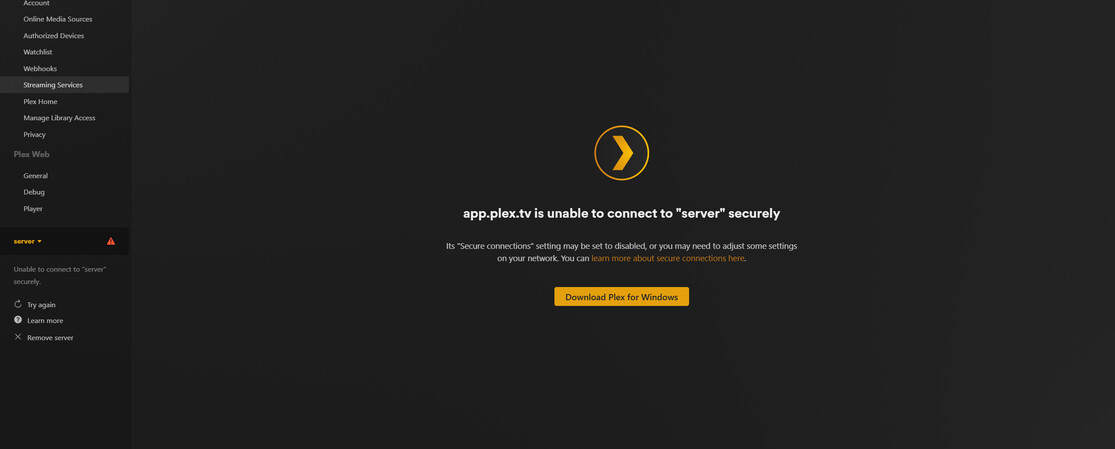
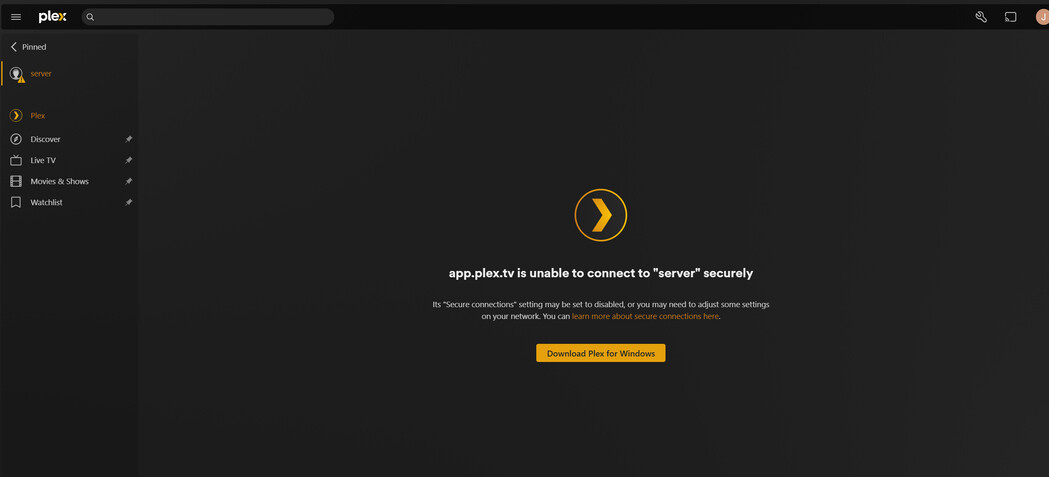
Hello, im trying to setup a new plex media server but its not working for some reason. soon after i go to the web url and login using my email email im getting an error :
Not authorized
You do not have access to this server.
You may be able to claim it by choosing “Open Plex…” from the Plex menu in the macOS menu bar or Windows system tray. For more troubleshooting tips, see our .
I tried all sort of method to troubleshoot including using a claim code but its just not working. i also reinstalled plex media server twice in my ubuntu server. Any idea what could be the issue? I was able to access theweb and login once. But I couldn’t add my media directory so i reinstalled the media server.
root@server # journalctl -u plexmediaserver -n 50 --no-pager
Jul 29 18:09:48 server systemd[1]: Starting Plex Media Server…
Jul 29 18:09:48 server systemd[1]: Started Plex Media Server.
Jul 29 18:22:28 server systemd[1]: Stopping Plex Media Server…
Jul 29 18:22:28 server systemd[1]: plexmediaserver.service: Deactivated successfully.
Jul 29 18:22:28 server systemd[1]: Stopped Plex Media Server.
Jul 29 18:22:28 server systemd[1]: plexmediaserver.service: Consumed 23.181s CPU time.
Jul 29 18:22:28 server systemd[1]: Starting Plex Media Server…
Jul 29 18:22:28 server systemd[1]: Started Plex Media Server.
Jul 29 18:39:10 server systemd[1]: Stopping Plex Media Server…
Jul 29 18:39:10 server systemd[1]: plexmediaserver.service: Deactivated successfully.
Jul 29 18:39:10 server systemd[1]: Stopped Plex Media Server.
Jul 29 18:39:10 server systemd[1]: plexmediaserver.service: Consumed 4.962s CPU time.
Jul 29 18:41:05 server systemd[1]: Starting Plex Media Server…
Jul 29 18:41:05 server systemd[1]: Started Plex Media Server.
Jul 29 18:46:25 server systemd[1]: Stopping Plex Media Server…
Jul 29 18:46:25 server systemd[1]: plexmediaserver.service: Deactivated successfully.
Jul 29 18:46:25 server systemd[1]: Stopped Plex Media Server.
Jul 29 18:46:25 server systemd[1]: plexmediaserver.service: Consumed 22.616s CPU time.
Jul 29 18:48:52 server systemd[1]: Starting Plex Media Server…
Jul 29 18:48:52 server systemd[1]: Started Plex Media Server.
Jul 29 18:51:32 server systemd[1]: Stopping Plex Media Server…
Jul 29 18:51:32 server systemd[1]: plexmediaserver.service: Deactivated successfully.
Jul 29 18:51:32 server systemd[1]: Stopped Plex Media Server.
Jul 29 18:51:32 server systemd[1]: plexmediaserver.service: Consumed 3.553s CPU time.
Jul 29 18:51:32 server systemd[1]: Starting Plex Media Server…
Jul 29 18:51:32 server systemd[1]: Started Plex Media Server.
Jul 29 18:55:36 server systemd[1]: Stopping Plex Media Server…
Jul 29 18:55:36 server systemd[1]: plexmediaserver.service: Deactivated successfully.
Jul 29 18:55:36 server systemd[1]: Stopped Plex Media Server.
Jul 29 18:55:36 server systemd[1]: plexmediaserver.service: Consumed 3.383s CPU time.
Jul 29 18:55:36 server systemd[1]: Starting Plex Media Server…
Jul 29 18:55:36 server systemd[1]: Started Plex Media Server.
Jul 29 18:56:33 server systemd[1]: Stopping Plex Media Server…
Jul 29 18:56:33 server systemd[1]: plexmediaserver.service: Deactivated successfully.
Jul 29 18:56:33 server systemd[1]: Stopped Plex Media Server.
Jul 29 18:56:33 server systemd[1]: plexmediaserver.service: Consumed 2.801s CPU time.
Jul 29 19:00:37 server systemd[1]: Starting Plex Media Server…
Jul 29 19:00:37 server systemd[1]: Started Plex Media Server.
Jul 29 19:03:54 server systemd[1]: Stopping Plex Media Server…
Jul 29 19:03:54 server systemd[1]: plexmediaserver.service: Deactivated successfully.
Jul 29 19:03:54 server systemd[1]: Stopped Plex Media Server.
Jul 29 19:03:54 server systemd[1]: plexmediaserver.service: Consumed 3.187s CPU time.
Thanks for the replies. I tried to use that password reset utility but it was not successful -
root@server /var/lib/plexmediaserver/Library/Application Support/Plex Media Server # ./UserCredentialReset.sh
./UserCredentialReset.sh: line 7: syntax error near unexpected token newline' ./UserCredentialReset.sh: line 7: ’
@ChuckPa I have gathered the logs as requested. My requirement is simple, I just wanted to install Plex, add a library path (/home/mediia/Downloads) and let it detect the files within this directory path.
Hi @ChuckPa I’m gonna be honest. I have no idea. This is a dedicated server I bought from a service provider. Not something I host personally. The IP you shared is the public IP address of the dedi server.
root@server # ./UserCredentialReset.sh -p “/var/lib/plexmediaserver/Library/Application Support/Plex Media Server/Preferences.xml”
Plex Media Server user credential reset and reclaim tool (User-Defined)
This utility will reset the server’s credentials.
It will next reclaim the server for you using a Plex Claim token you provide from https://plex.tv/claim
Using given Preferences path: ‘/var/lib/plexmediaserver/Library/Application Support/Plex Media Server/Preferences.xml’
Please enter Plex Claim Token copied from http://plex.tv/claim : claim-xxxxxxxxxxxxxx
Clearing Preferences.xml
Getting new credentials from Plex.tv
Claim completed without errors.
Username: xxxxxxxxxxx
Email: xxxxxxxxx
May be this is a very silly question, but this is the reason i messed up the install and tried to reinstall it again. How do I configure my media path in plex? I saw online guides where it’s asking users to add library etc but I don’t see such an option. I simply need plex to scan this directory for media files: /home/media/Downloads
Don’t let Plex scan folders which could potentially contain half-downloaded files.
Don’t point Plex to folders which contain a mix of media types.
Movies are different from series, are different from music, is different from photos.
When i clicked the server icon it’s saying something unrelated:
app.plex.tv is unable to connect to “server” securely
Its “Secure connections” setting may be set to disabled, or you may need to adjust some settings on your network.
Then it’s asking me to download windows server?
I’m sorry if im missing something very very basic here, but it;s really confusing. Where is this “Browse for media folder” wizard? how do I access it?
The fact that your server’s name still appears with a red exclamation mark on the left side bar means, that you still haven’t succeeded with claiming the server.
Try clicking on it, to see if there is more than one item to select.
As far as I can see, you have not claimed that server – at least not with the account that you use to post in this here forum.
But I defer to @ChuckPa for further investigation, as I have no big clue of Linux in general.
Ok, I just ran the bash script again - can you check now?
Plex Media Server user credential reset and reclaim tool (User-Defined)
This utility will reset the server’s credentials.
It will next reclaim the server for you using a Plex Claim token you provide from https://plex.tv/claim
Using given Preferences path: ‘/var/lib/plexmediaserver/Library/Application Support/Plex Media Server/Preferences.xml’
Please enter Plex Claim Token copied from http://plex.tv/claim : claim-xxxxxxxxxxxxx
Clearing Preferences.xml
Getting new credentials from Plex.tv
Claim completed without errors.
Username: xxxxxxxxxxx
Email: xxxxxxxxxx
Thank you for your reply, but I am not sure how that is relevant. Google SSO is a common integration method on many platforms now. However, I have manually set a password. After attempting to claim it, I received a success message, but I still encounter an error when I click the server.
app.plex.tv is unable to connect to “server” securely.
Do I need to have an active Plex Pass subscription for this to work? I wanted to purchase that but only after trying. Right now I only have " Remote Watch Pass".
Thank you for your willingness to help. I previously shared the server logs but later deleted them, as they contained the IP details of the media server.
@ChuckPa if you have any insights on this, please let me know.