Magica
February 13, 2023, 10:41pm
1
Good morning,
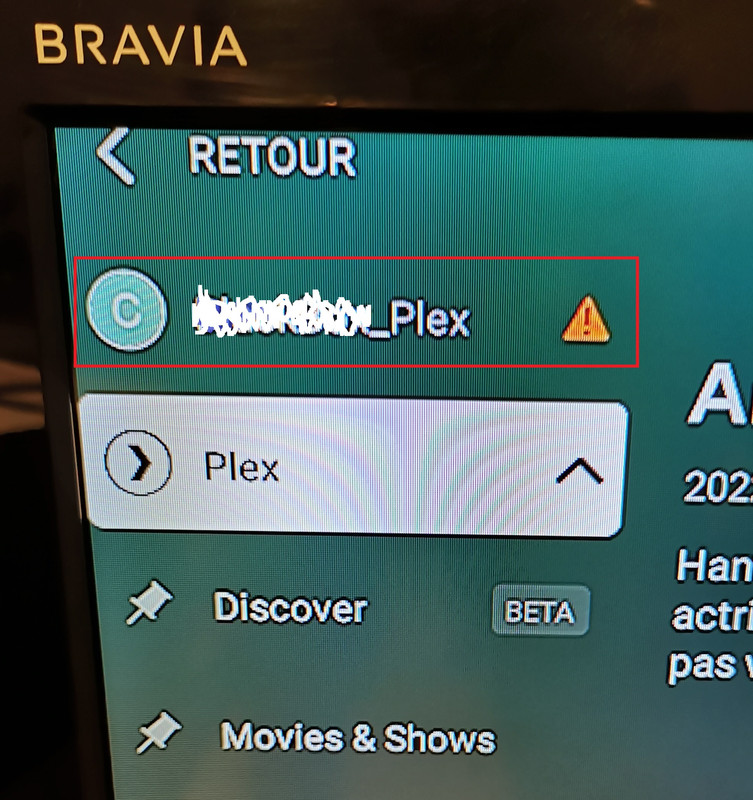
I installed 2 chromecast google tv recently. On the first, everything works perfectly, I have good access to my nas library. However, on the second chromecast google tv I can’t see my nas library. like in the picture below.
On my smartphone I have good access to my library.
I’m a little lost, I’ve been looking for a few days and I can’t find a solution.
I hope you can help me.
Thanking you in advance.
Cordially
1 Like
Have you checked the app android logs to see how it is trying to connect to server.
is it on the same network? like make sure it is not on a guest wifi network
Magica
February 13, 2023, 11:13pm
3
On this chromecast, I have a usb-c RJ45 adapter, I access netflix, I can do all the updates.
I even reset the chromecast and tried wifi to see if the problem did not come from the usb-c RJ45 adapter. But it’s the same I can’t see the server from then the chromecast while with the other chromecast it worked directly.
I am connected with the same google account on the 2 chrome cast + my smartphone. Only 1 chromescast cannot connect to the server.
I don’t see anything obviously wrong with the server on your account. I would look at the android logs , search for your servers local IP address and check what errors there might be with the app connecting to it.
Magica
February 14, 2023, 7:23am
5
this is what i get in the logs for the chromecast googletv.
From what I understand it can’t connect to my nas.
I do understand the other chromecast does it perfectly.
02-14 08:19:09.625 i: [UpdateChannelsBehaviour] app in foreground, scheduling a pending update Resources Refreshed
02-14 08:19:10.162 e: [PlexDevice] Box_Plex Couldn’t build URL for /updater/check?download=0 with a null connection.
02-14 08:19:10.163 e: [PlexDevice] Box_Plex Couldn’t build URL for /updater/check?download=0 with a null connection.
02-14 08:19:10.165 e: Unable to setup connection.
02-14 08:19:10.166 e: [PlexDevice] Box_Plex Couldn’t build URL for /updater/status with a null connection.
02-14 08:19:10.167 e: [PlexDevice] Box_Plex Couldn’t build URL for /updater/status with a null connection.
02-14 08:19:10.168 e: Unable to setup connection.
Magica
February 14, 2023, 10:02pm
6
does anyone have an idea, please?
that log snippit is just it failing to know if there are updates to the server. Need to see where is it actually trying to connect to the server. generally you can find this by looking for your servers local IP address.
Magica
February 14, 2023, 10:29pm
8
Voici le log, j’espère que vous allez pouvoir m’aider, car personnellement je ne vois pas du tout d’où cela peut provenir, car sur mon autre chromecast (même modèle) +3 smartphone cela fonctionne parfaitement.
02-14 23:24:39.212 i: Hello, Plex for Android world (debug: false)!
02-14 23:24:39.212 i: App version: 9.15.0.38159 (855199984)
02-14 23:24:39.213 i: Nano server version: 1.28.0.5999-97678ded3
02-14 23:24:39.221 i: FFmpeg version: 1.7-a48fbc4519f
02-14 23:24:39.225 i: Treble version: 2.1.0.587
02-14 23:24:39.236 i: ASS version: 0.16.0
02-14 23:24:39.243 i: Manufacturer: Google Device: boreal Model: Chromecast HD Product: boreal Version: 12
02-14 23:24:39.244 i: Screen size: Large Screen density: XHigh Resolution: 1920x1080 DPI: 320 Touchscreen: false Marketplace: com.android.vending Architecture: armeabi-v7a
02-14 23:24:43.837 i: [Billing] Destroying background handler after inactivity.
02-14 23:24:43.844 i: [Billing] Ending connection after inactivity.
02-14 23:24:43.846 i: [Billing] Ending connection to billing service.
02-14 23:24:50.394 i: [BootCompletedReceiver] Bootup receiver initiated
02-14 23:25:01.309 i: [UserAction] Navigate back.
02-14 23:25:01.840 i: Resuming HomeActivityTV.
02-14 23:25:06.369 i: [ContentSectionNavigation] Navigating to path /hubs/sections/tidal
02-14 23:25:06.383 i: [ServerClaimingHelper] Server Music cannot be claimed: it doesn’t allow claiming
02-14 23:25:06.435 i: [Boot] FragmentWithBehavioursDelegate took 2ms to run create behaviours.
02-14 23:25:06.568 i: Fetching [method:GET] https://music.provider.plex.tv/hubs/sections/tidal?count=10&excludeElements=Actor%2CCollection%2CCountry%2CDirector%2CLabel%2CMood%2CPart%2CPhoto%2CProducer%2CSimilar%2CTopic%2CVast%2CWriter&excludeFields=file%2Ctagline&includeDetails=1&includeEmpty=1&includeExternalMetadata=1&includeLibraryPlaylists=1&includeMeta=1&includeRecentChannels=1&includeStations=1&includeTrailers=1&includeTypeFirst=1&libraryHubsOnly=1&X-Plex-Token=...DcYZ&X-Plex-Language=fr-fr
02-14 23:25:06.692 i: [HomeHubsManager] Cancelling tasks because there are no listeners.
02-14 23:25:07.123 i: [SectionHubManager] Notifying listeners with status: SUCCESS
02-14 23:25:07.538 i: Fetching [method:GET] https://music.provider.plex.tv/hubs/sections/tidal/newPlaylists?includeDetails=1&includeExternalMetadata=1&includeLibraryPlaylists=1&includeMeta=1&includeRecentChannels=1&includeStations=1&includeTypeFirst=1&libraryHubsOnly=1&X-Plex-Token=...DcYZ&X-Plex-Container-Start=0&X-Plex-Container-Size=10&X-Plex-Language=fr-fr
02-14 23:25:08.214 i: [Boot] FragmentWithBehavioursDelegate took 0ms to run create behaviours.
02-14 23:25:08.236 i: [PlexTV] Refreshing Resources, reason: More menu
02-14 23:25:08.236 i: [ServerTestsManager] Active profile is now: allServers
02-14 23:25:08.240 i: [PlexTV] Refreshing resources (empty token: false)
02-14 23:25:08.262 i: [ServerTests] Scheduling job to test BlackBox_Plex. Reason: allServers.
02-14 23:25:08.294 i: Fetching [method:GET] https://xxx.xxx.xxx.xxx.168.1.32:32400/media/providers?includePreferences=1&X-Plex-Token=...DcYZ&X-Plex-Language=fr-fr
02-14 23:25:08.432 i: [PlexTV] Discovered 1 servers
02-14 23:25:08.921 i: [PlexTV] Refreshing Resources, reason: More menu
02-14 23:25:08.924 i: [PlexTV] Refreshing resources (empty token: false)
02-14 23:25:09.017 i: [PlexTV] Discovered 1 servers
02-14 23:25:09.744 i: [PlexTV] Refreshing Resources, reason: More menu
02-14 23:25:09.745 i: [PlexTV] Refreshing resources (empty token: false)
02-14 23:25:09.835 i: [PlexTV] Discovered 1 servers
02-14 23:25:11.335 i: [ServerTestsManager] Active profile is now: default
02-14 23:25:23.323 i: Time out fetching https://xxx.xxx.xxx.xxx .:32400/media/providers?includePreferences=1&X-Plex-Token=…cYZ.
02-14 23:25:23.325 w: [MediaProvidersApiClient] BlackBox_Plex Couldn’t fetch providers. Result: Error (null)
what is “allow insecure connections” set to in the app?
I mean in the app on the Google TV. It should be in the “advanced” row of settings
And can you copy the entire log to a text file and upload it, instead of the snippets
Magica
February 15, 2023, 7:21am
12
I did it’s allow ‘‘unauthorized apps’’, but it didn’t change anything.
Olus it’s fine and the less I can understand what is blocking.
If you have any leads, I’m a taker.
Thank you
can you copy the entire log to a text file and upload it, instead of the snippets
Magica
February 15, 2023, 8:12am
14
OK, I’ll do this to you tonight. Thanks a lot for your help.
Magica
February 15, 2023, 9:33pm
15
Hi,
This is the log.
log.txt (102.1 KB)
Thanks a lot
system
Closed
May 16, 2023, 9:34pm
16
This topic was automatically closed 90 days after the last reply. New replies are no longer allowed.