Server Version#: 1.32.5.7516
Player Version#: Android 9.31.0.3817
Hello experts,
After spending numerous hours of trying to troubleshoot the reason/s for the random connects and disconnects to the PMS via remote access, I am at my wit’s end and hence turning to these forums to see if I can get any additional pointers to get to a stable remote access connection. BTW, I have explored many posts here and on reddit, etc. on this topic and while it appears to be a common problem that many are facing, I couldn’t find any definite resolution steps.
See the screenshots showing the successful connection and disconnection. I believe these statuses are misleading because regardless of whether the light is green or red, I could or couldn’t connect remotely.
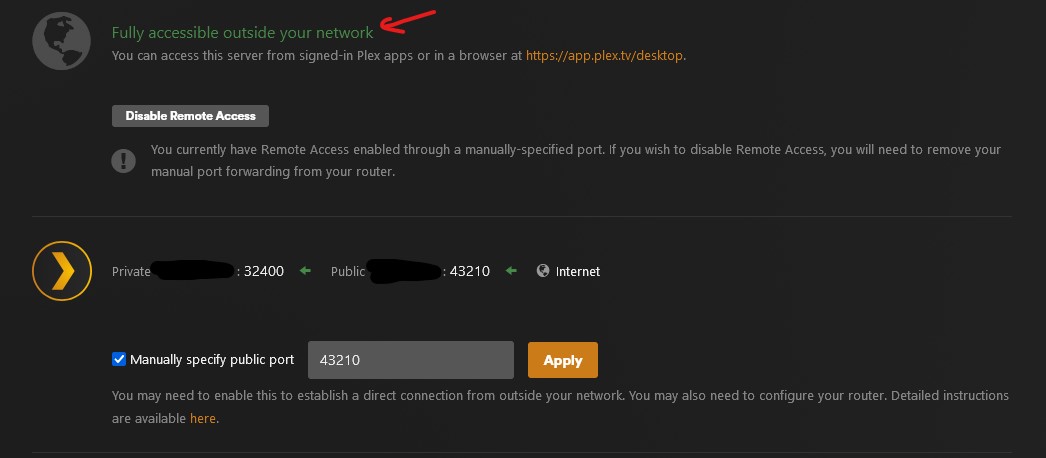

Here’s my setup-
I am running PMS on a QNAP NAS with a Lifetime Plex Pass subscription and it works beautifully on devices within the local network. On the router, which is an ASUS ZenWifi XT8 mesh, I have forwarded port 32400 for the local host of the QNAP IP (which is set up as a static IP address) to a designated port on the router.
When accessing PMS from my Samsung Galaxy android phone via a cellular connection (WiFi turned off), there are two results-
- It is a hit or miss with the Plex app. Sometimes I am able to access the PMS, other times, it just wouldn’t connect. On the server side, as shown in the screenshots, it could be green or red!
- With the same connection, if I use the Google Chrome browser on the phone and go through plex.tv, it always connects (or at least I haven’t had a failure in the 2-3 times I tried that option).
My internet connection is set up as below -
AT&T 1Gbps
Fiber → AT&T Gateway box (no routing, wifi, or any devices connected directly) → ASUS ZenWifi XT8 in an AiMesh network → QNAP NAS (connected via ethernet) → Plex Media Server running via QNAP native app (manually updated to latest version)
All help would be greatly appreciated! Thanks!
