Internal network speed check between PMS and Nvidia Shield Pro - 4K playback

I have just bought an Nvidia Shield Pro 4K and I’ve been trying to playback some original 4k video filmed on a GoPro Hero 7 black.

6 of the 7 videos played, but for some reason the 7th video only plays for a few seconds and then pauses stating that the connection to the server is not fast enough for playback.

Plex Media Server is running on a Dell Poweredge T30 (Intel Xeon E3-1200 v5 processor) with Ubuntu 16.04 for the OS and the connection between server and client is hardwired using CAT5e cable.

I want to know if my network is fast enough or whether there is a bottleneck or issue somewhere.

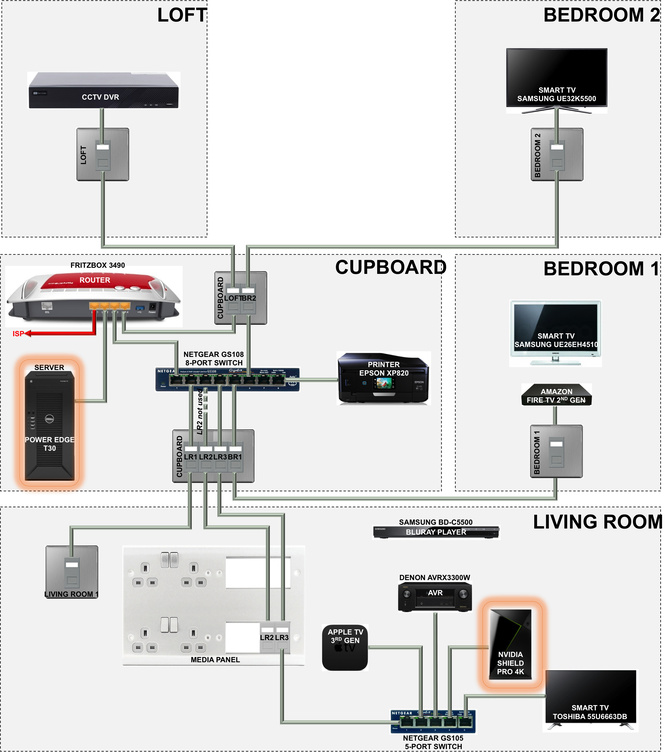
A diagram of my wired network setup is shown below - the server and Nvidia are highlighted in orange:
Am I right in thinking my network setup should be fast enough to play this (and other) 4K video ?

Is it an issue that the connection between the server and Nvidia goes through the router, then an 8 port network switch and then a 5 port network switch ?

Is my network performing as expected or is there room for improvement somehow ?

I performed an iPerf test between the server and the Nvidia (using Analiti) which gave the following results:


Server listening on 5201

Accepted connection from 192.168.178.66, port 48792
[ 5] local 192.168.178.25 port 5201 connected to 192.168.178.66 port 48794
[ ID] Interval Transfer Bitrate Retr Cwnd
[ 5] 0.00-1.00 sec 11.0 MBytes 92.7 Mbits/sec 0 144 KBytes
[ 5] 1.00-2.00 sec 11.2 MBytes 93.8 Mbits/sec 0 168 KBytes
[ 5] 2.00-3.00 sec 10.4 MBytes 87.6 Mbits/sec 0 185 KBytes
[ 5] 3.00-4.00 sec 10.8 MBytes 90.7 Mbits/sec 0 195 KBytes
[ 5] 4.00-5.00 sec 10.5 MBytes 88.1 Mbits/sec 0 208 KBytes
[ 5] 5.00-6.00 sec 10.1 MBytes 84.5 Mbits/sec 0 208 KBytes
[ 5] 6.00-7.00 sec 8.33 MBytes 69.8 Mbits/sec 0 208 KBytes
[ 5] 7.00-8.00 sec 10.0 MBytes 83.9 Mbits/sec 0 208 KBytes
[ 5] 8.00-9.00 sec 9.57 MBytes 80.3 Mbits/sec 0 208 KBytes
[ 5] 9.00-10.00 sec 10.4 MBytes 87.6 Mbits/sec 0 208 KBytes
[ 5] 10.00-10.03 sec 445 KBytes 116 Mbits/sec 0 208 KBytes


[ ID] Interval Transfer Bitrate Retr
[ 5] 0.00-10.03 sec 103 MBytes 86.0 Mbits/sec 0 sender

Server listening on 5201

Accepted connection from 192.168.178.66, port 48828
[ 5] local 192.168.178.25 port 5201 connected to 192.168.178.66 port 48830
[ ID] Interval Transfer Bitrate
[ 5] 0.00-1.00 sec 10.6 MBytes 89.2 Mbits/sec
[ 5] 1.00-2.00 sec 10.5 MBytes 88.4 Mbits/sec
[ 5] 2.00-3.00 sec 10.9 MBytes 91.7 Mbits/sec
[ 5] 3.00-4.00 sec 10.7 MBytes 89.4 Mbits/sec
[ 5] 4.00-5.00 sec 10.9 MBytes 91.4 Mbits/sec
[ 5] 5.00-6.00 sec 10.9 MBytes 91.5 Mbits/sec
[ 5] 6.00-7.00 sec 10.8 MBytes 90.6 Mbits/sec
[ 5] 7.00-8.00 sec 10.7 MBytes 89.4 Mbits/sec
[ 5] 8.00-9.00 sec 11.0 MBytes 92.4 Mbits/sec
[ 5] 9.00-10.00 sec 11.0 MBytes 92.0 Mbits/sec
[ 5] 10.00-10.03 sec 385 KBytes 93.6 Mbits/sec


[ ID] Interval Transfer Bitrate
[ 5] 0.00-10.03 sec 108 MBytes 90.6 Mbits/sec receiver

Server listening on 5201

The media info for the video that will not play is below:

Format : MPEG-4
Format profile : Base Media / Version 1
Codec ID : mp41 (mp41)
File size : 2.46 GiB
Duration : 5 min 50 s
Overall bit rate : 60.3 Mb/s
Encoded date : UTC 2019-10-27 15:50:45
Tagged date : UTC 2019-10-27 15:50:45

Video
ID : 1
Format : HEVC
Format/Info : High Efficiency Video Coding
Format profile : Main@L5.1@Main
Codec ID : hvc1
Codec ID/Info : High Efficiency Video Coding
Duration : 5 min 50 s
Bit rate : 60.0 Mb/s
Width : 3 840 pixels
Height : 2 160 pixels
Display aspect ratio : 16:9
Frame rate mode : Constant
Frame rate : 50.000 FPS
Color space : YUV
Chroma subsampling : 4:2:0
Bit depth : 8 bits
Bits/(Pixel*Frame) : 0.145
Stream size : 2.45 GiB (100%)
Title : GoPro H.265
Language : English
Encoded date : UTC 2019-10-27 15:50:45
Tagged date : UTC 2019-10-27 15:50:45
Color range : Full
Color primaries : BT.709
Transfer characteristics : BT.709
Matrix coefficients : BT.709

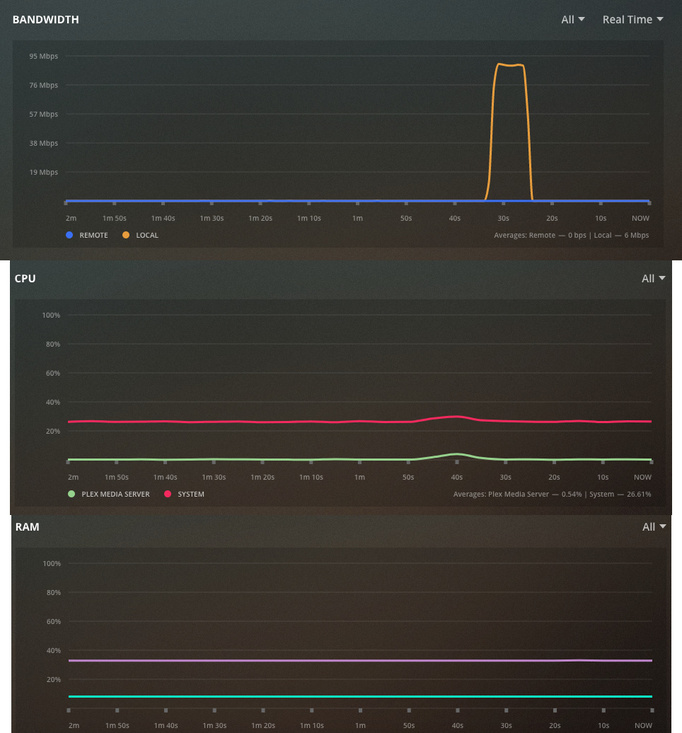
And here is the PMS activity when the video is played…

As a test, connect the Dell to the Netgear switch.

Several years ago I had an ISP supplied modem/router with four gigabit Ethernet ports on the back. Even though the ports would link at 1 Gbps, the actual port to port throughput was closer to 100 Mbps.

I bought a couple of Netgear switches for all my local wired connections and problem solved.
One switch has a wired connection to my router for traffic to/from the Internet. No more local throughput issues.

1 Like

Thanks FordGuy Ill give that a try

I was thinking earlier, the specs of the network should all be rated up to 1000 Mbps so why would I not see speeds nearer to this ?

The network card in the server is rated at 10/100/1000 Mbps
The router is rated at 10/100/1000 Mbps
The network switches are rated at 10/100/1000 Mbps
The Nvidia Shield is rated at 10/100/1000 Mbps
CAT5e cable is rated at 10/100/1000 Mbps

The LED on the RJ45 connector on the server flashes orange which I read indicates its connected to a valid network at 1000 Mbps port speed.

I connected the Dell to the Netgear switch (8 port) and tried to play the video but it made no difference

Below is the iPerf speed test result with this setup…


Server listening on 5201

Accepted connection from 192.168.178.66, port 51720
[ 5] local 192.168.178.25 port 5201 connected to 192.168.178.66 port 51722
[ ID] Interval Transfer Bitrate Retr Cwnd
[ 5] 0.00-1.00 sec 10.9 MBytes 91.1 Mbits/sec 0 127 KBytes
[ 5] 1.00-2.00 sec 10.2 MBytes 85.5 Mbits/sec 0 141 KBytes
[ 5] 2.00-3.00 sec 10.0 MBytes 83.9 Mbits/sec 0 148 KBytes
[ 5] 3.00-4.00 sec 10.3 MBytes 86.5 Mbits/sec 0 158 KBytes
[ 5] 4.00-5.00 sec 10.2 MBytes 85.5 Mbits/sec 0 184 KBytes
[ 5] 5.00-6.00 sec 10.1 MBytes 85.0 Mbits/sec 0 194 KBytes
[ 5] 6.00-7.00 sec 10.4 MBytes 87.6 Mbits/sec 0 194 KBytes
[ 5] 7.00-8.00 sec 10.0 MBytes 83.9 Mbits/sec 0 194 KBytes
[ 5] 8.00-9.00 sec 10.4 MBytes 87.6 Mbits/sec 0 194 KBytes
[ 5] 9.00-10.00 sec 10.4 MBytes 87.6 Mbits/sec 0 194 KBytes


[ ID] Interval Transfer Bitrate Retr
[ 5] 0.00-10.03 sec 103 MBytes 86.2 Mbits/sec 0 sender

Server listening on 5201

Accepted connection from 192.168.178.66, port 51736
[ 5] local 192.168.178.25 port 5201 connected to 192.168.178.66 port 51738
[ ID] Interval Transfer Bitrate
[ 5] 0.00-1.00 sec 10.9 MBytes 91.1 Mbits/sec
[ 5] 1.00-2.00 sec 11.2 MBytes 94.0 Mbits/sec
[ 5] 2.00-3.00 sec 11.2 MBytes 94.1 Mbits/sec
[ 5] 3.00-4.00 sec 11.2 MBytes 94.1 Mbits/sec
[ 5] 4.00-5.00 sec 11.2 MBytes 94.0 Mbits/sec
[ 5] 5.00-6.00 sec 11.2 MBytes 94.1 Mbits/sec
[ 5] 6.00-7.00 sec 11.2 MBytes 94.1 Mbits/sec
[ 5] 7.00-8.00 sec 11.2 MBytes 94.0 Mbits/sec
[ 5] 8.00-9.00 sec 11.2 MBytes 94.0 Mbits/sec
[ 5] 9.00-10.00 sec 11.2 MBytes 94.1 Mbits/sec
[ 5] 10.00-10.04 sec 494 KBytes 93.8 Mbits/sec


[ ID] Interval Transfer Bitrate
[ 5] 0.00-10.04 sec 112 MBytes 93.8 Mbits/sec receiver

Server listening on 5201

I thought the Fritzbox might be limiting the connection somehow.

My setup is similar to yours.

Shield Pro 2015 is connected to a Netgear switch (like your living room).
Synology DS918+ (PMS server) & PC connected to a second Netgear switch (home office, but like your cupboard).
I use MoCA, Ethernet over CATV cable, to link the two switches (I’ve a spare CATV cable & no way to run UTP between the locations).

My results:
Shield from DS918+, download is 500+ Mbps.
Shield from Win10 PC, download is ~375 Mbps.


Not sure why you are not getting faster rates, but 90+ Mbps should be fast enough to stream a 60 Mbps video.

If that is the only video that does not play and they are all have the same encoding, rate, etc, then it may be that the Plex Server or the Shield client doesn’t like the video for some reason.

Maybe try using another Plex client - Plex for Windows/Mac or Plex Media Player. They both direct play HEVC (available at plex.tv/download). Unsure if the FireTV 2nd gen can handle 4K HEVC. See if you can isolate the problem to the one video.

1 Like

Thats what surprises me, the fact I only get around 90 Mbps.

The only other possible thing I can think of is that I am assuming the cable is CAT5e.

The house is nearly 5 years old and came with network cable routed from the cupboard to the living room and bedroom 1. I installed additional cable (CAT5e) from the cupboard to bedroom 2 and the loft.

I guess the only way to confirm is to remove the wall plates and see if there is any print on the cable stating that its CAT5e. As the house is fairly new, surely they would have used CAT5e ?

I’ve found the bottleneck and managed to increase the speed 10x !

I found that the network cable plugged into the server was only CAT5 (2 meter length) so I changed it for a CAT5e

I performed another speed test and the results are below (both up and down speeds are nearer to 1000Mbps)

Presumably this confirms the house was fitted with CAT5e cable when it was built 5 years ago ?

I played the GoPro video from where it was left off (2/3rds into the video) and it played.

However, when I tried to play from the start and half way I got the same error, where it played for a few seconds and then said the network speed was too slow !!!

So it seems to be a problem with the video ? But on the plus side, I’ve increased the network speed 10x simply by changing a network cable :slight_smile:


Server listening on 5201

Accepted connection from 192.168.178.66, port 54060
[ 5] local 192.168.178.25 port 5201 connected to 192.168.178.66 port 54062
[ ID] Interval Transfer Bitrate Retr Cwnd
[ 5] 0.00-1.00 sec 106 MBytes 892 Mbits/sec 0 977 KBytes
[ 5] 1.00-2.00 sec 110 MBytes 923 Mbits/sec 0 1.29 MBytes
[ 5] 2.00-3.00 sec 111 MBytes 933 Mbits/sec 0 1.36 MBytes
[ 5] 3.00-4.00 sec 111 MBytes 933 Mbits/sec 0 1.43 MBytes
[ 5] 4.00-5.00 sec 110 MBytes 923 Mbits/sec 0 1.57 MBytes
[ 5] 5.00-6.00 sec 111 MBytes 933 Mbits/sec 0 1.68 MBytes
[ 5] 6.00-7.00 sec 110 MBytes 923 Mbits/sec 0 1.68 MBytes
[ 5] 7.00-8.00 sec 110 MBytes 923 Mbits/sec 0 1.68 MBytes
[ 5] 8.00-9.00 sec 111 MBytes 933 Mbits/sec 0 1.68 MBytes
[ 5] 9.00-10.00 sec 110 MBytes 923 Mbits/sec 0 1.68 MBytes
[ 5] 10.00-10.03 sec 3.75 MBytes 937 Mbits/sec 0 1.68 MBytes


[ ID] Interval Transfer Bitrate Retr
[ 5] 0.00-10.03 sec 1.08 GBytes 924 Mbits/sec 0 sender

Server listening on 5201

Accepted connection from 192.168.178.66, port 54084
[ 5] local 192.168.178.25 port 5201 connected to 192.168.178.66 port 54086
[ ID] Interval Transfer Bitrate
[ 5] 0.00-1.00 sec 108 MBytes 905 Mbits/sec
[ 5] 1.00-2.00 sec 112 MBytes 939 Mbits/sec
[ 5] 2.00-3.00 sec 111 MBytes 934 Mbits/sec
[ 5] 3.00-4.00 sec 111 MBytes 934 Mbits/sec
[ 5] 4.00-5.00 sec 112 MBytes 938 Mbits/sec
[ 5] 5.00-6.00 sec 112 MBytes 936 Mbits/sec
[ 5] 6.00-7.00 sec 111 MBytes 934 Mbits/sec
[ 5] 7.00-8.00 sec 112 MBytes 938 Mbits/sec
[ 5] 8.00-9.00 sec 112 MBytes 938 Mbits/sec
[ 5] 9.00-10.00 sec 112 MBytes 940 Mbits/sec
[ 5] 10.00-10.03 sec 3.74 MBytes 933 Mbits/sec


[ ID] Interval Transfer Bitrate
[ 5] 0.00-10.03 sec 1.09 GBytes 934 Mbits/sec receiver

Server listening on 5201

This topic was automatically closed 90 days after the last reply. New replies are no longer allowed.
