I use Collections to sort my Home Videos by year. Works pretty well, considering there’s really no other way to do it, I think, but I struggle with the upkeep.
For instance, if I go to a folder of videos, select them all and choose to Add to the “2022” collection, it works fine. However, I’ve noticed that if you then go into a collection and edit the video - say, change the poster, or something like that, about half the time it removes the “2022” tag and the video disappears from the collection. You have to be very careful to remember to make your edits, then check the tag to make sure it didn’t erase itself. If you have 100 videos in the collection, it’s about impossible to tell if it’s gone.
So, what would make my life easier with Plex is a list view or something that showed all of my videos and their metadata. This would help me identify which videos do not belong to a collection and help me rectify it. It’s tough in the current state - in Collections, there’s no sorting, no list view, it really seems like an afterthought.
Edit the library containing these videos and navigate to the Advanced tab. Set “Collections” to “Hide items which are in collections.” After saving, anything shown in the Library view is not currently in a collection.
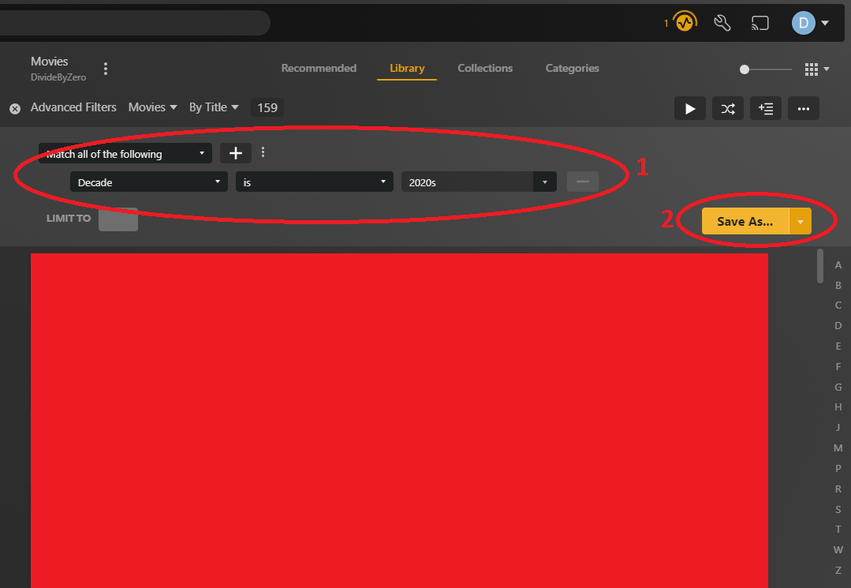
In the future, I’d recommend you create a Smart Collection for automating collection creation. It will automatically add a movie to these collection based on “decade”. And it won’t use the “collection” tag to do this, so you don’t have to worry about dropping the movie from the collection accidentally while editing a movie.
Whether you add a video into a collection of e.g. “2022” or whether you edit the video directly and put the Originally Available date of 2022-xx-xx doesn’t really matter.
But I think the latter is more intuitive, particularly for sorting and filtering in the various client types.
Hey all - thanks of the brilliant suggestions! Technically @pshanew solved my issue, but the smart collection tip is great, for some reason I’ve always overlooked that. I will definitely take advantage of that going forward, thank you.
Now, if only I could get Plex to recognize tags that are applied during FCPX renders, I’d have a complete solution!
I’m a photographer, and have a little OCD issue keywording everything. I’ve been doing that for 25 years, and have 50,000+ photos meticulously keyworded. So I carried that process over to FCPX, but alas, I’m guessing my years of methodically adding tags to the rendered videos is probably useless. I think they may only be useful when working in FCPX, they aren’t EXIF data like I’m used to in photos.
Wouldn’t it be great, though, to be able to search for “Mike” + “Park” + “School” and immediately be taken to that video, instead of clumsily scrolling through each year trying to remember what year it was. Tsk. One can dream? Or perhaps it’s manually accomplished once the video is loaded in Plex. I have over 2,000 videos, so not sure I’m up to tagging them all. Ugh