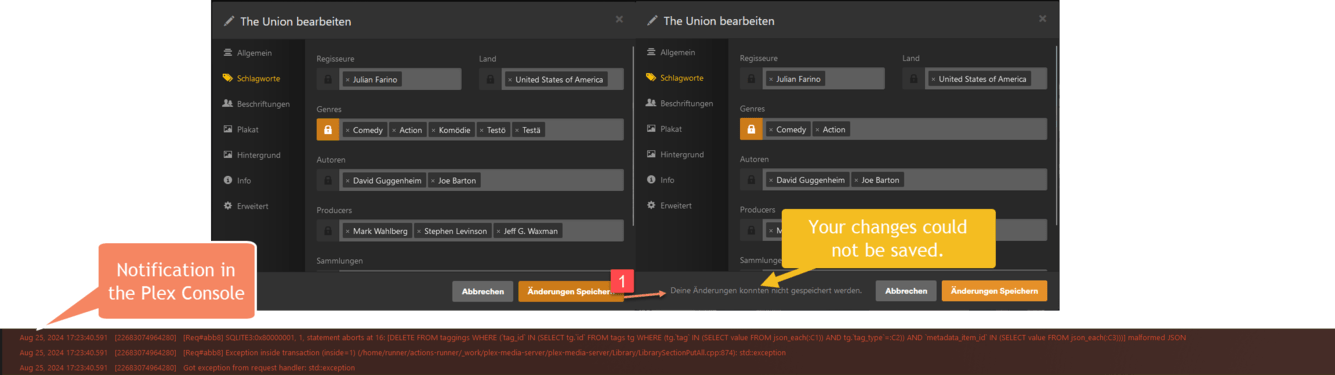
Server Version#: 1.41.0.8911
Player Version#: Plex Web 4.136.0
I have encountered an issue in the current beta version of Plex Media Server (1.41.0.8911) where genres containing umlauts (e.g., “Komödie”) can be added without any problems but cannot be removed. When attempting to remove such genres from a movie or TV show, an error occurs in the SQLite database.
Steps to Reproduce:
Add a genre with an umlaut (e.g., “Komödie”) to a movie or TV show in the Plex Media Server.
Attempt to remove the genre with the umlaut.
An error in the SQLite database occurs, and the genre is not removed.
Expected Behavior:
Genres with umlauts should be able to be removed without causing any errors.
Actual Behavior:
An error in the SQLite database prevents the removal of genres with umlauts.
Additional Information:
The issue is present in the beta version 1.41.0.8911.
This issue does not occur in the stable release version 1.40.5.8854.
Please let me know if you need any more information or logs to help diagnose this issue.
Same issue with special characters in collection name for example “special châr test”, if you try to delete the collection you get a 500 Error from plex and the collection is not deleted.
Plex version : Version 1.41.0.8930
I’m still having this issue in 1.41.0.8994 with collections and labels that contain an Emoji. They all have an emoji as the first character if that makes any difference.
I don’t want this to close. Version 1.41.3.9314 unable to remove labels that have emojis in the name. Not a full workaround, but to get started I ran a python script to remove the label using the label id, not the name. In plex, this results in the label still showing up on the front-end (edit a movie > labels), but if you click get info > view xml > scroll down to the label section, it doesn’t appear there. Not good enough, but a start.
FWIW, when I try and remove a collection tag from a media item, the tag is not removed, but the media item does move up to the first position within the collection. So it does something, just not removing the tag. The collection is still in each media item’s XML.
The collection did originally show up in my Collections tab. I deleted it from there but none of the media items had the tag removed. So now all of these media items still have the same collections tag, but that tag does not appear as a collection in the Collections tab. This collection does appear on each movie’s details page though.