Hi,
I have multiples issues with streaming Plex to Nvidia shield.
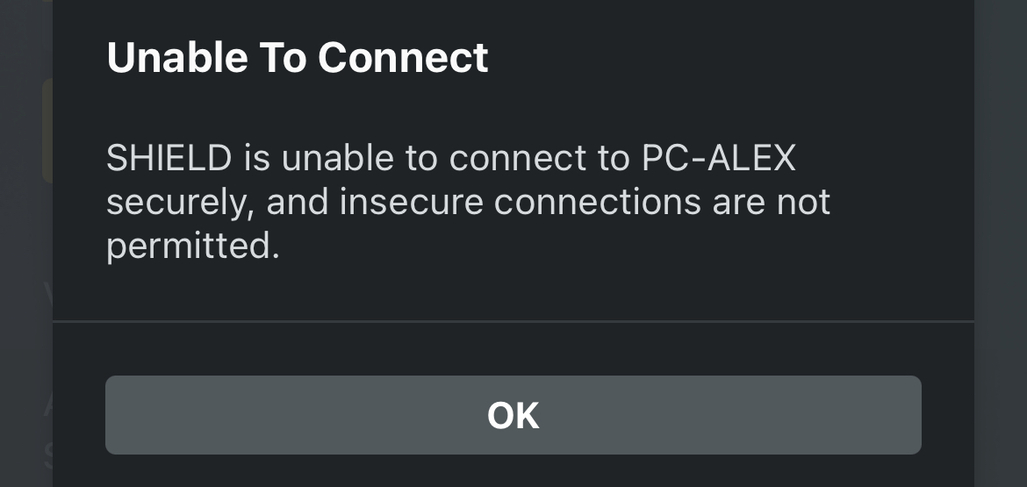
1: I get an error when trying to stream to “SHIELD”. Something about an insecure connection. This is very weird, because it is connected wired to my router, which IP address has been added to the secure list. In addition, there is a second option “SHIELD Android TV” that seems to work. However this latter option requires me to first boot up Nvidia shield, open plex app and log in. This takes too much time versus just casting. In addition, casting to my old chrome cast never posed an issue (same network, connected by Ethernet to same router). Perhaps server certificate needs to be reset?
2: I use an iPhone to cast. When I reopen my phone and reopen the Plex app during casting a movie or series, the plex app “restarts” and I have to start sharing again, because the movie stopped. This did not happen on my Android phone. Perhaps the iPhone app needs to be fixed?
3: I don’t find the sync button anymore to sync my music library. I can only download a playlist (containing all my songs), which is super annoying and cumbersome. Syncing worked a lot better
Thank you for your help!
Server Version#:
Player Version#: 8.9
Question 1
which IP address has been added to the secure list.
ss your list, the syntax is rigorous
first a connection is made between two devices either insecurely or securely if the two Certs are valid and settings allow secure connections. The list you mention applies to what happens after that connection is made, where the decision is whether login user/passwords are considered or bypassed.
“SHIELD Android TV”
Yes likely a Cert issue on a TV where it doesn’t get updated, while the Cert on your PMS does.
Standard solution:
- in PMS Settings → Network → Show Advanced → Secure Connections: Preferred
- in the Android TV Plex App: Allow Insecure Connections → On Same Network Only
- on the Android TV itself: We don’t know the make and model. Try asking it nicely?
Question 2
the plex app “restarts” and I have to start sharing again,
I’ve read in the Plex articles on casting to Chromecast, that the iOS device is not in casting path once the video is playing but that it still controls it. If that’s failing when you come out of lock screen, my guess is try to:
- set the iOS Plex App to auto login as your user and not ask for any PIN by choosing:
Hamburger Home → Gears → Account → Automatically Sign In → On
- Allow the Plex App to do Background App Refresh in:
iOS Settting → General → Background App Refresh → Plex → On
Q3: there’s a kink in your sync? <insert joke about plumbing>
- in PMS Settings → Network → Show Advanced → Secure Connections: Preferred
- in the Android TV Plex App: Allow Insecure Connections → On Same Network Only
Thanks, this helped and resolved Q1.
- set the iOS Plex App to auto login as your user and not ask for any PIN by choosing:
Hamburger Home → Gears → Account → Automatically Sign In → On
- Allow the Plex App to do Background App Refresh in:
iOS Settting → General → Background App Refresh → Plex → On
This was already the case on my phone, for Q2.
Not sure what you mean for Q3.