Server Version 4.8.4 This version is apparently dropping folder in the listing on the left side. One that was there yesterday before the update is not there now, but, all of the files within the folder are showing in the display on the right, go figure. Very strange things been happening with the last rash of updates, and many not good. Also found one file within this same folder, the folder that does not exist, that will not play in Player even though it plays perfect on my computer, which is running the server. No corrupt file, no apparent problem with the file, just will not play… player just shows it loading forever. Oh the frustration!
That is the web app version. scroll down and under the server name below the Status group of settings is the server settings. under General you will see server version. guessing you are on version 1.18.0 of server
Home is is a set of default hubs like On Deck, Recently Added Movies and such. You can customize which hubs are there. even hubs from other servers.
On the left below home, those are Libraries not folders. (sorry if being pedantic, but folders are a different thing)
Clicking on MORE at the bottom left will reveal all the other servers and their libraries that you have access to. Do you see the library the items there? You can pin any of these libraries to the home side bar by click on the vertical ellipses that shows in the right of the library name when hovering over it. (basically favorites) Click Pinned at the top to go back to the pinned library side bar view.
I would first try to let the server analyze the file. when hovering on the poster or thumb for the item click the ellipses on the bottom right. in the menu is an Analyze option. might not work but simple enough to try.
If it still does not work after that probably need to see server logs to figure out what is going on when it tries to play it back
Did the analyze thing first off when the file wouldn’t play, didn’t help. Deleted and reinstalled the library (folder or whatever) and the library, which wasn’t showing there before showed up but without the PIN on the right of the name. Then reloaded the browser window and its gone again, the library (folder). Pretty much gave up on that problem because the individual mp4 files are there and can be played, just don’t display as one would think they would.
Re HOME, only have one server. Loading Plex in browser window shows HOME at the top just below the PLEX logo. Going to the bottom and clicking MORE puts the server name in that spot just below the logo and the word PINNED. At the bottom are all of the other features (news, etc) and no servers. With the server name showing at the top, the way I would like it to always be, reloading the browser window puts HOME back at the top and one has to go to the bottom to click MORE again to get the server back. You can’t keep the server name as the default when the browser window is opened/refreshed? Without the server name showing the + isn’t available to add libraries (folders). That’s the problem.
Server Version 1.18.0.1913
When you click more to the right of any library of the server you can pin that library to the home screen sidebar so you don’t have to click MORE every time to get to whatever libraries you use most ( from multiple servers as well)

not sure why it did not ask you at the start but on the home screen on the top right there is a Pencil icon to edit the home screen. There you can rearrange the hubs on home screen. on the bottom of that window you can hit “reset customizations” which will ask you which is your preferred/most used server (if you have more than one) then which libraries from that server you want pinned to the home screen as favorites. Seems like it did not take you through that wizard when you first launched it for some reason.

Went thru the reset and nothing changed, the server did not show as something I can pin. This is the screen I get every time I start Plex:
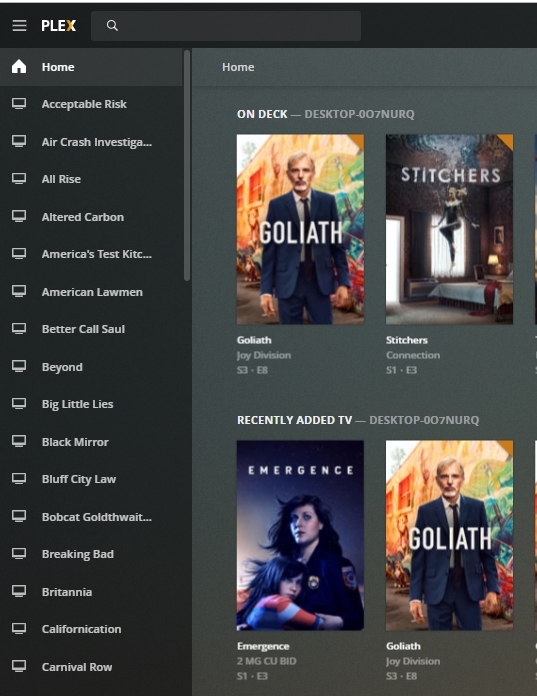
This is the screen I get when I select the MORE option at the bottom of the left column:

This second layout is what I would like to come up when plex is first loaded, but every time you reload plex the first screen is what I get. There is no way to get the server name to be the first time displayed when I start plex.
You can’t pin a server. you pin libraries.
why do you have every single show as a separate library? Just make one TV library and put all your shows in it.

When you make a library just add the one folder that has all your shows in it. each show should have its own separate show folder. You don’t need to hit the + sign every time you want to add a new show. just put it in that folder ( the “TV” folder in my case) and hit scan files and Plex will find it.

Appreciate the chastising on how I arrange my stuff, even more appreciate all the information and time, very helpful. Your last statement basically answered all my questions for the last two days, sorry I couldn’t make it more clear in the beginning, we both wouldn’t have lost so much sleep. Thanks…
BTW… accidently did a reboot last night while we were messaging back and forth and found that the reboot fixed the lost libraries (folders) problem. I would think it would be useful to suggest everyone reboot after every update of the server as there apparently are things that get confused until the server is restarted from scratch with any new update. Might cut down on a lot of frustration. Might even have helped the person who did the update and then could not start any movie afterwards (showed up last night in our thread). Thanks again…
Didn’t mean to chastise. sorry if being too harsh.
i am concerned that was even necessary. but definitely could not hurt.
