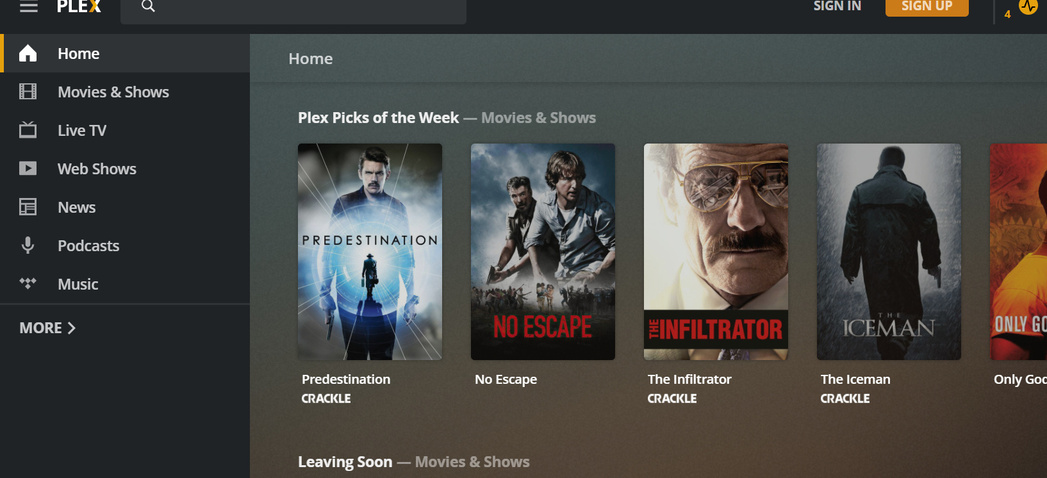
I’ll attach them but I can sign in as the owner. It’s not really a “log” type issue, I think. It’s more of a UI flow type deal.
Even without signing in, I can get to the settings page. I just don’t see my content and only see the hosted content regardless of changing what’s pinned, etc.
Do you know the router that PMS is behind is itself behind another router?
Oct 27, 2020 20:06:57.102 [0x7f3c6d7fa700] DEBUG - NAT: UPnP, public address is 192.168.1.223
Oct 27, 2020 20:06:57.102 [0x7f3c6d7fa700] DEBUG - PublicAddressManager: got WAN IP 192.168.1.223 from router
Oct 27, 2020 20:06:57.102 [0x7f3c6d7fa700] WARN - PublicAddressManager: WAN IP is a private IP address
It appears to be working but not certain because the scanner is running and filling the logs.
It won’t be remotely accessible this way.
are you accessing the server from the correct IP/subnet ?
Also, for “just in case” sake.
Stop plex
sudo chown -R plex:plex /var/lib/plexmediaserver (adjust appropriately if you use different username or directory)
Start plex
I suggest because file permissions and DNS+plex.tv access are the two main things required to ‘pin’ and make something stick.
Sure. I just mainly am not certain how to convey exactly what I am meaning.
You are correct that allowed local subnets without authentication is the main setting I’m referring to. My /24 is in there (and has been for a long time)
I’d refute the notion that it broke before the update, given I had restarted the server earlier in the day, and this wasn’t an issue. It was certainly something within the update.
So, to be as clear as possible.
Steps and results:
I navigate to my server IP 192.168.1.100:3200/web. Previously, I could see my libraries and no hosted content, as I had hosted content disabled.
Now, I only see hosted content and have to sign in to see my content. I can get into settings though. This allows me to pin my libraries to the home page, but only for that session, unless I sign in. Once I exit the browser, these pins revert back. (I tested on a fresh install of two different browsers, to ensure cache / history purging wasn’t a factor)
In essence, it negates about 50% of the use case for allow local subnets, since you have to sign in to get a reliable experience, unless you want to reconfigure the home screen every time to go in.
Hopefully this makes more sense? I’d be happy to screen record, screenshot, whatever.
@TeknoJunky That is partially correct. If it was only that I had to click more, I’d be somewhat OK with it. The bigger issue is that, in order to see anything other than the library name, I need to re-pin it each time.
Think of the flow most admins (I’m making an assumption, I know) use the embedded web server for.
I add a movie, a full show and a single episode.
I scan my libraries.
To ensure they match correctly, have a poster that is in my language (a whole other can of worms that off topic) and are there, I have three options now.
I can sign in, which defeats the allowed subnets.
I can click more and pin the applicable libraries so that the content shows up on the home page.
I can click more and enter each library.
All of these put additional steps in to what used to only be about 50% of the total time / effort.
Can we still achieve the end result? Of course. Should we have to?
Yup, this is all around administrative tasks, at least for myself.
If the intention was to change the behavior of allowedNetworks, ok. Don’t love it but can accept it.
If not, I’d consider this an unintended consequence of the recent update, hence my reporting it here.
Do keep in mind though, this changes how admins can use the embedded web. If they happened to use it for playing content as well, it changes that process. I won’t go down the rabbit hole of if they should, but recognize that some do.