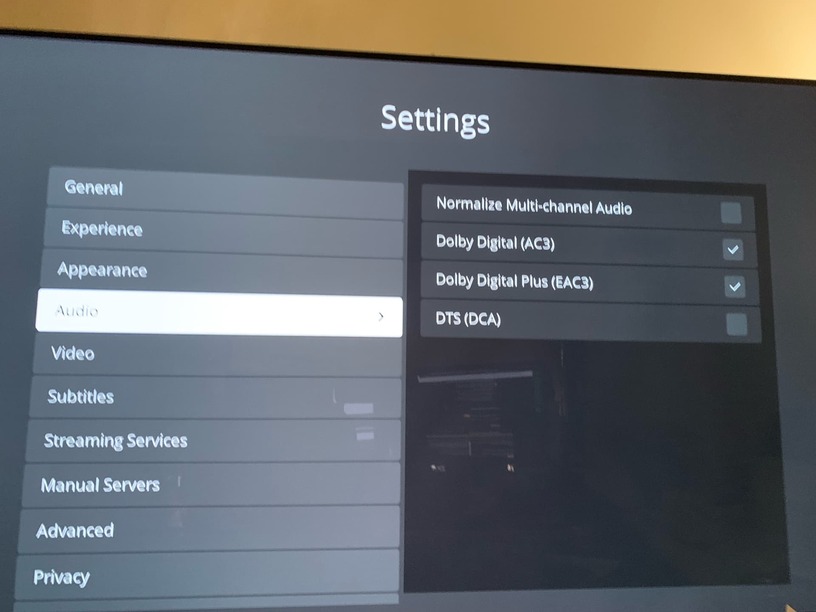
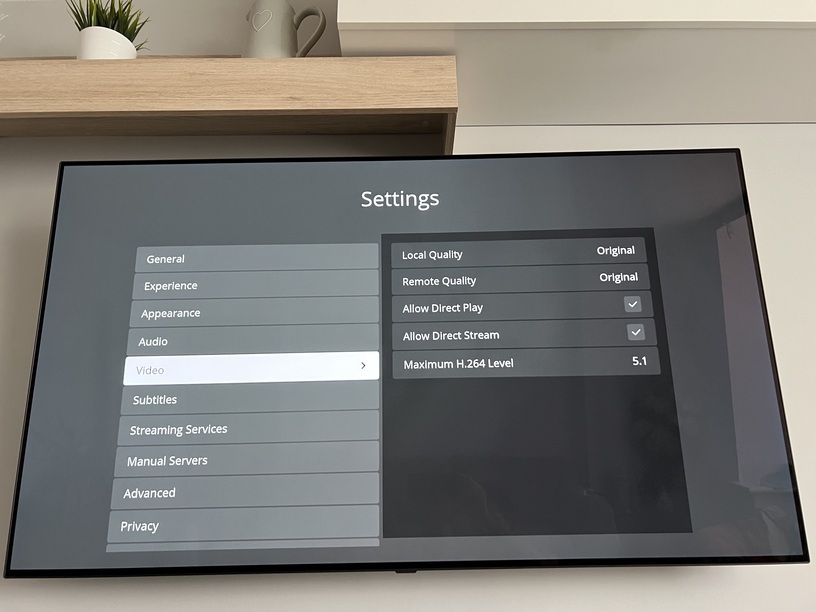
Plex Media Server Logs_2023-07-01_20-04-56.zip (4.9 MB)
Hopefully attached the right logs. Tried to play the file @ 19:59
Plex Media Server Logs_2023-07-01_20-04-56.zip (4.9 MB)
Hopefully attached the right logs. Tried to play the file @ 19:59
I can see it being forced to transcode because of the playback settings.
Jul 01, 2023 19:59:39.233 [1870037872] DEBUG - [Req#44/Transcode] TranscodeUniversalRequest: using augmented profile Generic
Jul 01, 2023 19:59:39.233 [1870037872] DEBUG - [Req#44/Transcode] Downloading document http://127.0.0.1:32400/library/metadata/40600?includeBandwidths=1&offset=-1&X-Plex-Incomplete-Segments=1&X-Plex-Session-Identifier=j8rcel6rh5at0xubc26sfepx
Jul 01, 2023 19:59:39.278 [1870037872] DEBUG - [Req#44/Transcode/Req#5c] We're going to try to auto-select an audio stream for account 1.
Jul 01, 2023 19:59:39.278 [1870037872] DEBUG - [Req#44/Transcode/Req#5c] Selecting best audio stream for part ID 888850 (language: en)
Jul 01, 2023 19:59:39.278 [1870037872] DEBUG - [Req#44/Transcode/Req#5c] We're going to try to auto-select a subtitle.
Jul 01, 2023 19:59:39.278 [1870037872] DEBUG - [Req#44/Transcode/Req#5c] Audio Stream: 1750677, Subtitle Stream: -1
Jul 01, 2023 19:59:39.325 [1870037872] DEBUG - [Req#44/Transcode] MDE: Selected protocol hls; container: mpegts
Jul 01, 2023 19:59:39.325 [1870037872] DEBUG - [Req#44/Transcode] MDE: analyzing media item 888651
Jul 01, 2023 19:59:39.325 [1870037872] DEBUG - [Req#44/Transcode] MDE: Fast X (2023): Direct Play is disabled
Jul 01, 2023 19:59:39.325 [1870037872] DEBUG - [Req#44/Transcode] MDE: Fast X (2023): media must be transcoded in order to use the hls protocol
Jul 01, 2023 19:59:39.325 [1870037872] DEBUG - [Req#44/Transcode] MDE: Fast X (2023): no direct play video profile exists for http/mkv/hevc
Jul 01, 2023 19:59:39.325 [1870037872] DEBUG - [Req#44/Transcode] MDE: Fast X (2023): no direct play video profile exists for http/mkv/hevc/aac
Jul 01, 2023 19:59:39.325 [1870037872] DEBUG - [Req#44/Transcode] MDE: Fast X (2023): Direct Streaming is disabled, so video stream will be transcoded
Jul 01, 2023 19:59:39.325 [1870037872] DEBUG - [Req#44/Transcode] MDE: Fast X (2023): no remuxable profile found, so video stream will be transcoded
Jul 01, 2023 19:59:39.325 [1870037872] DEBUG - [Req#44/Transcode] MDE: Cannot direct stream video stream due to profile or setting limitations
Jul 01, 2023 19:59:39.326 [1870037872] DEBUG - [Req#44/Transcode] MDE: Fast X (2023): selected media 0 / 888651
Jul 01, 2023 19:59:39.326 [1870037872] DEBUG - [Req#44/Transcode] Streaming Resource: Required bandwidth unknown (media requires deep analysis) Changing decision parameters provided by client to fit bandwidth limit of 1000kbps
Jul 01, 2023 19:59:39.326 [1870037872] DEBUG - [Req#44/Transcode] Streaming Resource: Determining preferred transcode encoders through transcode only decision.
Jul 01, 2023 19:59:39.345 [1870037872] DEBUG - [Req#44/Transcode] Streaming Resource: Reducing playback quality for 952kbps stream bitrate: video resolution to 480x270, audio channels to 2, quality to 43, disable audio DS as 385kbps is > the 165kbps available
The player cannot connect DIRECTLY to the server (TV and server)
– It’s forced to reduce the bit rate to 1 Mbps (you have a free account)
– To fit the audio, it’s further required to change the geometry - 480x270
– The ARMv7 CPU cannot transcode. This is only a dual core CPU with no HW capability.
From here forward, it’s a snowball rolling down the hill.
– convert HEVC → H264 (which it can’t do in software)
– convert HDR → SDR (which it cannot do in software)
Jul 01, 2023 19:59:44.142 [1848234864] INFO - [Req#5e] [Plex for LG] [b5noj:j8rcel6rh5at0xubc26sfepx] [MDE] Application decision, directPlay: false, directStreamVideo: false, directStreamAudio: true
Jul 01, 2023 19:59:44.142 [1848234864] INFO - [Req#5e] [Plex for LG] [b5noj:j8rcel6rh5at0xubc26sfepx]     Cannot direct stream. Video bitrate is greater than allowed quality setting.
Jul 01, 2023 19:59:44.142 [1848234864] INFO - [Req#5e] [Plex for LG] [b5noj:j8rcel6rh5at0xubc26sfepx]   videoStream: {
  "id": 1750676,
  "streamType": 1,
  "default": true,
  "codec": "hevc",
  "index": 0,
  "bitrate": 6001,
  "bitDepth": 10,
  "chromaLocation": "topleft",
  "chromaSubsampling": "4:2:0",
  "codedHeight": 2160,
  "codedWidth": 3840,
  "colorPrimaries": "bt709",
  "colorRange": "tv",
  "colorSpace": "bt709",
  "colorTrc": "bt709",
  "frameRate": 23.976,
  "height": 2160,
  "level": 150,
  "original": true,
  "profile": "main 10",
  "refFrames": 1,
  "scanType": "progressive",
  "width": 3840,
  "displayTitle": "4K (HEVC Main 10)",
  "extendedDisplayTitle": "4K (HEVC Main 10)"
}
In your diagram (thank you),
“Wall Socket” is?
– plain RJ-45 cable back to the Linksys 16 port switch?
– PowerLine ethernet adapter ?
Are you comfortable using Putty / SSH to log into the Synology command line?
ping 192.168.0.87
[chuck@lizum ~.2008]$ ping 192.168.0.71
PING 192.168.0.71 (192.168.0.71) 56(84) bytes of data.
64 bytes from 192.168.0.71: icmp_seq=1 ttl=64 time=0.178 ms
64 bytes from 192.168.0.71: icmp_seq=2 ttl=64 time=0.173 ms
64 bytes from 192.168.0.71: icmp_seq=3 ttl=64 time=0.258 ms
64 bytes from 192.168.0.71: icmp_seq=4 ttl=64 time=0.174 ms
64 bytes from 192.168.0.71: icmp_seq=5 ttl=64 time=0.253 ms
I’ve not put my finger on it yet but it screams connectivity through that Wall Socket 1.
The Macbook is connecting via WiFi over a different path.
Have you considered turning off the ethernet network in the TV and connecting it via WiFi ?
Wall sockets are just plain RJ45 cat 6 face plates wired into the switch.
Had to google that but got there in the end. I think the ping looks good?
I’ve tried the LG CX through WIFI also and same issue. Worth noting this is impacting all three TVs. The CX & C7 (Wired) and the C1 (WiFi).
I’m happily watching the same movies from the NAS on this TV using the LG videos inbuilt app. Makes me feel like the issue is specific to a setting in Plex and not a general network issue? I’m no expert though…
For the last step…
Terribly sorry, but your post was WAY OFF TOPIC and not at all contributing.
It has been removed.
I’m trying to solve an issue for someone here.
There is no need to advertise a different player while slamming the Plex player
If you wish to contribute / help solve an issue with the Plex app, please do join in.
I am seeing one problem on my LG → The app starts with everything hidden. It looks like a blank screen. Hitting the “back-arrow” (lower left corner under the disc / above the red button)
I am writing this up and will discuss tomorrow with the team.
Sorry for the delayed reply. When I disable the Syn firewall, restart PMS, then open the Plex LG app it won’t connect at all to my NAS. Then when I reenable the Syn firewall and restart the PMS I can connect via the LG Plex app in indirect mode. Is this strange? It feels it…
Had the Synology tech support team remote into the NAS to check the settings and they said port 32400 was still not open and needed to be so said it must be my router at fault.
I’ve googled port forwarding on the Virgin Media Hub 5 and there’s lots and lots of posts complaining port forwarding not working properly. Just on the phone to Virgin and almost 2 hours in and 4 different people, most of which don’t understand what I’m talking about when I mention ports.
Am I right in thinking I could eliminate the Virgin Hub as being an issue if I set it to modem only mode? I got 3 x Eero 6+ mesh routers yesterday so I could try those not in bridge mode and then see if the ports work via their port forwarding rules?
You should not need port forwarding in the Virgin Media Hub for local playback to work correctly.
Does your Virgin Media account have Web Safe enabled? See Web Safe | Virgin Media Help.
If so, disable it. Disable the Synology firewall. Power cycle the TV (to force the Plex app to re-launch), then see if you can access the Plex server.
You mentioned earlier that the Mac cannot access Plex via app.plex.tv, but can access it via the server IP address.
I’ve a hunch whatever is stopping the Mac from using app.plex.tv is also interfering with the LGs.
Just not sure what that is.
The only other thing I can think to try is to assign a fixed IP address to the LG TV and use a public DNS such as 1.1.1.1/9.9.9.9/8.8.8.8. That should bypass any issues using the Virgin Media DNS servers (the only way I can change DNS on my LG is to assign a fixed IP address).
@FordGuy61 - apparently you do need port forwarding for local playback to work according to the synology tech support. They said even for local playback the comms go via the Plex servers. How true that is I don’t know.
Anyway I’ve just tried to put the virgin hub 5 into modem only mode to test if using the Eero 6+'s as routers would alter the situation. I couldn’t get an internet connection after doing the above. I gave up and also couldn’t access the virgin hub via 192.168.100.1 even with the MacBook directly ethernet connected to the hub so had to reset the virgin hub. The virgin hub is back in router mode now and the Eero 6+'s in bridge mode. Whatever the hub reset has done has solved the issue. I now have a direct connection to Plex on the tv. I really don’t like this hub 5, I wish I’d stayed with the hub 3 which worked fine for years. The virgin support forums are full of hub 5 port forwarding problems.
I was in the same situation as you, connected via a switch and with the infuriating indirect play showing.
Aware that you’re sorted now, but I managed to get direct or ‘Nearby’ by navigating to the LG Plex app’s Advanced settings and changing Allow Insecure Settings to ‘Always’.
Might work for some searching for a solution.