LG OLED55C9 and Plex setup

Server Version#: 1.18.3.2156-349e9837e
Player Version#: Plex for LG 4.17.1

Hi all,

I’ve recently bought LG OLED55C9 which is meant to be the centre point of my media playback. My plex server is on Synology DS1813+ (Intel Atom D2700) with 4GB RAM and 5 4TB HDDs.
Audio is delivered from LG TV set to Cambridge Audio Edge NQ via ARC HDMI.
Both Synology and LG are on a gigabit ethernet connection.
I am perfectly aware that Synology is rather old to do any transcoding but I was hoping that LG might do this for me. I have both Direct Play and Direct Streaming enabled in Plex player but even with this Synology CPU spikes to 100% and it’s not possible to watch anything.
Not to be lazy I’ve tested same material (720p mp4 file) on my i7, 16gb PC and got the same result!.
When the same file is hosted and played on the PC it plays with no issues locally.
Am I safe to conclude that my Synology is simply way too under-powered to host files even for Direct Play/Direct Stream?

I would truly appreciate a word of advice on future proofing my setup. Options are getting the new Nvidia Shield and host Plex server on it while the library is still on Synology (is this viable for 4k?). Alternative is (albeit a much more expensive one) getting a new NAS.

Bonus question: Did anyone try running Plex and Roon Core on Nvidia Shield Pro 2019?

Thank you for your help.
Imp

No suggestions?

Well … my advise it to really get an external “box” like a ShieldTV and not rely on the software on these smartTV’s that get outdated so fast and have limited resources to work with.
With a ShieldTV (at least here) running the PLEX CLIENT (my PMS runs on Synology NAS) it plays just about anything without Transcoding, so the “load” on the NAS-side is practically zero…

Sure you can “select” Direct Play etc in the LG TV but that is no guarantee is does so … you should check on the PMS while playing a file and see which mode you are in for audio / video. Transcoding / Direct Stream / Direct Play

Your NAS looks certainly capable of handling this! UNLESS this box is doing a ton on other things ? What are the average CPU & MEM stats on that NAS ?

Hi,

Thanks for helping.
With an H.264 1080p file i’ll get CPU at 28% and RAM 42%.
With an H.265 1080p file CPU will strike 99% and renders playing impossible. Ram is at 47%.

Where can I see which mode am I in for audio/video? In the client on my PC I can only see one option available (see screenshot).

NAS isn’t doing much of anything apart from random file hosting and CPU isn’t stressed at all (unless trying to play H.265).

I get your suggestion to go for an external box but a C9 from LG should be more than capable of playing this. I just can’t tell what am I doing wrong.

Thanks,
Imp
Screenshot (1)

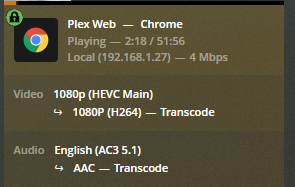
This might give a clue.
234

Bingo, so trancoding all the way in this case.
Especially with H265, you are indeed killing your NAS/Intel Atom easily.

It is not that you are doing something wrong, enabling (certain types of) subtitles can be enough to revert to transcoding. You use media with subtitles?

And more in general, only by looking in details at all the logs in the dialog between your LG/Plex Client and the PMS you can have some info on what is the reason to go into “Transcode” in stead of Direct Play/Stream

You have the option to “Burn Subtitles” or something on that LG Plex App ? Enable it. (set yo “Always” or something)

This shows playback using a web browser. Web browsers do not support H.265 video, hence the transcode.

What does the Dashboard show when playing via the LG Plex app?


Note that subtitles can cause issues when using the Plex SmartTV apps.

  • Enabling PGS or VOBSUB subtitles forces a video transcode.
  • If audio is transcoding, enabling SRT subtitles forces a video transcode.
  • If audio is direct play/stream, SRT subtitles will direct play.

I’m not sure what audio codecs are supported by the Cambridge Audio Edge NQ.

Assuming they’re supported on the Cambridge, the TV will pass AAC, AC3, EAC3, dts, and PCM 2.0 via ARC. For dts-HD audio, only the core dts 5.1 is sent. The -HD part is dropped. TrueHD audio will be transcoded, probably to AAC. This is due to limitations of the TV and of HDMI-ARC.

All Blu-ray discs with TrueHD audio also include an AC3 5.1 audio track. You should choose the AC3 audio track when possible to avoid transcoding and its associated issues (CPU load, issues with subtitles).


If you are looking for a “plays anything” client, then go with the Shield Pro. Get the Pro even if you do not intend to use it as a server. There are other threads where people are having stability problems with the non-Pro, tube version.

Even with the Shield, some audio may still be transcoded if it is not supported by your sound system. For example, if your audio system does not support TrueHD, the Shield cannot pass it over HDMI and it will be transcoded.


Regarding Plex Media Server, you do not necessarily have to replace your NAS.

  1. If you do buy a Shield, you can use it as a Plex Server. It can mount NAS shares via SMB. The Shield and NAS should both be on wired Gigabit Ethernet.

  2. If, for some reason, the Shield doesn’t work as a server for you, you can use another computer as a Plex Server - NUC, small desktop, etc. The advantage of this is you do not have to replace the NAS if you need additional processing power, just replace the PMS host.

  3. If you’re just in the mood for a new NAS, you’ve options. The Synologys w/ a Celeron processor work well and can handle 1080p transcoding if you’ve a Plex Pass and enable hardware acceleration. QNAP makes models with Intel i3/5/7 processors. They are generally more expensive than the Synology units.


My setup:

Shield Pro (2015) <–HDMI–> Denon AVR-X4300H <–HDMI–> LG OLED55B7P
PMS runs on Synology DS918+

The C9 should eat that hevc 5.1 channel title without issue. Something not right here.

The LG OLED’s only suffer with HD-MA 7.1 channel Titles. Then subs can also be an issue.

Not saying the shield is not a good addition, but another remote.

Can the NAS be just storage and point the a Computer with PMS installed to the NAS?

The audio spec of Cambridge edge

I believe the issue is Audio pass through is causing transcode and the NAS can not handle the load.

FYI, ran a quick check with my B7 OLED.

dts-HD MA 7.1 direct plays. The TV sends the dts 5.1 core to my receiver.

TrueHD 7.1 transcodes to AAC 5.1.

First of, thanks to all contributing, truly appreciated and I’m learning a lot.
Subtitles weren’t involved but thanks for the info.

Indeed it was. Adding new screenshots when using LG Plex App.
It would seem that AC3 5.1 is played directly just as HEVC Main but I have issues with HEVC Rext. My bad I assumed this would just go.

download (1) download

Would the LG be doing the transcoding in this instance? If so, it should be powerful enough?

Am not tbh. Not keen on splashing stupid amount of money if I don’t need to. Would be perfectly happy withe a cost effective solution and finally understand what is going on :slight_smile:

Ideally I’d use LG for playback but if NAS isn’t good enough for PMS than I’d intend on using Shield Pro as a PMS only (additional remote is a bust).

Thanks!

Edge NQ isn’t intended for Home Theatre purposes but it has to do it as a second job. Supported digital audio formats include WAV, FLAC, ALAC, AIFF, WMA, MP3, AAC, OGG Vorbis, and DSF and DFF DSD formats. Accepted streaming protocols include RTSP, MMS, HTTP, HLS, and DASH.

If I end up getting a Shield Pro this is what I intend to do indeed.

Try playing the Rext video without subtitles.

I don’t have any HEVC Rext video. If you can point me to a sample site I’d be glad to try it with my LG & Shield clients. I searched for some samples, but could not find any. Everything I found was 4:2:0 video.

I think the Edge NQ may be causing the audio transcode issues.

When using TV speakers on my B7, AC3, EAC3, dts, and dts-HD audio all direct play. TrueHD is transcoded by the Plex Server to AAC 5.1.

When passing audio to my Denon AVR via HDMI-ARC, I have the same results.

The issues with the Edge NQ seem to be twofold:

  1. Among audio codecs commonly used for home theaters, it only supports AAC.
  2. It looks like it is a 2.0 channel device, so no support for 5.1/7.1 audio.

So, when you play a movie with a 5.1 audio track, something will have to downmix it to 2.0 channels. Also something will have to convert it to a supported audio format, presumably AAC.

“Something” could be the Edge NQ, the Plex app on the TV, or the Plex server transcoding the audio.

I cannot tell you which. I do not have a way to simulate your environment.

The best can recommend is to play videos with each type of audio and see what happens. You can monitor using the Dashboard. That will tell you if the Plex Server is transcoding the audio.

If/when you run the tests, make sure the video track direct plays and turn off subtitles, so not to skew results.

Note that what happens with the LG Plex app does not imply what will happen with the Plex app on a Shield.

The Plex app on the Shield is more capable than the LG Plex app. Among other items, it can play PGS & VOBSUB subtitles without transcoding the video.

However, if you connect the Shield to the Edge NQ, you’ll still be faced with the same issues of downmixing to 2.0 and converting to a supported audio format.


To go back to your original question regarding whether or not you need a new Plex Server, the answer is 'it depends."

If you can find the right combination of audio & video codecs that direct play/stream, then you should be able to run PMS on your Synology.

If you need to transcode video for any reason, then you’ll find the Synology underpowered.

Given your use of the Edge NQ, the only way to know how your system will behave is through trial and error (unless someone on the forum has an Edge NQ and can provide additional info).

Sorry for taking so long to reply, business matters…

I have been experimenting over the weekend and, as much as results won’t surprise you, they were quite opening for me.

SHIELD TV PRO 2019
I got the new Nvidia Shield Tv Pro 2019 hoping that I’ll be able to run a PMS as advertised by Nvidia. I must admit this was one of the worst UX I’ve ever had with a piece of technology. While I initially went on to blame Plex for issues turns our Shield itself is the culprit and Nvidia forums are bursting with complaints.

Main problem is that Shield isn’t capable to hold on to mounted media served on Network and drops occur from instant to few minutes time span of connection actually being up. Needless to say PMS couldn’t see any of the media and if it did it would lose them as soon as the mounted folder was lost resulting in endless restarts, factory resets only to try and fail again.
I’ve tested this both with a wired and wireless connection with same results.

DON’T BE LAZY
I’ve then on went to see if the network itself is stable and have installed Windows PMS on my desktop (i7, 16GB RAM, wired network). Worked like a charm instantly. After initial media scanning I was able to play media from LG TV via PMC and from Shield PMC. Shield PMS however never could stick to mounted folders.

MEDIA TESTING

As much as I wanted to play those HEVC (Rext) files it seems they themselves are badly transcoded as they’d bring down i7 PMS as well.

I then went on the try a 4K x264 file with two audio sources (TrueHD 7.1 and AC3 5.1) played from LG PMC as follows:

LG PMC + i7 PMS with AC3 5.1 sound.
Both video and Audio are directly played with no issues

LG PMC + Synology PMS with AC3 5.1 sound.
Both video and Audio are directly played with no issues

LG PMC + i7 PMS with TrueHD 7.1 sound.
Video is played directly but sound is transcoded and everything is stuttering. CPU usage on i7 is cca 30%. Why can’t this be properly transcoded?

LG PMC + Synology PMS with TrueHD 7.1 sound.
Even worse result (as expected).

QUESTION
I would really like to understand why couldn’t i7 PMs transcode sound properly as it clearly had no significant advantage over much older and poorer Synology Atom CPU. Is this the restriction of not having PLEX Pass?

Thank you for your time. I hope this helps other users as well.

This topic was automatically closed 90 days after the last reply. New replies are no longer allowed.