for starters, I am not a IT specialist so my knowledge of LAN’s is surely not up to date.
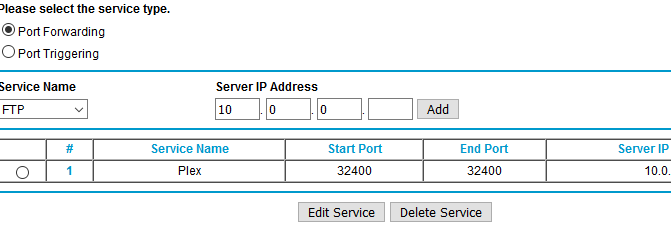
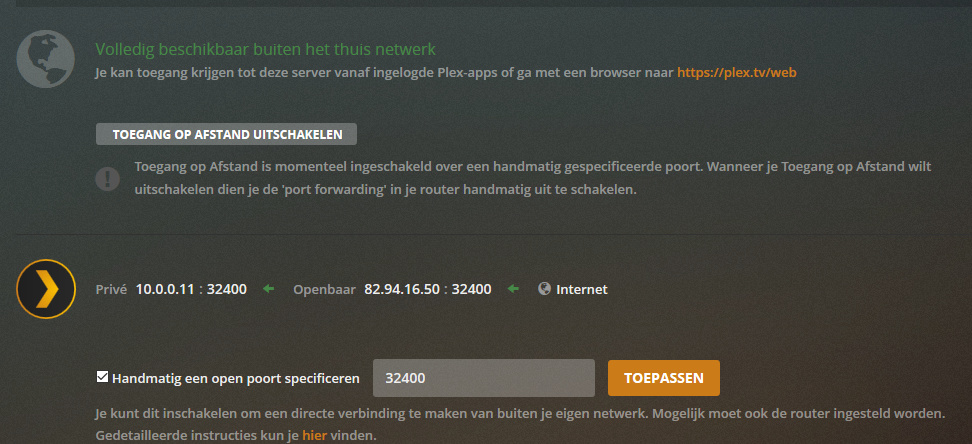
My network consists downstairs of a ISP router (Fritzbox), a hot wired switch to which the LG tv is connected and a hot wired (upstairs) netgear router WNDR 3700 to which my desktop (media server) is connected. I change the neatgear routed into port forwarding. so the media plex server allows remote acces
I got a few plex apps , like the one on my Ipad. this one is “air-wired” to the fritsbox and plays plex well (i got remote access). my LT tv which is also connected to the fritzbox (via the switch) does not see my media server on my desktop.
Firstly have you entered your Server LAN IP address and port to LG client settings / Manual server
Port :32400
Then log into your Fritz router and add a LAN static address for your server.
In your Server add the information as illustrated in attachment, using your correct Server LAN IP address with /24, then save.
Misc checks:
a) Disable IPv6 on your LG TV and in server network settings
b) General setting in LG client scroll to bottom and make sure connections fall back to insecure, in your server network settings/ secure connections Preferred
As your native language is not english it seems, it best i leave this to someone else.
My concern is one router connects to internet and one should be in Bridge mode. Your remote connection suggests 10.0.0.11, yet your fritz box 192.168.178.25, which states DSL. Are you on DSL?
What i can see is the fritz box needs to be in bridge mode for it to work.
Updated: Well that throws a spanner in works if fritz is your modem router. So what does netgear router do then? Using it as a switch?
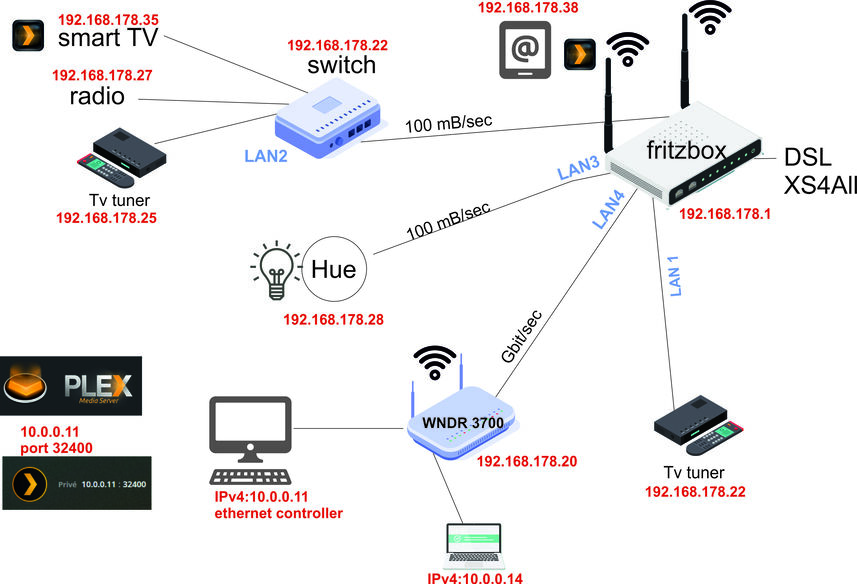
can anybody help me. this picture is my network. i do not understand why it is like it is. it just happened to be so. which also means i have not got a clue.
What I don’t understand, is why your Server and Laptop are on a different network 10.0.0.1, you have the Netgear labeled 192.168.178.20
If it’s the fritz box, your Computer LAN IP address should be 192.168.178.14 and or 11. The netgear router needs to be in bridge mode. What I’m saying is the Computers are on a different LAN, you need to assign them a different LAN address like the rest of your network.
Example : 192.168.178.14, 192.168.178.11
Which Router is your WAN connection / internet connection? My guess is the Fritz
hi and thanks. the fritzbox is indeed the WAN connextion. i checked on the internet and it seems that the netgear sets the IP LAN port automatically to 10.0.0.1 when it looses connection with the ISP. dont ask me why. Some experts advise to leave it that way. If i change the IP address on the netgear router it tells me “The IP address conflicts with the WAN IP subnet. Please enter a different IP address”. which makes no sense to me because i do not understand what is happening
You may not be able, but login into Netgear and have fish around. You maybe needing a Wifi Router that can be assigned to bridge mode, if you don’t need the WifI in that location of your house a Gigabit switch would be ideal.
so i bought the wrong equipment. the NETGear was purchased as i wifi enhancement thing. the fritzbox has little wifi coverage in the house. oke, this new piece of information brings me a little closer towards the main objective
I also had to use the WAN port on the Netgear (connected to a LAN port on the primary - Netcomm - modem router).
Apart from that it was straightforward - IP address in the same subnet as the rest of the network, but outside the DHCP range, DNS servers manually assigned, WiFi set up with unique SSID and that’s about it.