(LG WebOS bug) Wrong audio track despite of what is chosen

Steps to reproduce the bug
Play a file (like the one linked below) with multiple audio tracks. One of them has to be a Dolby TrueHD Atmos track.

Expected behavior
The chosen audio track is played.

Actual behavior
The chosen audio track is not played. Instead it will be an other track present on the file.

400 MB Test clip from 4K Blu-ray of BlacKkKlansman with multiple audio languages
https://www.dropbox.com/s/h5tygogu3ywetdc/BlacKkKlansman%20(2018).mkv?dl=0
Earlier bug reports of the same issue

Hardware and software (all latest versions at the time of writing)
TV: LG OLED55C8
WebOS version as reported by Plex app: 4.1.0
Plex for LG version: 4.21.1
WebOS software version: 05.10.40 (European)
Server version: 1.18.5.2309

Your solution at present is to use a Tool called MKVToolNix

I could do that for sure but that’s more of a workaround than solution really. Remuxing all my Atmos rips to circumvent a software bug… doesn’t make much sense does it. :wink:

1 Like

Key word “Present”

I have issue with wrong audio as well on my LG WebOs client. Server and client are both newest version. Default language in my case is Czech language which is selected correctly, but played language is english. If I pick English option, czech language is played. All works perfectly when played on web or desktop client, but not in WebOS on my LG. Most of my media files are properly remuxed by myself to achieve Direct Play since server is running on Raspbery Pi. Any idea what is going on and why it behaves so weird on my LG TV?

Does this occur only on files with Atmos track or on other files as well? Or does it happen on all files? Could you upload a short test clip to Dropbox or Google Drive?

Good question. I need to clarify that, but currently I’m not at home so I cannot test it on TV now. At least I will prepare files with different type of audio. Actually last file played contained Atmos track before, but due to transcode I was forced to re-encode and remux all files with Atmos to DTS-MA for example which was OK for direct play. I will test it and post sample when I’m back home.

Ok, great!

Same issue. Its like the indexing on the audio tracks is off by one. Workaround so you don’t have to mux-out the Atmos is to just pick the track after the one you actually want from the list.
I understand the Plex team having priorities - but would be nice to see them reply and acknowledge the bug - its been around for quite awhile

Plex Server - up to date
LG WebOs Plex player - up to date

Finally back so I made a lot of tests. In my case it appears that problem is not tied just to specific type of audio, but it’s muxing setup in mkvmerge, specifically audio tracks order.
My whole library is muxed with track order like this:
video (default track yes, forced track no), original audio mostly english (default track no, forced track no), foreign audio mostly czech in my case (default track yes, forced track no), forced subs if exsits (default track yes, forced track yes), full subs (default track mo, forced track no).

These settings seems to be headache for LG WebOS Plex player where foreign audio is played when original audio selected and vice versa.

Workaround in my case is to remux files in specific order where foreign audio NEEDS to be first then followed by original audio:
video (default track yes, forced track no), foreign audio (default track yes, forced track (yes or no - does not matter)), original audio (default track no, forced track no), forced subs (default track yes, forced track yes), full subs (default track no, forced track no).

This specific muxing order works for me.

There is also specific case when you have files with more than 1 foreign audio like I do have some with czech and slovak audio.
In this case muxing order has to be like this:
video (default track yes, forced track no), foreign audio 1 (default track yes, forced track (yes or no - does not matter)), original audio (default track no, forced track no), foregin audio 2 (default track no, forced track no), forced subs (default track yes, forced track yes), full subs (default track no, forced track no).

I created samples with combination of different audio types like E-AC3 - AC3, DTS-ES - AC3, DTS - AC3, DTS-HD MA - AC3. I don’t have files with TrueHD Atmos anymore (re-encoded to DTS-HD MA) because of transcoding. Running Plex Server on raspberry Pi which is strictly set for direc play what so ever. You can download sample package from my google drive and test it yourself. Here is the link.
“Bad” folder contains files with my usual muxing order: video, original audio, foreign audio, forced subs, full subs.
“Fixed” folder contains files with muxinf order: video, foreign audio, original audio, forced subs, full subs.

Please test and let me know.

LG WebOS Plex player has clearly issue with track IDs of muxed files. God knows if devs will do something for this case or not. Hope they will narrow it somehow and I would be very happy if they will see this post.
In the meantime we need to rely on workaround. I was searching if there is way how to change tracks order without remuxing entire files and answer is you cannot. With mkvpropedit you can change track number and track UID which are Matroska properties, but not track ID because this is mkvmerge thing, not Matroska. So I think I will create some script(s) once I will have time for this which can be run on plex server doing preciselly defined remuxes file by file.

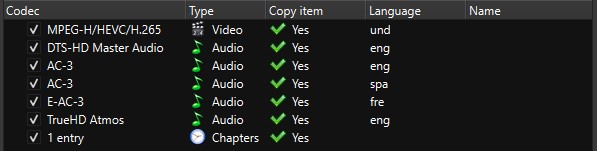
Finally had time to test The Irishman and Tomb Raider and they behaved exactly as you described, so the bad ones did have the audio tracks swapped and the fixed ones were correct.

I’m glad you posted as this made me try to switch the order of tracks on my BlacKkKlansman clip and the order that works is when Atmos track is at the bottom (see screenshot). It’s obviously still not feasible to go through all the files with Atmos tracks to move the tracks around, as it requires remuxing and takes so much time.

Plex team has apparentely acknowledged this issue on another thread (Audio streams titled wrong), so hopefully we’ll get a fix soon!

Annotation 2020-02-25 143057

Same issue

Problem is that this is not just files with TrueHD tracks, it’s global thing. I have around 5 titles with TrueHD tracks and rest are DTS or AC3. All of them are affected in my case. In the meantime I did remuxed my whole library with some automation in windows powershell. Even though I had to do it manually for over 50 files.

Just wanted to add a “me too” here. LG OLED55B8, all software are latest versions as of date of post.

Thanks for the report and all the information.

It looks like this issue is due to webOS removing audio streams it can’t play, so in the case of the TrueHD stream being anywhere other than last position in the audio streams it causes everything after it to have an unexpected position in the list and mismatch.

The fix for this slated for the release next week,.

5 Likes

That’s excellent news, thank you!

Hey ! Following my topic from a few months ago : Plex on LG TV is slowly biting me

YES ! The issue is definitely gone with the new update.
I don’t know how it’s related to TrueHD files, as it happened with the vast majority of my files, including the ones that do not own trueHD audio tracks.

So far, the dozen I tested are now working correctly.

If you want more info for debugging purpose : During the the first 2 seconds, the wrong stream is still being selected, replaced immediately after by the correct one, which means a tiny audio cutout.

Thanx a lot !

1 Like

This issue is fixed for me as well with Plex for LG 4.27.1 update! Excellent work Plex team, thank you all so much!

Hi !
Little update : This update mostly fixed the issue, but yesterday, I read a file with 2 audio tracks :
DTS-HD MA (english)
AC3 (french)

I had to select the english one to play the french one (and vice-versa)

If you want logs or the file itself, I’m all yours, just tell me.

A sample of the file would be very helpful.

Also, which model TV?
