Server Version#: Version 4.47.3
Player Version#:
I have a WD MyCloud and all my music is on the drive but will not show up in Plex.
Help! This is the second time this has happened and I am furious. I have posted about this before and I did not get one response for technical support!
But I did get a lot of questions from other people that are having the same problem.
Come on Plex, I need some help here!!!
Mind sharing some details on (a) your setup and (b) the exact symptoms?
e.g.
- what version of the WD MyCloud do you have and what OS version is installed on it?
- which version of the PMS do you have installed (
Settings>[Server Name]>General>Version→ e.g. 1.21.4) - have you changed anything about the structure of the data on your platform (e.g. file organization or permissions)?
- how are you accessing that server of yours, e.g.
- locally or remotely?
- using the local vs. hosted web app (http://[WD MyCloud IP address]:32400/web vs. http://app.plex.tv/desktop)?
- anything showing in your clients or is it all gone?
WD MyCloud: Single 6TB drive, OS V.4.1.270
PMS: 1.18.6.2350
I have not changed anything about the structure of the data.
I access the server:
My PC (Local), Android Phone (Remotely), Samsung Ultra HDR blue ray player (local).
This is the second time this has occurred:
All of my music disappears from the library. My playlist Icons show but they are all missing music content.
All of my music is still on my drive.
The last time I restored the server. I lost all of my Metadata and playlist that I have inserted/created manually which took over a month to complete.
Can you update to the latest release (PMS 1.22.0)?
I hope this helps:
It looks like the actual PMS version I am running is: 4.51.3
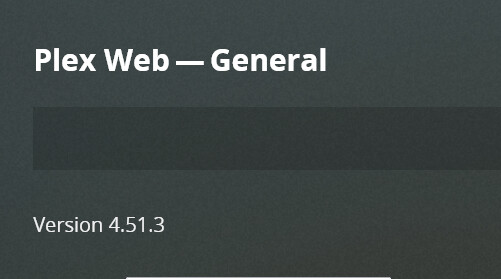
This is the most current screenshot:

I have searched for updates and have not found any new ones.
I hope some of these screenshots will help also.


Thank you for your help. Just let me know what information you need.
Seems like you’re having 2 separate servers, one on the WD MyCloud and one on a Windows 6.1 (aka Windows 7) machine.
Just in order to rule out the obvious traps… could it be you setup the Windows server at some point by accident? In which case that one will obviously have been empty to start with… while the server on the MyCloud might still live on (ideally with all your libraries; if you had disabled it at some point it might however have been reset at some point)
I do not use the server on the Windows 7 machine.
I have never disabled the server on my Mycloud.
Something happened on March 12th.
Like I said this is the second time this has happened. All I do is add content and update the metadata. There is something going on with the PLEX software. Plex keeps losing my information.

How does all my metadata and my whole library disappear. Nothing has changed all my content it on my drive!
Can you post your server logs for plex?
I am not 100% sure how to do that. I have uploaded a Zip file.
Plex Media Server Logs_2021-03-16_15-53-30.zip (5.7 MB)Plex Media Server Databases_2021-03-16_15-56-47.zip (5.0 MB)
You have verbose logging on in general settings. Turn that off unless plex staff tell you to turn it on.
That won’t help just something I noticed right away.
I have that turned off. 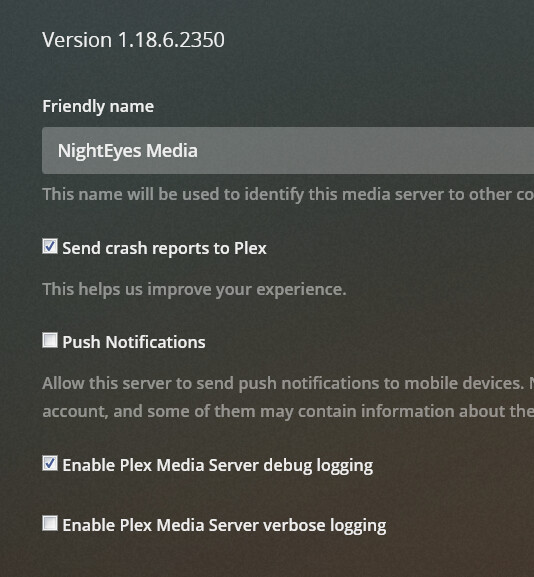
How do provide you the logs that you require?
No you were right sorry I shouldn’t respond when I’m still waking up. I will look at the logs, this afternoon. I have had theirs happen one time before as well. I don’t use WD though so maybe it isn’t specific. I just readded the library in the end.
Maybe @tom80H will be able to shed some more light in the meantime
Thank you for your help.
Please any advice you can give on how to make the server more reliable please let me know or how to create a backup of my metadata. I have about 1000 hours of data entry.
I plan on upgrading my server to an WD NAS in the future.
For some reason the Plex Media Server app on your WD MyCloud cannot access the shared directories and attempts to reflect this by removing the media items from the libraries (from what I can find in the logs this happens for the Shared Home Videos, Shared Music, Shared Photos and `Shared TV Shows). When Plex attempts to access those folders, it gets a “permission denied” message from the WD MyCloud.
When it cannot see the Plex folder in the first place, your PMS attempts to create the folder structure anew but fails (again with a permission error).
There’s also a number of network errors – however those don’t seem related to the immediate issue.
Have you set any specific permissions on your WD MyCloud so the default user might not be allowed to read/create stuff in the Plex folder?
I have not changed any permissions settings on my my cloud.
Do you know how I would check that?
I think we are on to something!
This looks like to be a permissions issue.
It seems like every time either Plex or WD MyCloud has an update; it somehow changes the permission settings. So WD MyCloud denies permission for Plex to access your library. Therefore causing the media folder to disappear as well as the playlist.
I think I have found a way the preserve the metadata by making sure the actual file name is the song title, and the album covers are in the same folder.
The playlist is another story. But you still lose the star rating and all other details that were inserted.
I’m not sure this will help… however you might want to try disabling Settings > [Server Name] > Library > Empty trash automatically after every scan. This might help with Plex at least keeping your library records until the permissions are restored
This topic was automatically closed 90 days after the last reply. New replies are no longer allowed.
