Local Media Assets Ignored?

I just noticed this issue on my server last week. Updated to 1.13.5.5291, hoping that would resolve it, but no dice.

My particular issue is with movies — for example, I have the theatrical cut of Dune, as well as the Extended Cut. I placed each file into its own folder, appropriately named, etc. This gave me two distinct entries in my database, with distinct play histories. Now, both movies are lumped into the same entry, and playing one file will reflect the play history on the other. I even tried moving one of the folders out of the library, re-scanning the library, then re-introducing the folder to the library and re-scanning again. This did nothing.

Bump, please look into this devs.

Same issue here on 1.13.5.5332, SHIELD Exp 7.1
Local Media Assets ignored.

Plex Media (6.2 MB)

Hi guys, just got pointed to this thread. Is this happening with all media that has local artwork or just some?

Movies and TV are mostly fine for me, but I have some TV shows that have gotten their cast pictures from TMDB instead of TVDB. Haven’t done a Plex dance for that issue yet. I do however have some more persistent issues with music.

All artists have their own folder, and every folder has an artist-poster.jpg. For some reason, 10% of artists ignore that and get their art from last.fm (I guess, it’s the only non-local music agent I have).

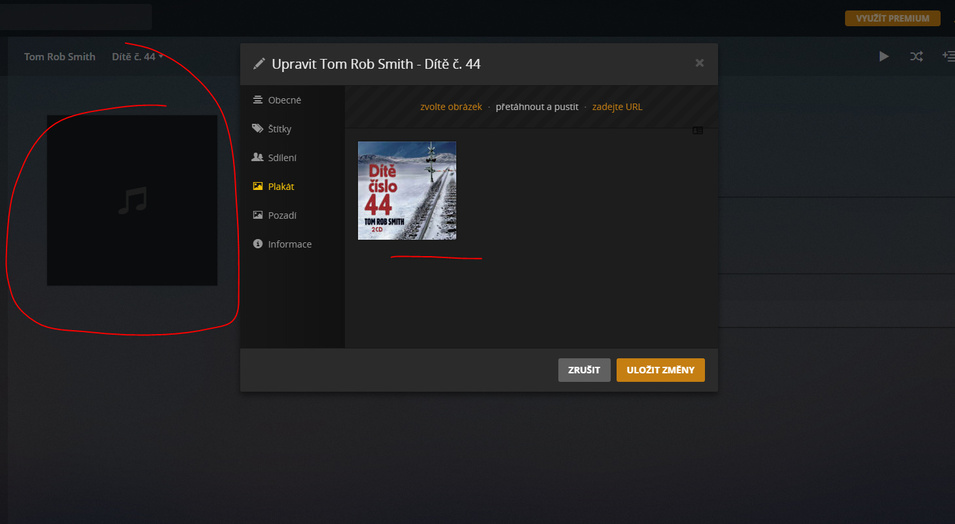
One artist even insists on a completely black poster, which I doubt is hosted by last.fm.

Album art is also iffy. Plex seems to find all album posters, cover.jpg, and lists them, but doesn’t actually select them to be used. Easily spotted because the posters it does pick are in horrible quality.

My issue is with movies, but it’s sporadic. Some titles pull the local assets correctly (trailers, BTS stuff), and some get ignored. The titles that do end up ignoring my assets also ignore my custom entries (description, title, etc). I can’t figure out what the defining factors are.

Local artwork for music in my case. Album artworks are found but not applied. I do not have own artwork for movies and local subtitles work fine for me (besides ANSI encoded).

Same as Marcus1

Album art is also iffy. Plex seems to find all album posters, cover.jpg, and lists them, but doesn’t actually select them to be used.

Did some more testing.

Doing a Plex dance fixed most cast photos, but actors that appear in several shows have their photos reused even if they have different photos on TVDB. Don’t know if Plex is supposed to use photos from each show.

Elaborating on the music issue, I have two music folders. One for artists with full albums, and one for artists I only have some singles from. The full album library has the issues with certain artists not selecting the local artist poster and album covers. Interestingly it’s the same artists not selecting the local artist poster every time.

The second folder seemingly has no problems at all, loading the local artist poster and the album art from the music files. Tried to add a cover.jpg to one folder, and it was immediately loaded on a metadata refresh.

Trading places of the two doesn’t change the result.

Now the actually interesting part. If I move an album folder out of the artist folder, rescan the library and then put some of the songs back directly into the artist folder, not in an album folder, and rescan again … the proper artwork is selected from the embedded cover art in the music file.

Edit:

The bad artist poster looks like some caching issue for me. Of the four artists I have that do not load the local artist-poster, three of them use the displayed artist-picture in Windows’ folder preview. As they don’t contain the picture displayed right now, and it wouldn’t go away, I remade the folder and moved over the music and they now work.

I still don’t know what’s going on with the fourth artist. I did the same thing there, but to no success. It won’t recognize that there’s a local poster in its folder. I even tried to add other artists’ posters and other file names, like cover.jpg and poster.jpg.

Edit 2:

Looks like it’s a caching issue with the folder art as well. Recreated the folders and moving over the files, and now it works.

Still don’t know what causes that one artist to not find local artist posters.

Edit 3:

Copied the poster for the artist I was having problems with and named it artist-poster.png, and suddenly Plex finds it. Remove the .png and refresh library and metadata, the proper image stays. Remove artist from library, scan files, clean bundles and trash, re-add artist, proper artist poster loads.

Thanks for the info on this one… Hoping Plex can come up with a solution.

Plex Supprt simply does not have the time to fix this.

They are way too busy releasing loads of new features that wont work either.

Its like they get an idea, spend 5 minuites making it then releasing into the general public without any care for the user at all.

I’m pretty sure their customer service motto is ‘We’re not Happy until Your Not Happy’

I also faced the issue with the local artist-poster being ignored and instead some artist artwork from LastFM was used. Doing some analysis on the MP3 ID3 tags I discovered that this issue was only happening for artists that had the ‘Composer’ field populated. Using Mp3tag I changed the ‘Composer’ field to null in the MP3 files and then did a Plex Dance. Those artists are now correctly using the local artist-poster.

Does this also work for the local album art?

Well, this is still happening to me on the latest server v1.14 for movies and TV. When adding new libraries it grabs screenshot thumbnails and uses them as the defaults for both the poster and the background. Also happens when using the XBMCnfoMovieImporter plugin. Only manually changing the images to the local images has any effect.

I’ve got an entire set of libraries to add and simply can’t spend countless hours changing the images. It’s incredibly frustrating that this problem has been around for 8 months or more and is happening through countless versions of Plex server. And yet, Plex don’t seem interested in fixing what is a bit of a showstopper problem for some users.

1 Like

Honestly makes Zero sense why this is not being fixed… At some point you guys need to GO back and just do LONG STANDING bug fixes and be done with it. This is an issue, Issues with Camera uploads, issues with Sync’ing content… the list goes on and on. And like people have said… NOBODY is asking for these new features when the current features don’t even work correctly.

4 Likes

Just bought a Plex Pass to use parental controls for my kids. While this works fine with my perfectly tagged MP4 files it doesn’t work with series. Version 1.14.1.5488 and still no bugfix? Hope to see this improved like all of you.

I have 5 shows that do not have any metadata associated with them. I can choose the show in the match/unmatch option but no metadata will show up for any of them. I recently moved to a Shield as a server from a PC and all the show info is listed on the PC side. All my other 276 shows work just fine. Plex will play episodes from the show without an issue.

This is seriously annoying. The fact I take time to manually pick what I want than plex actively ignores it is starting to ■■■■ me.

Every other app i use (kodi, emby) quite happy uses the local assets + additional online context. Wish they would fix bugs instead of releasing features no one wants.

Wasn’t for the fact i hate emby’s client interface i would have moved 100% by now (which is a shame, because i had been recommending plex heavily before the last 1.5years) + i have invested a fair bit of time into custom projects adding stuff to plex for friends/family

Is this forum monitored by Plex staff at all?

I just started using Plex a few weeks ago and followed the (very good) instructions on the web for local media assets, and then find they don’t even work correctly. Imagine my frustration when I find that the issue is almost a year old and hasn’t been corrected.

I was originally using nVidia ShieldTV as my PMS, but the database cannot (easily) be backed up, so I figured I’d just implement the local media asset file naming that way if the SheildTV bites the dust, I can just re-import my media folders and voila! Not the case it seems…

I’ve now tried PMS on a windows 10 PC as well with the same issue of not recognizing local media assets.

I bought a NVIDIA SHIELD and thought I’d get a Plex Pass because I wanted to be able to access my music remotely but NONE of the embed album art is picked, neither are the fanart images and artist thumbnails (actually, these two are, but not applied).

I did some testing with dummy folders to no avail. Everything’s black. I really don’t want to manually add album art to my 13,678 perfectly tagged albums.

I’d really like to like Plex, I’ll pay the $159.99CAD for a Plex Pass, but it can’t do basic things that (free) KODI can: using album art from tags.

Any update on this one? We got Logs, we got all the information you should need to fix this issue. Album/Artist is there when I click edit and go to the cover art, its just not selected. How hard is it to just have it select the cover art that is already there? Why does this take 6 months to fix?

Anyone have any thoughts on this one from the DEVS?