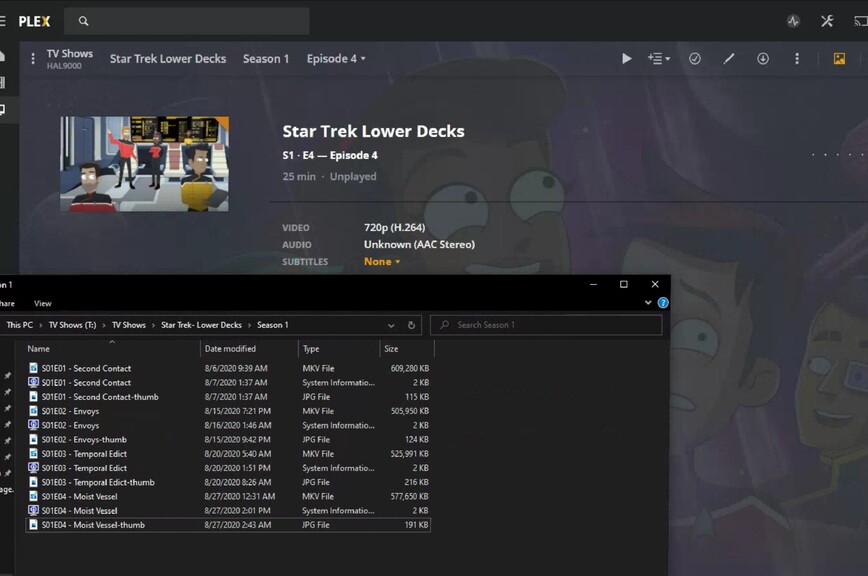
Hello all, I have an issue that appears to have shown up over the last couple of weeks. My tv shows all use local metadata and have been working fine. I use Kodi locally and Plex remotely so I didn’t notice until just now, but Plex decided to stop pulling the metadata that is clearly there for tv shows and had been provided by sonar.
Nothing has changed in my sonar setup or Plex settings for a long while now. Any ideas why Plex won’t use the local metadata now?
What kind of metadata are we talking about?
Are you sure your files are in mp4/m4v Format (because Plex can only read metadata from these)?
Settings - Server - Agents - TV shows
Make sure the line “Local Media Assets” has a check mark in all subcategories.
I have sonar create nfo files for every episode
I looked through each of the agents, even though no settings have been changed in quite a bit, and local media assets has a check for each.
Sonar is renaming the file before it even goes in the folder that Plex would be looking for new media and Plex doesn’t even pull the episode name from the file. Kodi is still pulling all the local metadata correctly when I watch locally. The file type of each show is mkv, which it has been for years without issues.
If I go to the main page of the show and select match, the auto match has the show correctly identified as well. Just not sure what’s gone wrong recently.
.nfo files are not read by Plex.
Do you have the latest version of the .nfo importer agents installed?
They will not work in a movie library, which has been converted to the new native Plex Movie agent.