Server Version#: 1.15.2.793 (Haven’t updated since this has been occurring over several updates
Player Version#: 3.83.1 (Web)
So I have a show (Men on a Mission, Knowing Bros, whatever you want to go by) that doesn’t see any local srt subtitles. Files are as follows (using the first episode as an example)
I:\TV\Men on a Mission (2015)\Season 2015\Men on a Mission - S2015E01 - Pilot.mp4
I:\TV\Men on a Mission (2015)\Season 2015\Men on a Mission - S2015E01 - Pilot.srt
Before any comments, yes, there is no language added, but that shouldn’t be a problem since it just appears as an unknown language (and how all of my subtitles are done and the ones I’ve used recently all work). It also works in other media players like VLC as well.
I have tried the Plex Dance, as suggested in other threads, so things such as removing and readding, moving local media assets to the bottom, renaming (I’ve tried with the language added as well) and none of these have worked.
This issue happens on the plex web player, on the app on a Roku, and the app on an Amazon Fire TV.
If there’s any information needed, please let me know and I’ll update as soon as possible.
You’re right. It does say that but isn’t entirely true. I have hundreds that don’t have the lang code(before I knew of it) and they work, though as “unknown” lang.
1
00:00:00,300 --> 00:00:02,633
Subtitles by OnDemandKorea
2
00:00:07,102 --> 00:00:12,164
(On December 1, 2011, JTBC was established.)
3
00:00:15,142 --> 00:00:21,968
(For the past 5 years, JTBC have done many gem-like variety programs.)
4
00:00:22,812 --> 00:00:27,031
(In 2016…JTBC opens up in Sangam!)
5
00:00:27,459 --> 00:00:31,562
(Specially produced “Ask Us Anything”)
The language code is not required per se, but I highly recommend to add it.
The reason is that OP is not using Season xx subfolders. If you want external subtitles to work in tv shows, always use Season subfolders – even if the show only has one season.
I definitely understand using the language code, I might look into adding it into my process (just a matter of syntax but still).
As for my issue, that’s clearly not the case, as I’ve posted my directory in the original post.
If it is an issue with seasons, the only thing I could think of is that Plex has an issue with seasons over 2 digits, as this is the only show that I have with a season over 2 digits (that has external subs anyway). Otherwise, not the issue.
It must be a 2-digit number. It cannot be 4-digits. Though, I wonder if plex supports 3-digit season folders. Guess we must wait 70 years for The Simpsons. Unless you can think of a series that has over 100 seasons that isn’t in the 4-digit format.
Apologies. I must have missed that.
Then it is the usage of 4-digit season numbers which makes the difference. This is actually a known bug, which is already filed.
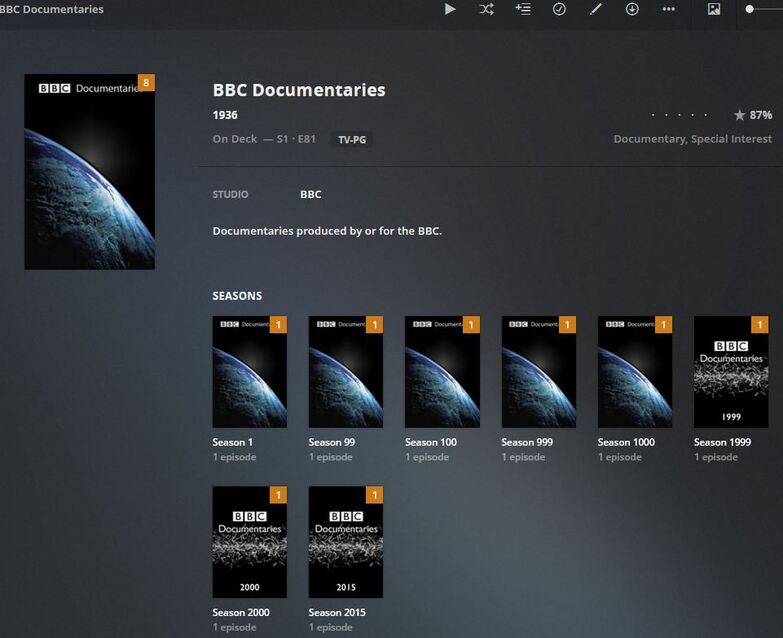
I give up. When I first tried this I wasn’t getting the sub, but now.. All seasons have the sub. Don’t get it. Perhaps I misunderstood what @OttoKerner stated.
Nothing. Just kept adding one season at a time. Season 1 was originally Season 2015 but I renamed it. Scanned library for change… Then added season 99, 100, 999, etc…I scanned the library each time. And that is where we are now.
So perhaps I “tricked” plex when I initially renamed Season2015 then along the way, adding season2015 again. But honestly I don’t know.
So for now, I just have to either hope subtitles get found, rename my seasons manually as a temporary fix, or just wait until Plex (if ever) gets support for 4 digit seasons?