I understand what happened now…I just copied a sample thinking it was some kind of standard, when it was just an example I couldn’t use…
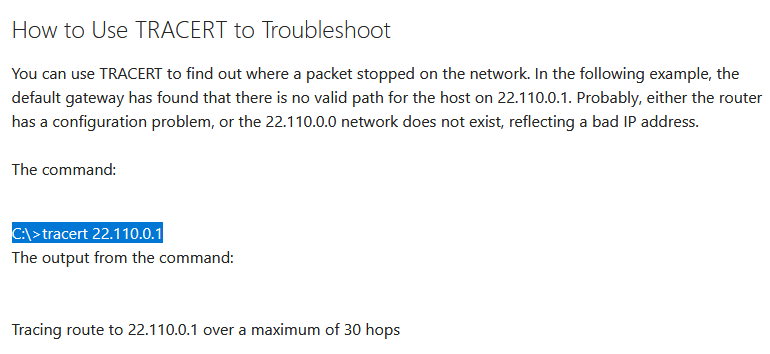

I understand what happened now…I just copied a sample thinking it was some kind of standard, when it was just an example I couldn’t use…
I just did Tracert with 127.0.0.1 it just came up with 1 MS one line and complete so maybe I’m not double NATed?..
Perform the tracert to 1.1.1.1. Based on the above, you’re definitely double-NAT’d. The good news is that is almost certainly not causing the claim issue you’re experiencing (it generally only interferes with remote access).
Edit: I’d recommend continuing with Otto’s suggestions. The fact that you ran the server as Administrator likely borked your permissions/ownership for the Plex data directory.
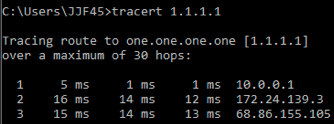
It means you’re in a double-NAT configuration. Given the latencies involved, it’s likely a CG-NAT (carrier implemented). There’s nothing you can do about that. But it probably is not impacting this issue. You could experience some issues with remote access down the road, but that’s a future issue.
Continue working with @OttoKerner on getting your directory permissions sorted out and proceed from there.
Tried overwriting my current PMS install from the web host location while signed in and while signed out. Denied.
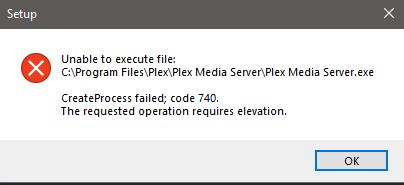
“Elevation” means that the installation .exe requires administrator privileges. Which is only logical, since an app installation is a potentially dangerous process which shouldn’t be allowed to run without confirmation by the system admin.
It usually triggers a prompt for the admin password (the screen is darkened while the prompt is displayed).
Are you working with a non-admin Windows user account?
Have you disabled or reconfigured anything related to this mechanism?
I have one computer, the server, which I can run as administrator. I have complete control of the thing and it’s not connected to any other machine. I’m not completely computer illiterate, but I’m not someone who has ever taken care of a network of computers either. Permissions can baffle me. I need to have my hand held on something like this I’m afraid. To my knowledge I have not disabled or reconfigured anything, but I was forced, by Microsoft (and of course it didn’t even solve the issue) to do something called an in place install of Windows 10, which I did last month sometime. It didn’t seem to affect anything, but maybe it made some changes I am not aware of. If you can give me some kind of checklist to rule out a permission issue I’m more than happy to execute it, but I don’t know what I’m looking for (or where) exactly. Thanks Otto.
I keep thinking the logs in Plex should identify where I should be looking, but I don’t read technical. I noticed I don’t have an allowed networks entry in my registry, but I don’t know how to populate that after I add that entry. Regarding the nuclear option; shouldn’t I be able to back up the data I need to a separate drive away from this computer/server and reintroduce it after I’ve wiped out my Plex install? My DB is in the neighborhood of 5 TB, all music, I don’t care about the TV portion. Watching it on my Smart TV is out now. It bounced my credentials and wants me to do that code thing again. I think whomever muscled into my server the last time only cares about scamming me for the code money (I was scammed out of $100 last time, but the bank gave it back to me). I’m never doing that again. I’m sure you don’t remember because you have hundreds of customers, but when I open the Plex TV app on my Smart TV it says my credentials have expired and go here for a code. I can’t just type in my username and password like normal apps would have you do. Anyway, that’s a whole other rat’s nest I can deal with another time. What I’d really like to do, since you seem disinclined or too busy to shepherd my lack of access to a positive resolution, is to see if I can go nuclear and then put back the data that I painstakingly added over the course of years. It’s mostly photos and improved album covers and punctuation, but punctuation hasn’t been an issue since I asked the software to take my own data rather than download it from the cloud. I imagine I would able to do that again before adding my media again. I realize I would have to merge artists again, but right now I’ve got no access unless I Run As Administrator via Program Files. Even then I will never get another update it seems. I worked on permissions via Windows all day and got nowhere. I feel like I have tried every Error Code 740 remedy and came up with nothing.
I don’t know if it’s relevant, but, running as administrator via the local host, my picture comes up with the account status, but when you click on server settings it’s gone. I can get at my library, but it’s like I’m not completely connected, as the manual download request seems to confirm. Anyway, have a good weekend if I don’t talk to you.
You won’t be needing anything in there.
I suggest you concentrate on getting your server working, before dabbling in remote access issues and exotic network configurations.
Then you might as well leave it in place.
There is nothing to be gained.
I am not aware of that incident.
What happened?
It’s done that way because typing in a long email address plus a complex password with mixed case and special characters is very exhausting to do with a remote control.
Instead, it shows you a 4-digit code which you type in immediately in a web browser on the address https://plex.tv/link
Since you’re logged in to your user account in the web browser already, plex.tv can assign your TV to your user account with the code. You just need to be quick, because the code is only valid for a very short time.
I thought it was pretty clear I don’t know the difference between what is a remote issue and what is a local issue. All I know is that I can’t get an update, I can’t get a fresh version of PMS to install, I can’t see my own library unless I log in as administrator and have no idea why my pc/server is unable to connect to the web host. I can’t distinguish between which issues are causing my issue because I seem to have several issues at present seemingly unrelated to my Plex issue. For instance I can’t get online access to play Windows Solitaire, but I have full access to the internet. I used to not be able to get into the Windows Store altogether, but now, even with access to that, the other issue remains. That is why I had to do an in place re-install of Windows 10 Home last month (because their outsourced instruction readers couldn’t diagnose my problem). Then MusicBee, my preferred jukebox software, stopped being able to automatically search for artwork. I work around that by downloading and editing the artwork one by one, but it’s annoying and their forum is useless on this issue as far as I can tell. Another thing that is happening is I get these (below) message all the time and Googling and fixing the issue also seems to be above my pay grade. Something overarching and strange is plaguing me and I feel like all of these things are related, but for the life of me I can’t figure out the root cause.
Regarding the code and Plex TV, fine, but about six months ago I asked for the code and I was directed to some place related to Amazon Gift Exchange (don’t quote me, but something similar) and asked to download something to my phone. Like a sap, when it didn’t work, I call tech support and they offered to take over my phone and do it for me. Then they wanted $1 for an alleged upgrade, but all they wanted was access to my credit/bank card. I used an account I knew only had $120 in it in case I got scammed and sure enough they started trying to take $100 at a clip while I watched in horror. Anyway, the bank gave me my money back so that is a story for another time. I may try it again after I get my priority issues addressed. Thanks. - John
P.S. Regarding the nuclear option I just assumed everything related to Plex would be removed so I just thought I’d find out where my data was actually housed and back that up. I’m not sure you are following my question or maybe it makes no sense, but I’m thinking my old database, with a fresh install, might work somehow. Maybe I’m dreaming.
I found this in my digital certificate information file. Does it mean anything?

i can’t tell, as long as I don’t know which certificate this is.
It came from here…I just hit show information after running as administrator, still the only way I can see the local host. No access from the web host.

Have you cranked the User Account Control setting of your Windows to the highest level?
No, I tried to access Plex while it was completely disabled to see if that helped. It didn’t. So that certificate message meant nothing to you? I’m out of ideas. I can’t tell you how frustrating this is for a novice like me.
I finally had to pay for some dedicated help, but my problems are mostly solved. Kaspersky Internet Security and Plex apparently no longer play nice. They had go on very well for years, but something about the latest updates to both products has forced me to choose. Goodbye Kaspersky.
I’m having a similar issue. I have the same revocation message when I launch in administrative mode. Is it possible for you to elaborate how the person figured out that Kaspersky was the issue? I don’t have Kaspersky. Did they only have to uninstall the program or start everything from scratch? Any help would be greatly appreciated. Any steps or programs they used to find the issue would be of great help. Hopefully your issue is fully solved. I don’t want to wait a month to figure it out?
Hi Stacula. I wish I had more of a clean answer for you. The guy I had to hire to solve my issue didn’t really solve it as it applies to Plex. We forced Plex to Run As Administrator and I moved that icon to my desktop so I could see my own library (which is also on my desktop). Removing Kasperky solved a number of other issues I was having (see above), but initially we just took Kasperky out and it worked, not all the way really, but it acted like it did. I still can’t really tell if my server was claimed on the desktop or mobile, but I did go through the Method v2.2 steps and before I “solved” this issue and it isn’t asking for that anymore. My picture shows up on both Plex and Plex Media Server so that was an indication communication had been re-established, but my old links (one for the local host and one for the web host) both don’t work. What does work is the created icon from c/program folders/plex media server. We tried putting Kaspersky back in and it failed miserably. Changed all the settings in the software, etc and nothing flushed out why it wasn’t working. But taking it out regained my access to the Windows Store, Solitaire in particular (it couldn’t log in for some reason), my searching for artwork in MusicBee (fantastic jukebox software) and some DAI Google Stream issues I was having. I used Windows 10 Home so I installed gpedit.msc/secpol.msc, which it doesn’t come with, and tried to regain permissions I seem to have lost. I keep getting error a Microsoft Windows error relating to permissions when I tried to add my own media. I did not want to go nuclear on PMS because I spent months customizing it for mobile access. If you have a small media collection and are new I would go nuclear, but I didn’t have that option I felt. Removing Kasperksy Internet Security freed me up on a number of levels, but as it applies to PMS it only allowed us to jerry rig access. Honestly, I’m looking forward to when I get a new computer down the road so I can start fresh. Something still isn’t right, but I wasted a lot of time and money never really got a clean answer. Wish I could of more help to you.



