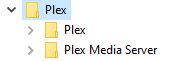
No. “Plex” is the dedicated client app, which is only available in 64bit.
“Plex Media Server” is the actual server component.
Having both installed on the same machine is absolutely possible and is actually pretty common.
The server is available in 32bit and 64bit versions. On a 64bit capable system, it is strongly recommend to install the 64 bit version of the server.
And no, don’t simply delete the program files.
Use the regular method of uninstalling apps in the Windows control panel.
Do NOT use “uninstaller” or “registry cleaner” apps to do this.
Thank you, but I’m still a little confused. I have the 64 Bit server app software ready to install. It’s come to the point where I bookmark both the Local Host and the web TV host because I have trouble getting them to work together presently. Yesterday, by some miracle, I got back to the point where I could see my library on the local host and make some changes to artwork without the thing blowing up. At the server settings mark, at least when I shut the computer/server/host off yesterday, I was at the point where I had access to my library locally and via mobile. Today I clinked on that saved link and I got an unable to connect (127.0.0.1:32400) message. My Web TV Host just spins endlessly trying to initialize the Server component, but it can’t. Using the local host yesterday, I was back at the point where I got the update message something went wrong install manually button. Hitting that option just wants me to download the server software again, which I have done many times, but I already know it won’t install. It’s a vicious circle jerk. There was no option to claim the server so I’m not sure if the server was claimed via Method 2.2 or what is happening. The error message in the console logs, when I can see them, which doesn’t include now unfortunately, was written on top of itself and highlighted in yellow. I couldn’t see what I needed to see even though I know there is an error there. Everything else, naturally, comes out clean and easily read, but not the error message.
I just deleted the 32 bit software as directed through the control panel and ran the 64 bit server piece, as administrator, and now I can see my library again. Still, I have included the message where it says I haven’t yet installed the latest version, which is where I was before I started having trouble. I would skip this version and try my luck with the next version, but if history is any guide I won’t have access to this either after I log out and shut off the machine for the night. The local host will again be unreachable and I’ll have to do the same thing I just did to gain access.
And I still have no idea if the server was claimed.
I realize I’m driving you crazy, but I feel like I’ve been spinning my wheels for 5 or 6 days now. If I uninstall everything and download it all again, will my username and password still work? I don’t even care if I have to reinstall my library at this point, I just want to have it work and leave you alone. Thanks Otto.
[HttpClient/HCl#6d] HTTP error requesting GET http://10.0.0.121:8080/description.xml (56, Failure when receiving data from the peer) (Recv failure: Connection was reset)
No, but I just double checked and re-synched to be sure. Are you not willing to say whether or not my username and password will still work if I uninstall everything and start from scratch? I feel like I have asked that question three times now. Anyway, On the TV Host side, I’m still not authorized, which I’m assuming means the server has not been claimed there. I can’t see any server settings there so I’m guessing that is the issue. I’ve logged out and back in so I don’t know what else to try.
The “something went wrong” error can mean almost anything. Which web browser are you using?
Have you made sure that the clock and date of your computer are set correctly and precisely?
Question round up; Still using FireFox with Chrome as my backup for is FireFox not working properly. TV Web Host I guess is the proper nomenclature. When I try to access my account via the web, I just get the spinning circle of death with regard to initializing PMS. I have made sure my clock and date are set accurately. I said as much above, but I realize you are trying to troubleshoot many other folks simultaneously. The nuclear option sounds so unappealing. Every photo, every piece of artwork, every punctuation correction, every merge…I guess I didn’t realize all of that stuff is saved in the cloud. I think some of that can be re-accessed by directing Plex to take my data rather than grab it from an internet database, but man that is daunting…
Today I turned on the computer/Server, hit the local host and was denied access yet again. I know if I go to Program Files and run the executable as administrator I can get back access with the old version that won’t update, but I can’t be doing this every day. This is so frustrating.
It isn’t. It is stored inside your plex data folder, which is lost if you choose the nuclear option.
Did you mention this before? I must have missed it.
If it works via “Run as Admninistrator”, then it is very likely that the access permissions inside your plex data folder have been messed up.
You would need to reset them back to default, so that the currently logged-in Windows user has full access permissions to every folder, subfolder, and file within.
Just to be clear Otto. Am I resetting permissions in the overall folder as highlighted in blue here or just in the Plex folder or Plex Media Server folder? Thanks!
I cannot determine whether you are showing me the data folder or the program folder in that screen shot. But likely the latter, which would be wrong.
I am talking about the data folder, not the program folder.
So I cannot answer yes or no.
It should be something like C:\Users\<yourusername>\AppData\Local\Plex Media Server
(hint: Users is a hidden folder)
Well, nothing seemed to happen so I checked all the boxes and ran it again. It takes like half an hour to cycle through everything. It’s still running as we speak, but it stops and sort of pauses every now and then so I don’t really know if it ever finished the first time. I don’t know if that’s normal, but my database is huge for sure.
I’ve gone down several rabbit holes trying to sort this out. Now I’m wondering if I have some kind of double NAT issue. I tried using Tracert. Does this mean anything to you? It’s cut off at the end, goes to 30, same result. I could be way off here, but just reading what other folks have tried and giving them a shot.
How do I do a simple clear cache in PMS if I can’t even get in? And I still don’t know if the claim server issue is one and the same here, but even running as Administrator on the local host does not produce the claim server button. I’m all mixed up obviously.
Question: What is at IP address 22.110.0.1 and why did you choose that particular IP address to perform your tracert? (That IP address space is registered to the US DoD.)
And yes, you are (at least) double-NAT’d. Both of those first hops (10.0.0.1 and 172.24.139.2) are in the private (RFC-1918) address space.
What is the private IP address of your Plex Media Server? If it is not in the RFC-1918 address space itself, extra steps are required for claiming, potentially.
Hilariously, I have no idea why that IP address was tracerted. I thought this was my local host/private IP address of my server → http://127.0.0.1:32400, but maybe I don’t know that either.
I was going to try and delete cache located in users/local/plex media server/cache as pictured here, but you just appeared with another question. Just to bring you up to speed, my local host address won’t let me in unless I run as administrator from Program Files and my Web Host just want to initialize PMS and it can’t so it spins in cricles. I can’ even see the claiming button anymore when I do get back in on the local level. I’ve been locked out of seeing my media on the web host link for over a week now.