PMS for Mac 1.30.2.6563 Crashed again 17 Jan 2023 1:32am PST
Apparently I have not been sufficiently clear. It is not that the recorded episode will be different than expected, but rather the wrong episode is played by all Apple Plex players.
This very serious PMS bug (of several bugs in PMS ≥1.28.1.6018 (or earlier)) is that an OTA Live TV show can be:
- completely recorded;
- such recording has its macOS path exactly listed in the Plex player GetInfo UI’s;
- can be seen using Finder within the PMS Library macOS files;
- can be manually played using QuickTime Player; but
all the Apple Plex players (ie, Plex for: macOS, Apple TV, iOS) will persistently play a completely different recording.
It very strongly appears, the Plex player GetInfo listed path is either:
- never the actual PMS pointer to the recording file (ie, a non-user-visible element is the actual pointer); or
- has its execution persistently and consistently corrupted by a bug in PMS versions ≥1.28.1.6018**.
.
I will so do.
PMS of Mac 1.30.2.6563 Falsely Serves to Plex for iOS & macOS UI Duplicate of the 26 Jan 2023 11:35pm PST [-0800] – 27 Jan 2023 12:37am PST [-0800] “The Late Show with Stephen Colbert (2015)”, both that Plex player Apple apps display the same file path GetInfo > Media Info.
Thanks for reporting this.
We would need to establish if there is really a duplicate in the database or the app is displaying the same episode twice.
Which screen was that on ? and sequence to get to the screen ?
And is it the same happening when you start at viewing the TV Library and then select the show and then the season to view the episodes ?
To investigate, I would like to see a download of the Plex Media Server database - through Troubleshooting Plex Web + the Plex for Mac app logs - see Plex for Windows/Mac/Linux Desktop App Logs | Plex Support and the debug Plex Media Server logs both taken just after you display the screen that shows the episode twice
And does the episode show twice in other Plex Apps ?
This turned out to be there being two entries in the PMS database for recordings on the 26th January and both pointing to the same recording file /Volumes/12TBHD1/Plex/TV Shows/The Late Show With Stephen Colbert (2015)/Season 2023/The Late Show With Stephen Colbert (2015) - 2023-01-26 23 35 00 - The Late Show With Stephen Colbert.ts
May be there is a timing issue and the entry was added twice. As mentioned in my PM, could you try and capture the logs a few minutes after the next few recordings of this show and also the database - and if you spot similar problem to capture the logs and database download as soon as you notice the problem
Is it possible that the airing for the 26th was on more than one TV channel and for some reason we ended up recording it twice?
Thank you for locating the crash dumps and the logs. Both were crashing in the same place - I have analyzed the dumps and referred them to the development team
PMS for Mac 1.28.2.6151 thru
PMS for Mac 1.31.3.6819
Since 2 Feb 2023, PMS has continued, to quote my very pissed-off wife, to be “a piece of s___ [the common word for dung].”
There have been twelve (12) more PMS crashes, off-line failures, and other severe bug manifestations, that I’ve noticed.
My wife, perhaps or perhaps not exaggerating, typically claims [Plex] failures occur every day multiple times as she attempts to watch OTA Live TV or recordings of OTA Live TV via the Plex for Apple TV app.
.
Personally and professionally, I don’t expect anything to be perfect, but, frankly, it has been five (5!) f’ing months since PMS was a reliable product for watching OTA Live TV or OTA Live TV recordings.
Just one example of many, beyond the ridiculous PMS instability, one can no longer count on watching a OTA Live TV show while it’s being recorded if the previous show on the same channel was also recorded—more than half the times the UI plays the previous show AND the scrub bar is completely useless; one then absolutely has to wait for the broadcast to end, hoping PMS doesn’t crash before it writes a permanent file.
I wonder if any Plex developers actually ever use OTA Live TV personally.
It’s difficult to conclude that Plex OTA Live TV is even a product today.
It does seem pathetic that Plex continues creating cosmetic features (eg, end-of-credit markers) of very little importance while the building is burning.
PMS 1.31.3.6819
28 Mar 2023 1-57am PMS again went Offline.
I was playing a completed OTA Live TV recording (Late Night with Seth Meyers) on my iPad. I was not making any UI action, merely passively playing the episode.
Only one show was being recorded, that being on a different channel.
Thanks for sending the crash reports and logs. We just released a fix for crashes due to excessive memory use. Beta 1.31.3.6868
Will look at what you sent me for the 20th march - but please do update to the latest 1.31.3.6868 beta - and let me have any new dmp files and related logs
I just installed PMS 1.31.3.6868 (after experiencing PMS going offline.)
(I sent you directly a link for a ZIP archive containing logs and database for 1.31.3.6819.)
PMS 1.31.3.6868
Plex for Apple TV app 8.16
28 Mar 2023 ~9-30pm PDT [-0700]
My wife (whom again exclaimed [Plex,] “this [PoS]”) was watching via the Plex for Apple TV app the OTA Live TV broadcast [display Channel 5.1 ; NBC] of “The Voice” while the show was being recorded (8pm - 10pm PDT [-0700]). Abruptly, roughly 75% through the episode, the screen went black with a Spinning Pinwheel. (This has happened many, many, many times since October 2022.)
She had to exit Plex for Apple TV app; then, after trying other things, Restart the Apple TV to get the Plex for Apple TV app to continue playing the Voice. My wife says that, every day she has to do one of several such hacks to get Plex to be useful.
(I sent link to logs & database.)
Thanks for the server logs.
Whilst they do not go back to the time you mentioned (21:30), I can see the connection between the Plex for tVOS app and the server aborting several times during DVR Live TV streaming of “The Battles Part 2” and also some buffering. The disconnections I can see at the following times:
Mar 28, 2023 21:44:31.012 [0x700001c45000] DEBUG - Failed to stream media, client probably disconnected after 573440 bytes: 32 - Broken pipe
Mar 28, 2023 21:44:31.012 [0x700001c45000] DEBUG - Completed after connection close: [10.10.10.40:49725] 206 GET /livetv/sessions/667c2527-2c9f-487a-8ba9-5574913c7a51/1B36F7F9-BA20-45B1-83C4-0E60866DF40B/01581.ts (18 live) #93e13 TLS 7ms 573440 bytes (pipelined: 29) (range: bytes=0-)

Mar 28, 2023 21:44:31.012 [0x700001bc2000] DEBUG - Failed to stream media, client probably disconnected after 868352 bytes: 32 - Broken pipe
Mar 28, 2023 21:44:31.012 [0x700001bc2000] DEBUG - Completed after connection close: [10.10.10.40:49724] 206 GET /livetv/sessions/667c2527-2c9f-487a-8ba9-5574913c7a51/1B36F7F9-BA20-45B1-83C4-0E60866DF40B/01580.ts (18 live) #93e12 TLS 10ms 868352 bytes (pipelined: 29) (range: bytes=0-)

Mar 28, 2023 21:50:40.999 [0x700001bc2000] DEBUG - Failed to stream media, client probably disconnected after 65536 bytes: 32 - Broken pipe
Mar 28, 2023 21:50:40.999 [0x700001bc2000] DEBUG - Completed after connection close: [10.10.10.40:49868] 206 GET /livetv/sessions/667c2527-2c9f-487a-8ba9-5574913c7a51/1B36F7F9-BA20-45B1-83C4-0E60866DF40B/02407.ts (17 live) #96ebf TLS 1ms 65536 bytes (pipelined: 72) (range: bytes=0-)

Mar 28, 2023 21:51:38.053 [0x700001c45000] DEBUG - Failed to stream media, client probably disconnected after 950272 bytes: 32 - Broken pipe
Mar 28, 2023 21:51:38.053 [0x700001c45000] DEBUG - Completed after connection close: [10.10.10.40:49914] 206 GET /livetv/sessions/667c2527-2c9f-487a-8ba9-5574913c7a51/1B36F7F9-BA20-45B1-83C4-0E60866DF40B/02547.ts (17 live) #97875 TLS 9ms 950272 bytes (pipelined: 57) (range: bytes=0-)

Mar 28, 2023 21:52:58.737 [0x700001bc2000] DEBUG - Failed to stream media, client probably disconnected after 65536 bytes: 32 - Broken pipe
Mar 28, 2023 21:52:58.737 [0x700001bc2000] DEBUG - Completed after connection close: [10.10.10.40:49945] 206 GET /livetv/sessions/667c2527-2c9f-487a-8ba9-5574913c7a51/1B36F7F9-BA20-45B1-83C4-0E60866DF40B/02641.ts (17 live) #9832b TLS 1ms 65536 bytes (pipelined: 64) (range: bytes=0-)

Mar 28, 2023 21:54:05.883 [0x700001bc2000] DEBUG - Failed to stream media, client probably disconnected after 655360 bytes: 32 - Broken pipe
Mar 28, 2023 21:54:05.883 [0x700001bc2000] DEBUG - Completed after connection close: [10.10.10.40:49966] 206 GET /livetv/sessions/667c2527-2c9f-487a-8ba9-5574913c7a51/1B36F7F9-BA20-45B1-83C4-0E60866DF40B/02660.ts (19 live) #98a9a TLS 6ms 655360 bytes (pipelined: 27) (range: bytes=0-)
The recording of the episode did complete ok at 22:00:00
I am afraid it would be necessary to look at logs from both sides for issues like this - that is the Plex for tvOS app and the server to try and understand why the failure arose
To retrieve the Plex for tvOS app logs you can do that after the issue arises
See this support article Apple TV Logs | Plex Support
To get the logs downloaded from the Plex for tvOS, you need to go to the Plex app Settings and enable logs download.
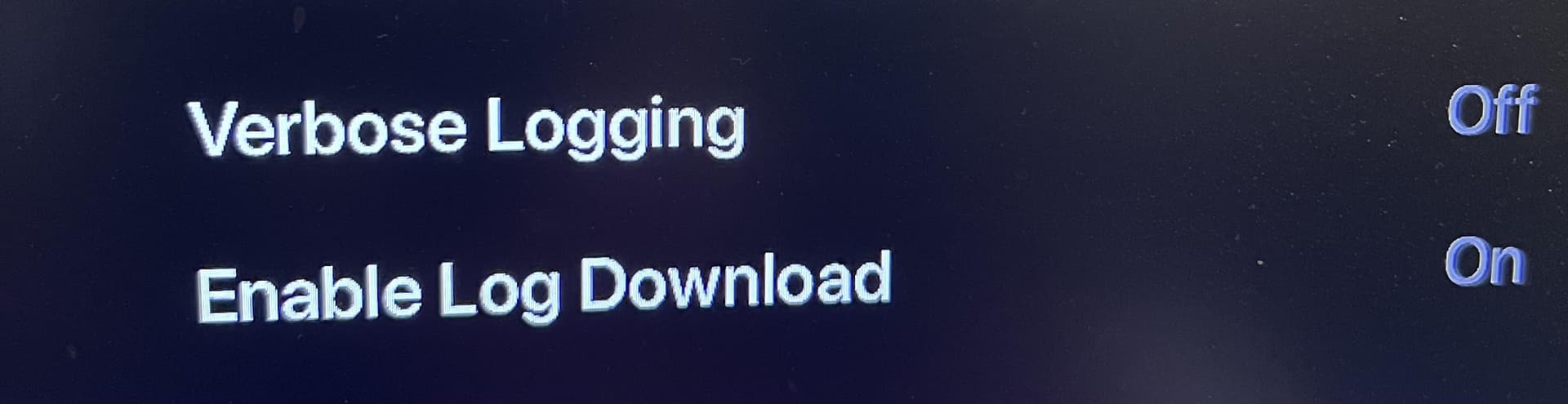
So with this setting enabled, then you can download the logs zip file using a browser. For example, with the Apple TV being on IP address 10.10.10.40, to get the logs from the app downloaded you would go to this url a browser
http://10.10.10.40:32500/logging
That would download a file named logging.zip
Include this zip with the server logs zip
Now as the server logs only covered one hour - you could increase the number of server log files eg to 10
eg in terminal, typing
defaults write com.plexapp.plexmediaserver LogNumFiles 10
. . .
I set this quite some time ago, but when I attempted to read the default just now before I wrote it, Terminal said it did not exist:
sh-3.2# defaults read com.plexapp.plexmediaserver LogNumFiles
2023-03-31 00:51:04.365 defaults[452:7340]
The domain/default pair of (com.plexapp.plexmediaserver, LogNumFiles) does not existsh-3.2# defaults write com.plexapp.plexmediaserver LogNumFiles 10
sh-3.2# defaults read com.plexapp.plexmediaserver LogNumFiles
10
.
Does PMS delete this default upon installing a new version?
.
.
I’ll have to wait for until my wife is not using the Apple TV. (She is currently using the Apple TV HDHomeRun app, because F’ing PMS crashed yet again.)
PMS for Mac 1.31.3.6868
I’m really pissed off. Trump finally gets indicted and f’ing PMS crashed 1 or 2 minutes before three OTA Live TV shows finished.
.
Is there any way for me to recover those temporary recording files?
.
BTW, it is pathetic that PMS does not automatically recover whatever portion of scheduled recordings exist in the event of a crash. It is trivial if the recording architecture is well designed.
I sent link to logs and database.
No it should not change this - if you had it set before and you are still using the same Mac user account on the computer. It is only absent on a new server setup. The absence of the field indicates it is at default
I understand. That’s why I asked. I set the default to something large a long time ago, but today it was gone.
.
Is there any way for me to recover the three temporary recording files from the PMS crash ~70 minutes ago?
.
.
What is the Plex for Apple TV log file retention default duration?
Is there anyway to change the Plex for Apple TV app log retention duration?
—OR—
Is there anyway to persistently enable remote downloading of the Plex for Apple TV app logs?
.
My wife has mobility issues to MS, so she is partially stuck on the sofa for extended periods, usually much of her waking hours. She uses Plex for Apple TV to watch OTA Live TV content: while it’s being recorded, or has been previously recorded, or isn’t scheduled to record (herein for which I use the term “Watching TV”). When she is Watching TV and Plex fails is some way, my wife will try a series of actions that may have helped her previously resume Watching TV:
- changing to a different channel, then back without exiting the Plex for Apple TV app;
- exiting the Plex for Apple TV app, launching then exiting a different Apple TV app, then re-launching the Plex for Apple TV app;
- exiting the Plex for Apple TV app, then Restarting the Apple TV, then re-launching the Plex for Apple TV app; or
- yell at me that “Plex is a PoS, you should have never canceled Comcast—fix it!”.
If her self-help attempts 1, 2 or 3 work initially, I (apparently) won’t learn of a Plex failure at all, or not until, potentially, several hours later after multiple Plex failures and self-help episodes have occurred. Then, if action #4 is necessary, I’ll only learn of the current Plex catastrophic failure, as she either doesn’t remember what happened or is too pissed-off about Plex to bother giving me details. (As I’ve previous written, my wife says that Plex fails every day, usually multiple times.)
So, until my wife goes to bed, I have no access to the Plex for Apple TV app settings from which I can enable the 20-minute-log-download access. If the Plex for Apple TV logs are only an hour deep, then I’ll rarely be able to recover anything of use.
PMS for Mac 1.31.3.6868
Plex for Mac 1.67.1.3665 (and earlier)
Mac Studio (2022) macOS 12.5.1
BTW, increasingly, Plex for Mac on my Mac Studio has not been able to play many OTA Live TV channels, nor recorded shows/movies.
I don’t have time to figure out what will play and what won’t play as it isn’t a big deal to me. I typically use Plex on my Mac for admin purposes, not for entertainment. Nevertheless, I’ve noticed that less and less watching seems possible after PMS 1.27 or 1.28.
.
I use a 55" 4K TV as the only display for my Mac Studio. Maybe the problem arises from the window size being large (~80% – 90% of full screen). When watching fails, there will be an error message such as:
Playback Error
An unknown error occurred (4294967280)
Error code: 4294967280
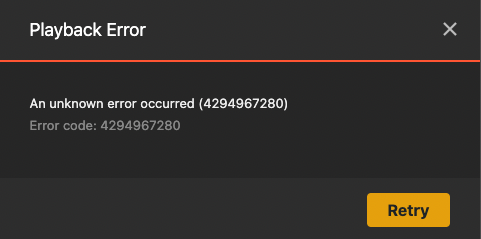
I quit Plex, then immediately launched Mac HDHomeRun, which had no problem playing the same channel at any window size.
.
(I directly sent a link to a ZIP archive containing PMS and Plex for Mac player logs.)
I have referred the app and server logs to the Plex for Desktop development team
I do have another report of this error from another user
Thanks for reporting this
If the server crashes, there would be .ts recordings files within the interim .grab folder for the library path. These would be purged when the server is restarted after the crash. So if you copy these out before restarting the server, then that would give you what was recorded up to time of the crash
This shows when the files were purged on the restart
Mar 31, 2023 00:40:46.586 [0x700007c31000] DEBUG - Grabber: Cleaning up orphaned grabs.
Mar 31, 2023 00:40:46.594 [0x700007c31000] DEBUG - Grabber: Deleting "/Volumes/12TBHD1/Plex/TV Shows/.grab/7042e1e601a7c33675303e3b04331ffc24f67f03-ed2f68ab98b34a7c0c745d6c87f6addcda41c59e".
Mar 31, 2023 00:40:46.623 [0x700007c31000] DEBUG - Grabber: Deleting "/Volumes/12TBHD1/Plex/TV Shows/.grab/8361dd5b1976e82754e0ef90a14aee0aa00a5c87-ed2f68ab98b34a7c0c745d6c87f6addcda41c59e".
Mar 31, 2023 00:40:46.635 [0x700007c31000] DEBUG - Grabber: Deleting "/Volumes/12TBHD1/Plex/TV Shows/.grab/8f8c4ed2f454570296230c1fe3e4c98c9a2129c0-ed2f68ab98b34a7c0c745d6c87f6addcda41c59e".
Mar 31, 2023 00:40:46.662 [0x700007c31000] DEBUG - Grabber: Cleaned up 3 decrepit directories in 0.0 sec.
Log files are switched every 1Mb and we keep a number of these log files.
Ensure you do not enable Plex for Apple TV Verbose logging
I suggest you try it and see what the oldest and newest timestamps are in the log files within the downloaded zip for your usage
It is only the ability to download the logs that is for 20 minutes. If you enable that option hours after the Plex for Apple TV was used last. it will download the logs and the logs should still include the period of time when the app was used previously.
As example I just enabled the option to download the logs on my Apple TV Plex app and I can see my logs from the 30th March.
