I am discussing this with the team. We would need to retain the EPG metadata that goes with the partial .grab files - as EPG metadata is separate from normal libraries metadata
Thank you.
The code to do this essentially already exists, right? Now, it’s just being done in the wrong order, . . . and then the partial results thrown away upon any severe disruption.
This is really the same problem as the classic server-client two-phase commit.
PMS now, one way or another, has to retain all the data ultimately required to format and write the .ts file and associated metadata. PMS already has some process(es) writing video stream valid chunks to disk periodically and retaining details of what’s been written.
All that’s likely missing is realizing what’s important to the DVR customer. (Hint: it’s not credits detection.)
The only thing that’s important is recording what the customer scheduled or spontaneously chose to record.
Just assume that at absolutely any moment, an uncontrollable disruption can occur: power failure, OTA signal loss, … , or, say, …. a software glitch. 
Forest Gump had it right—dung happens.
Always.
.
(BTW, it’s also a nearly complete lack of customer-focus that a contiguous OTA Live TV watching session can’t be entirely recorded spontaneously by a simple UI action at any time up through the broadcast end.)
.
Thank you for your personal time and efforts, and most especially for caring. I appreciate the work you and others do on my behalf.
May God continue to empower, protect and bless you, your associates and your families.
2 Apr 2023 ~9:35pm PDT [-0700] PMS Off-line (macOS Kernel Panic)
PMS for Mac 1.31.3.6868
Plex for Apple TV app 8.17
PMS Dedicated Host Mac
iMac (27-inch, Mid 2010): 20GB RAM, 1TB HDD (368GB free)
macOS 10.13.6
PMS Library on Host Mac
12TB WD My Book External HDD (3TB free) [USB 2.0 interface]
Using the Plex for Apple TV app, my wife was watching the OTA Live TV show “2023 CMT Music Awards” while it was being recorded as scheduled (8pm – 11pm PDT [-0700]).
At the same time, the OTA Live TV show “American Idol” was being recorded as scheduled (8pm – 10pm PDT [-0700]).

.
Abruptly, shortly before 9:35pm PDT [-0700], the Plex for Apple TV app display went black, and PMS went off-line. None of my wife’s usual Plex failure remedies worked..
.
Then, spontaneously, before I could restart the PMS host Mac, PMS came back on-line and my wife was able to resume real-time watching the OTA Live TV show “2023 CMT Music Awards” while was being recorded.
.
3 minutes later, at 9:38pm PDT [0700], I downloaded the:
- PMS logs;
- PMS database;
.
Unfortunately, the resulting recordings of both 2023 CMT Music Awards and American Idol only began at 9:35pm PDT [-0700], the first 95 minutes of both shows being unavailable, presumably purged by PMS.

After my wife went to bed and I could access the Apple TV, I then downloaded the:
- PMS logs (again);
- PMS database (again);
- Plex for Apple TV app logs; and
- PMS host Mac macOS>Library>Logs>DiagnosticReports.
.
(I have never attempted to dig into Mac diagnostic reports, and have only a modest general insight from a computer science graduate degree and non-Mac hardware & software engineering work). Crudely examining the PMS host Mac DiagnosticReports, it is apparent that the PMS host Mac had a kernel panic (for reason(s) I could not discern) at the same time as PMS went off-line. Also, recently, there have also been many GPU diagnostic reports for which, again, I was not able to discern the cause(s).
Clearly, there could be PMS host Mac hardware problems, but I am suspicious of PMS.
Between 20 Mar 2022 when I originally did a disk format and macOS 10.13 clean install to host PMS and 1 Apr 2023, the only changes made to the PMS host Mac were Plex and PMS updates.
Very early 2 April 2023 1:47am – 5:35am PDT [-0700] (ie, 16 hours before PMS went off-line and the kernel panic), I did all pending macOS updates.
.
I directly sent link to a ZIP archive containing all of the above referenced files.
sa2000, Thank you for your diligence and responsiveness.
May God continue to empower, protect and bless you, your associates and families.
Waiting for a zip I can download. Some issue with the file being shared
Thanks for re-sharing the diagnostics for the 2nd April 21:33 issue
This was simply a crash at 21:33 on 2nd April on the server and that of course impacted the DVR Live TV streaming on the Plex for Apple TV app and also the recordings that were in progress
This was not a Plex Media Server crash but a Mac OS crash
At the time, the Plex for Apple TV app was streaming DVR Live TV from the server - last log lines in the server logs
Apr 02, 2023 21:32:22.916 [0x70000a3b9000] DEBUG - Request: [10.10.10.40:50870 (Allowed Network (Subnet))] GET /livetv/sessions/d7c65594-87fc-4c13-bcde-25ab0b1cba3b/1B36F7F9-BA20-45B1-83C4-0E60866DF40B/07906.ts (16 live) #9d352 TLS Signed-in (range: bytes=0-)
Apr 02, 2023 21:32:22.916 [0x70000a3b9000] DEBUG - Content-Length of /Users/swappletf/Library/Caches/PlexMediaServer/Transcode/Sessions/plex-transcode-d7c65594-87fc-4c13-bcde-25ab0b1cba3b/media-07906.ts is 1720764 (of total: 1720764).
Apr 02, 2023 21:32:22.923 [0x70000914d000] DEBUG - Completed: [10.10.10.40:50869] 206 GET /livetv/sessions/d7c65594-87fc-4c13-bcde-25ab0b1cba3b/1B36F7F9-BA20-45B1-83C4-0E60866DF40B/07905.ts (16 live) #9d33a TLS 1026ms 1518852 bytes (pipelined: 39) (range: bytes=0-)
Apr 02, 2023 21:32:22.923 [0x70000914d000] DEBUG - Removed transcode data consumer, active count 2 => 1
Apr 02, 2023 21:32:23.139 [0x70000a5c5000] DEBUG - [Req#9d360/Transcode/30920d93-06b9-4dec-b3d3-2a989ab2010f/169e51d2-dff2-4257-930b-3c0a7b6f9e94] Transcoder segment range: 0 - 5541 (5541)
Apr 02, 2023 21:32:23.139 [0x70000a230000] DEBUG - [Req#9d369/Transcode/30920d93-06b9-4dec-b3d3-2a989ab2010f/169e51d2-dff2-4257-930b-3c0a7b6f9e94] Transcoder segment range: 0 - 5542 (5541)
and the MacOS crash was a Kernel Panic at 21:33
and the Plex for Apple TV LiveTV streaming failure coincides with the time of the Kernel Panic on the Mac
2023/04/02 21:33:12.333 (591 MB) (168599) 🔧 PMKServer+Requests.m:221 | Attempting recovery from error Error Domain=NSURLErrorDomain Code=-1001 "The request timed out." UserInfo={_kCFStreamErrorCodeKey=-2102, NSUnderlyingError=0x280949d70 {Error Domain=kCFErrorDomainCFNetwork Code=-1001 "(null)" UserInfo={_kCFStreamErrorCodeKey=-2102, _kCFStreamErrorDomainKey=4}}, _NSURLErrorFailingURLSessionTaskErrorKey=LocalDataTask <F8C31F69-2174-44F1-90A4-72C73272A0EC>.<6114>, _NSURLErrorRelatedURLSessionTaskErrorKey=(
    "LocalDataTask <F8C31F69-2174-44F1-90A4-72C73272A0EC>.<6114>"
), NSLocalizedDescription=The request timed out.,
The Kernel Panic was
Anonymous UUID:       E2F90C1F-FA76-EF8B-9D57-B66301E36579

Sun Apr  2 21:33:48 2023

*** Panic Report ***
panic(cpu 4 caller 0xffffff801ed8687f): Kernel trap at 0xffffff801f102c83, type 14=page fault, registers:
CR0: 0x0000000080010033, CR2: 0x0000000000000000, CR3: 0x00000004e18e1000, CR4: 0x00000000000026e0
RAX: 0x0000000000000000, RBX: 0x0000000000000007, RCX: 0x0000000000000020, RDX: 0xffffff8054ae54d0
RSP: 0xffffff82754ebed8, RBP: 0xffffff82754ebf40, RSI: 0x0000000000000000, RDI: 0xffffff8054ae5580
R8:  0xffffff8054ae55f0, R9:  0xffffff8050a5e490, R10: 0x0000000000000010, R11: 0x0000000000000001
R12: 0x0000000000000220, R13: 0xffffff80556c2fb0, R14: 0xffffff8054ae54d0, R15: 0xffffff804fa577c0
RFL: 0x0000000000010246, RIP: 0xffffff801f102c83, CS:  0x0000000000000008, SS:  0x0000000000000010
Fault CR2: 0x0000000000000000, Error code: 0x0000000000000000, Fault CPU: 0x4, PL: 1, VF: 0

Backtrace (CPU 4), Frame : Return Address
0xffffff82754eb9a0 : 0xffffff801ec6ae76
0xffffff82754eb9f0 : 0xffffff801ed94484
0xffffff82754eba30 : 0xffffff801ed86654
0xffffff82754ebaa0 : 0xffffff801ec1ce60
0xffffff82754ebac0 : 0xffffff801ec6a8ec
0xffffff82754ebbf0 : 0xffffff801ec6a6ac
0xffffff82754ebc50 : 0xffffff801ed8687f
0xffffff82754ebdc0 : 0xffffff801ec1ce60
0xffffff82754ebde0 : 0xffffff801f102c83
0xffffff82754ebf40 : 0xffffff801f202818
0xffffff82754ebfa0 : 0xffffff801ec1d646

BSD process name corresponding to current thread: cloudd

Mac OS version:
17G14042
You would need to look into the kernel panics - perhaps contact Apple Support / Do web searches
This shows the Kernel Panics showing in the DiagnosticReports directory you shared with me - i have extracted the time, panic details and last modules to be loaded/unloaded in case that is relevant
Kernel Panics
Mon Mar 6 2023 21:38:10
panic(cpu 0 caller 0xffffff800796a733): mbuf 0xffffff8256810900 redzone violation with value 0x9cdc8897 (instead of 0x9cdc88b4, using cookie 0xca5d81b4)

last loaded kext at 272881002274: com.apple.filesystems.msdosfs	1.10 (addr 0xffffff7f8a9b6000, size 69632)
last unloaded kext at 335338541870: com.apple.filesystems.msdosfs	1.10 (addr 0xffffff7f8a9b6000, size 61440)
Fri Mar 10 2023 04:10:42
Panic(CPU 1, time 103172578381611): NMIPI for spinlock acquisition timeout, spinlock: 0xffffff800c2bfc70, spinlock owner: 0xffffff8035963030, current_thread: 0xffffff8035963030, spinlock_owneRAX: 0xbce28b1c52cc470b, RBX: 0x0000000000000002, RCX: 0x00000000577dd00d, RDX: 0x0000000000005dd5

last loaded kext at 277024183967: com.apple.filesystems.msdosfs	1.10 (addr 0xffffff7f8efb6000, size 69632)
last unloaded kext at 338164250589: com.apple.filesystems.msdosfs	1.10 (addr 0xffffff7f8efb6000, size 61
Tue Mar 28 2023 01:57:35
panic(cpu 6 caller 0xffffff801138776f): Kernel trap at 0x0000000000000000, type 14=page fault,

last loaded kext at 278336632261: com.apple.filesystems.msdosfs	1.10 (addr 0xffffff7f947b6000, size 69632)
last unloaded kext at 339850837444: com.apple.filesystems.msdosfs	1.10 (addr 0xffffff7f947b6000, size 61440)
Sun Apr 2 2023 21:33:48
panic(cpu 4 caller 0xffffff801ed8687f): Kernel trap at 0xffffff801f102c83, type 14=page fault

last loaded kext at 323196180443: com.apple.filesystems.msdosfs	1.10 (addr 0xffffff7fa14e8000, size 69632)
last unloaded kext at 393522931155: com.apple.filesystems.msdosfs	1.10 (addr 0xffffff7fa14e8000, size 61440)
The only diagnostic reports directly relating to Plex Media Server were advisory ones logged when at some point Plex Media Server was taking more than 50% of CPU. These were not crashes and were just for info
{I wasn’t sure whether to post this associated with the same thread or EPG given this seems to be a very timely problem.}
PMS for Mac 1.32.0.6865
There seems to be either a broad EPG failure or an abrupt PMS bug.
Suddenly, regularly scheduled overnight news show regularly scheduled to record were not in the DVR Schedule and for the first time did not record today, Friday 7 April 2023, nor do they appear in the DVR Schedule to record in the future:
- ABC World News Now
- American This Morning
Notice that both are listed in the OTA Live TV > Guide as NEW & have Scheduled to Record set . . .

. . . both have been in the weekday DVR Schedules for the last three weeks:
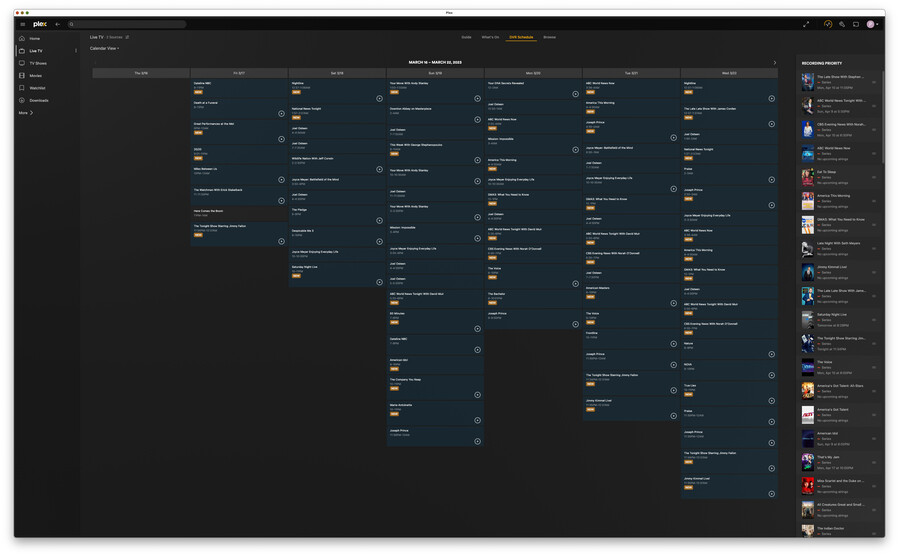
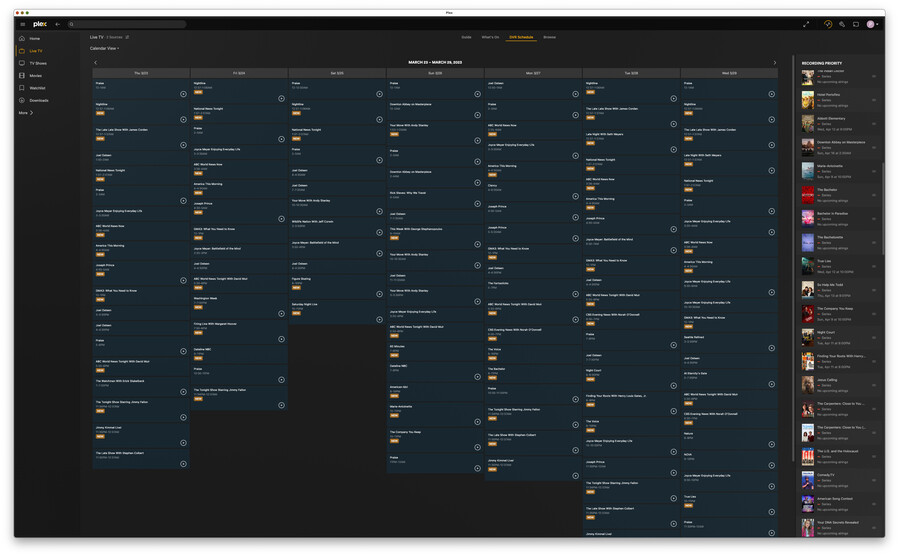
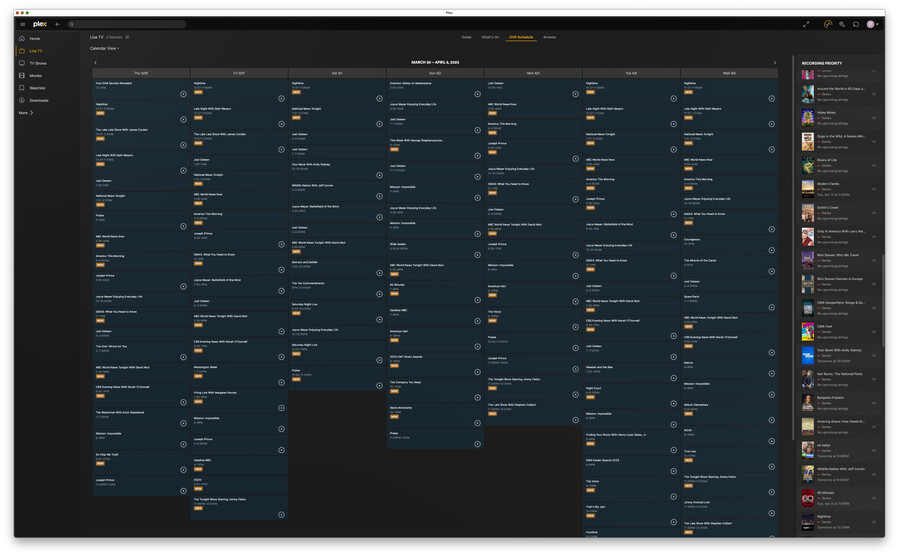
.
. . . but, notice that neither appear in the OTA Live TV > DVR Schedule for the next two weeks:

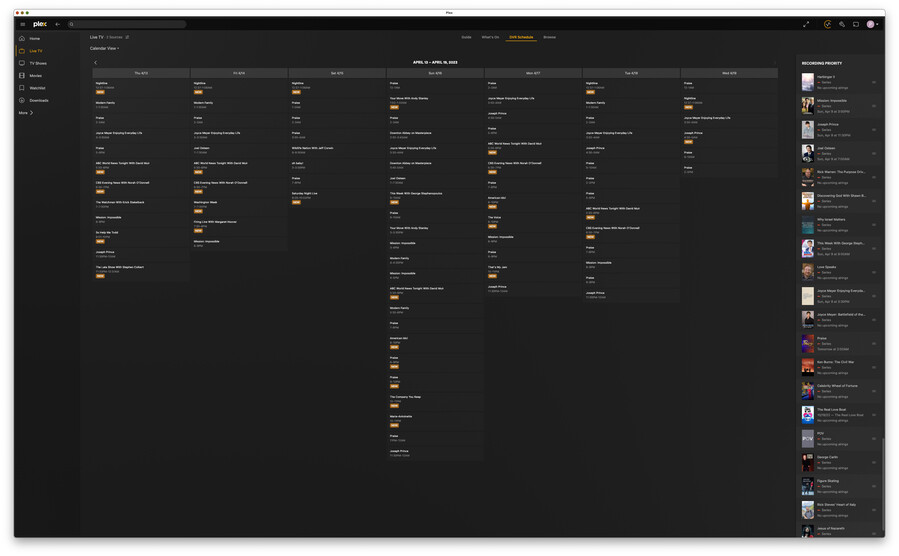
.
.
Further, my DVR schedule for the next week abruptly changed, missing several the usual entries, missing at least three other regularly scheduled shows, perhaps others:
- ABC World News Now (mentioned above) — [ABC]
- American This Morning (mentioned above) — [ABC]
- National News Tonight — [CBS]
- GMA3 — [ABC]
- Saturday Night Live [the “vintage” showings] — [NBC]
I tried canceling the National News Tonight recording, then re-creating it as it was with New Airings only. Despite there being NEW showings listed in the Guide, one even within a couple hours from which I initiated the schedule, no recordings are listed in the DVR Schedule.
I then tried changing to Repeat and New Airings. Similarly, this failed to result any DVR Schedule entries.
.
I also notice that at least two other repeating news shows I scheduled for my wife have not been recorded for a while, perhaps among others:
- Top Story with Tony Llamas — [NBC]
- BBC News — [PBS]
.
(I directly sent a link to a (rev A) ZIP archive with PMS logs, database. and many screenshots showing record options, schedules, Guide entries.)
PMS for Mac 1.32.0.6918
PMS for Mac 1.32.0.6918 hung the host Mac upon initial launch, apparently causing PMS host Mac WindowServer problems and multiple GPU restarts.
(BTW, the macOS account under which PMS has always since initial install March 2022 does not have admin privileges. This did not seem to cause any problem up through PMS 1.27. Does PMS require running under an admin account?)
BTW, typically when I’ve written that PMS has gone off-line, crashed, or hung the host Mac, or crashed the host Mac (hereinafter, I’ll use the inclusive term “PMS Glitch”), Apple Remote Desktop server process(es) have also died, so that I can not restart the host Mac using ARD. I am typically able to SSH to a different account with admin privileges, though.
Unfortunately, with only one exception that I recall after a PMS Glitch, both kill -9 and reboot have also always failed, and I have had to do a Force Power-Down, sometimes more than once.
In the case today of PMS for Mac 1.32.0.6918, both PMS for Mac 1.32.0.6918 and its host Mac appear to be stable after the necessary Force Power-Down, then Startup.
.
.
(I have directly sent a link to a ZIP archive containing PMS logs, database, and PMS host Mac DiagnosticReports.)
Thank you for your personal time and efforts—I very much appreciate you taking the time to read and route this message as needed. 
May God continue to protect and bless you, your associates and your families.
I certainly understood before I sent you the PMS host Mac DiagnosticReports that PMS might not be the cause of the kernel panic or the GPU restarts.
However, I can’t tell you how many times an engineer reporting to me voiced a lament literally such as,
- “I can’t figure out what’s wrong—I only changed one thing.”
.
That “one thing” has only been successive versions of PMS 1.28 – 1.32.
.
The kernel panics and or the GPU restarts might have been caused by an intermittent hardware failure or macOS bug, but the only non-Apple software running on the PMS host Mac is PMS, and nothing else changed except PMS for more than a year.
No one except me has any access to the PMS host Mac, neither physically, nor virtually.
Essentially, the only activity I have had on the PMS host Mac has been, via ARD:
- manually Quitting PMS from its Mac Menu Bar menu;
- then replacing the PMS application with an updated PMS version;
- then manually launching PMS;
- then clicking upon OK to Open the application downloaded from the Internet;
- then testing (using Plex for Mac on a different Mac) that the PMS is functional; and
- then Restarting the host Mac to re-verify PMS function (should my on-line UPS fail).
I do not run Safari, nor any other application on the PMS host Mac except PMS, other than three or four occasions of launching, then quitting a Plex for Mac (player) application new version, and a couple Terminal commands (eg, find, ls, cd and cp) via SSH. Spotlight is disabled. Checking for macOS updates and auto updating are disabled. User notifications are disabled. The screensaver is disabled.
Until 2 April 2023 shortly after midnight, for more than a year, I did not update any Apple software since reformatting the startup volume and macOS clean install immediately before the original PMS 20 March 2022 install.
(I did have iTunes running without any incident since the original PMS install 20 March 2022, but as no one has accessed it after I demonstrated to my wife how to play her music from the Apple TV, I removed it from the PMS host Mac macOS host account Login Items.)
.
.
So, from a high level perspective:
- PMS was very stable 20 March – 22 September 2022;
- The PMS-dedicated host Mac was near idle most of the time;
- I installed PMS 1.29; then
- PMS became dung, no longer a Live TV DVR product.
.
PMS has not been a stable, nor reliable product for more than six (6) months—I’ve had to install or re-install twenty-five (25!) PMS versions!
PMS has only gotten worse—much worse.
Abruptly yesterday, PMS will no longer schedule recordings of several major network news shows my wife watches every weekday.
I had a similar issue of a Intel iMac Crashing/ Kernel panic. With the introduction of Intro’s and credits, I believed were the culprits. My resolve was to Increase the Schedule Task period to 4 Hours from the default two and manually scan all libraries after title entries with the following Library settings. I have not had a crash in over a month and have been running the latest PMS Beta.
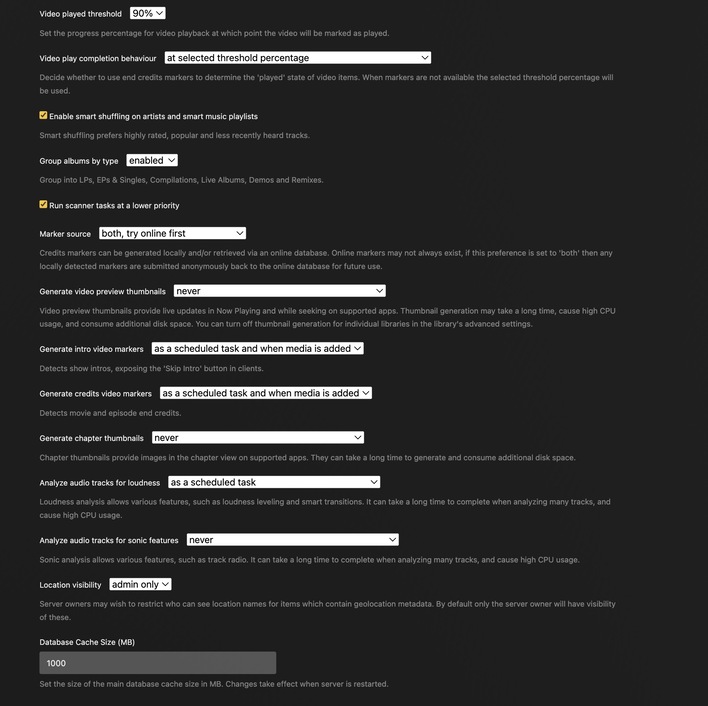
.
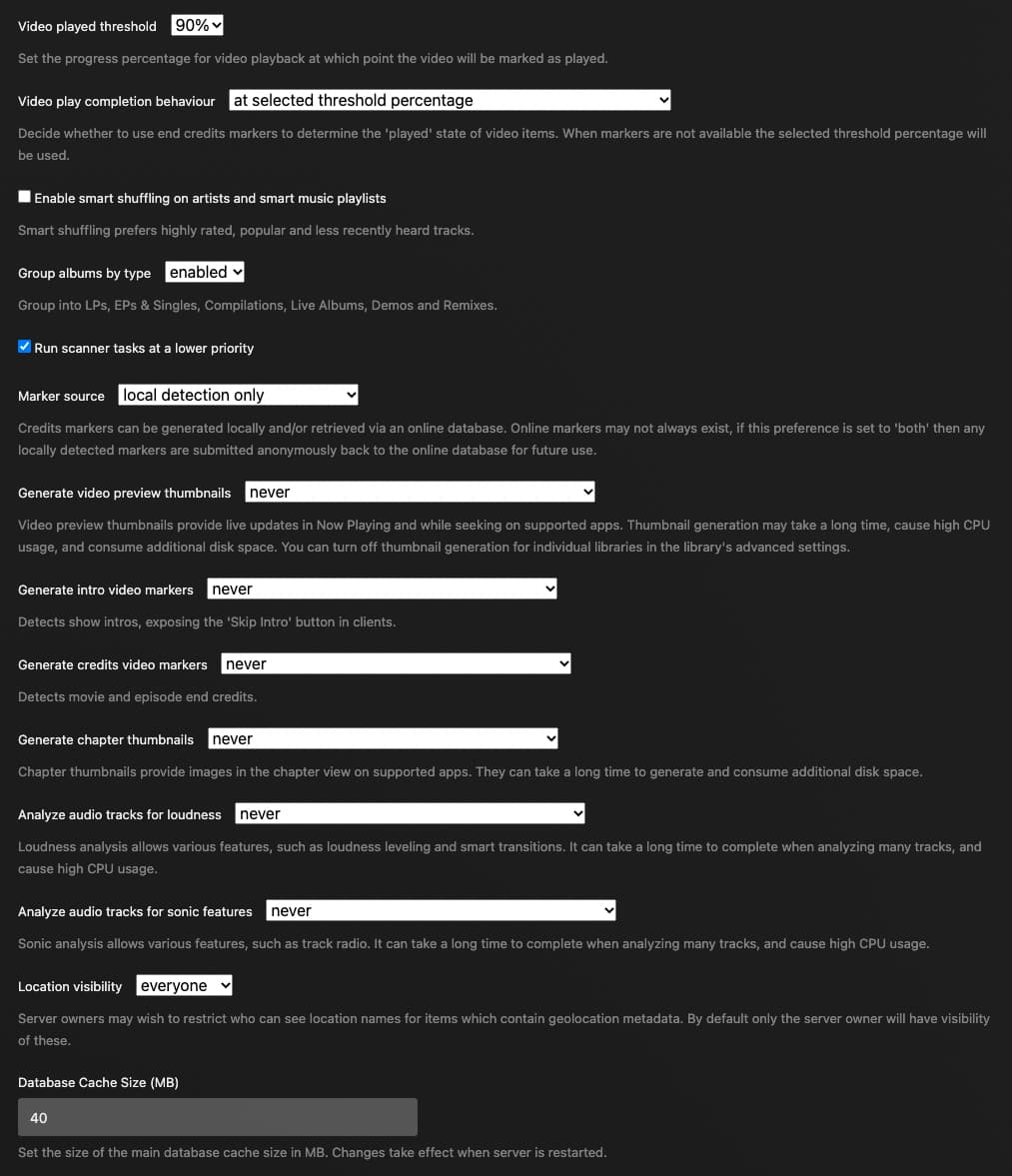
Recently, perhaps a week ago, I changed all the video and audio track marker settings to [never]:
.
I didn’t think to change the Video play completion behavior setting at that time. Just now, Saturday 8 Apr 2023 ~9:51am PDT [-0700], I changed from [earliest between threshold percent and first credits marker] to [at selected threshold percentage]:

SE56, Thank you for sharing your experience and evoking such thinking.
As trmembrino posted above, I tried a variety of canceling and re-creating several problematic scheduled recordings with every record option permutation, all without success.
However, I suspect the problem is more than any EPG change, possibly not arising from an EPG change at all.
These abrupt scheduling failures impact record a few, but not all, schedules of at least four (4) different major networks: ABC, NBC, CBS and PBS.
What is the likelihood that four networks data feeding EPG would abruptly change the same day?
.
Further, I found another troubling PMS behavior while trying to work around the PMS bug or EPG change.
Individual recording options seem to be preserved despite having canceled the associated schedule.
This suggests that PMS may not completely delete whatever database records are associated with a canceled recording schedule and that PMS may be, essentially, preserving any recording schedule corruptions that may occur.
I just wanted to say that I am experiencing the exact same thing. I have some regular recurring news recordings (FOX news at 10pm ET, CBS news at 11pm ET) that I have been recording daily for years that stopped recording starting on april 7th. AS previously stated, the DVR schedule tab just shows recordings for april 6th and prior. I originally thought it was some database problem where the DVR schedule section was simply stuck, but SO glad I found this thread and I’m NOT ALONE!!!
I tried deleting the DVR and recreating it. I tried deleting all the series that I had and re-creating (even with ALL airings and not just NEW airings). I tried updating the DVR dozens of times. does anyone know what is going on here under the covers? Is it a guide issue or a PMS bug? Doesn’t seem like a guide issue, as upcoming instances of the recording are showing up in the guide as to be recorded, but apparently the DVR series entry do not recognize them as an upcoming airing.
Running PMS Version 1.31.3.6868 on MAC OSX Monterey.
Thanks for the diagnostics. which I looked at today. Appears to be a Plex Media Server issue arising possibly only for date based episodes eg as in News and Sports and only if there is already some older recordings in the library
I have referred this to the server development team - reports from users in this thread starting with your post suggest it is an issue in 1.31.3.6868 and 1.32.0.x Live TV EPG - The update you’ve been waiting for - #1829 by pl4151
Looking at the your logs for the 2nd April 2023 Kernel Panic - at 21:33 - there was no credit detection or intro detection running. The only activities were DVR Recordings and Live TV streaming with transcoder processes running for them.
The last scanner job finished half an hour earlier
I was having this same issue, all with local channels and got it to start working again.
Here’s a list of everything I tried. I assume you could probably just delete the library and re-add it and it would work again. I would still nuke the folder just in case.
- Refreshed Guide - nope
- Delete and re-add scheduled item - nope
- Delete DVR and re-add DVR pulling new guide data again - nope
- Nuked recordings folder
- Cleaned Bundles
- Optimized Database
- Tried to add scheduled recording again - nope
- Tried with a temp library pointing to a temp folder - WORKED
- Deleted original library/Optimized Database
- Cleaned Bundles again
- Re-added library, named the same, pointing to original nuked location - WORKED
I was in zip 54923 and it was with a bunch of “Action 2 News” and “Local 5 News” shows. I did notice that the name of “Action 2 News at 5:30” was renamed in the guide to “ABC World News Tonight With David Muir”
Follow up to my earlier response. I now suspect this is the issue that was in our EPG back end system that we fixed this week on Wednesday - see Live TV EPG - The update you’ve been waiting for - #1856 by sa2000
.
For the last ~38 day since my above reply, I’ve tried restarting my PMS host Mac (iMac (27", Mid-2010) several times daily whenever the recording schedule permitted. I had no apparent crashes during that time.
Nevertheless, hardware can malfunction with age, so, to be cautious, in parallel, I did a macOS 10.13.6 clean install (including erase and reformatting startup drive) on a newer target dedicated PMS host Mac:
iMac (27", Late 2012)
- 3.4GHz Quad-Core i7
- 750GB SSD
- 16GB RAM
- USB 3.0
- NVIDIA GeForce GTX 680MX 2048 MB GPU
After installing PMS for Mac 1.32.1.6999, Sunday (14 May 2023), I shutdown my original PMS host Mac (which had also been running PMS 1.32.1.6999), and moved my PMS libraries 12TB drive to the new host, connecting via USB 3.0 (vs USB 2.0 on original host Mac).
Two significant problems occurred:
- PMS for Mac 1.32.1.6999 (partially) hung the host when I tried to restart;
- 110 of the 210 TV Shows’ posters are missing.
.
Problem #1.
Upon initial installation, PMS and macOS both functioned properly as I reviewed PMS settings and manually re-established those OTA Live TV recording schedules as was possible with the current EPG 7-day window.
After I finished such, I attempted restarting via ARD without success, and then a normal macOS Restart from the Mac Menu Bar—nada. I tried to shutdown—zilch. I tried quitting PMS, then restart and or shutdown—no apparent macOS response. Some macOS functions still worked, but clearly a few service did get halted.
I finally had to do a Force-Power-Down.
After startup, PMS appeared fine, and I was able to successfully restart from both ARD and the macOS Mac Menu Bar repeatedly.
(Unfortunately, I did not think to modify the log file retention quantity and did not have the time to submit this report until now, so no logs—sorry. There are no .dmp files, nor diagnostic reports.)
.
Problem #2.
Most (110 of 210) of my TV Shows have no display poster. Nothing I’ve tried resulted in any change whatsoever for existing TV shows. Plex.tv articles, pitiful as they are, were apparently wrong. No amount of diddling with scanning, refreshing metadata, nor analysis resulted in any restored posters.
Ironically, all the DVR Schedule > Recording Priority have (smaller) posters.
The Movie library posters were all fine.
The only action I tried that resulted a poster restoration was to entirely delete a TV show’s macOS folders and files. Then, upon the first recording of that show, a poster was displayed.
Did you copy all the media content to the new system and then follow the steps detailed in this support article Move an Install to Another System | Plex Support
For recordings in the libraries, it is important that the EPG metadata is preserved and the indication that the source of the content was the DVR - this data is held in the database and the related metadata and image information are held in the Plex Media Server data
If you did not follow these steps in that support article, and you have not wiped out the old server data, I suggest you repeat the process and start again - losing what happened between 14th May and now
PMS for Mac 1.32.3.7162
Plex for Apple TV 8.20
SiliconDust HDHomeRun HDFX-4K firmware version 20230505
PMS again crashed at 6:29:42.215pm PDT [-0700] when my wife attempted to watch a different OTA Live TV broadcast channel (ie, “change channels”) at a moment when there were no available tuners.
This appears to be a PMS bug of many versions, which I’ve previously reported.
See separate topic posting:
Bug: PMS 1.32.3.7162 Crashed When No New Tuner Available; NOT a New Bug
(I sent staff a link to a ZIP archive containing the .plist, database, logs, .dmp file from within Crash Reports.)
Thank you for the comprehensive set of diagnostics and details
I have analyzed the dmp file and have passed the diagnostics to the development team
I suspect it is a timing issue - as I was unable to reproduce with watching live tv channel while recording and then switching to another channel when no tuners available
