I download the Mac App and it will not open. Any idea why?
Mind sharing some more details?
e.g. …
- what version of macOS do you have installed?
- are you running the app from your applications folder ore some other place?
- does the app crash immediately on execution or do you get some app window but no content (if so… how far do you get)?
- any error messages?
- …
Hi Tom80H
It’s a Mac running Catalina 10.15.4
I download the app from Plex, run the package and it says it would not install. Just tried now and it worked.
Thanks for your offer of help
Steve
I have the same problem. but I haven’t solved it! I get it as far as my applications folder but it won’t open. I am running High Sierra on my Mac. I click on the app and nothing happens…no chevron in my tray.
I would definitely try Downloading and installing it again and swap out app in Applications Folder.
Which Server version are you running?
I have tried the newest version several times. I have also tried downloading an older version. Same result. I have tried creating a new account and downloading both new and old. This used to work great on my newer computer which crashed and I lost the hard drive. Now I am using an older Mac with a new faster hard drive.
Have also tried signing in online and using the Web version. Just keeps saying my Server isn’t available.
What exact app did you install?
If this is the Plex Media Server app… it’s not supposed to open any windows. Opening the app will only add a Plex icon to the menu bar.
If this is the Plex Media Player or Plex for Mac you should be able to open some window. If nothing is showing we’ll need to dig a little deeper.
downloaded the Plex Media Server for Mac. It downloads and I can get it into my applications folder but when I try to open the application, nothing happens. I get a flicker in my dock at the bottom but no icon and I get no chevron at the top, which was how I knew it was running before. I even tried downloading an older version and nada.
Starting the Plex Media Server will not open a window… you should however see a Plex icon in your menu bar from where you can open the web app. Alternatively you can open http://127.0.0.1:32400/web in Safari on that Mac (after starting the Plex Media Server).
I know that it doesn’t open a window. I know it should show the Plex chevron Icon in bar at the top. It doesn’t. I have used Plex before and when I did, I got the chevron icon at the top and a Plex Icon in my dock. I suspect the current version of Plex is not compatible with my OS which is operating (High Sierra.) My computer is older and I can’t put any OS after High Sierra on it…not that computer literate…lol. (Your link doesn’t work, btw. 
The current version of Plex Media Server requires a version of macOS 10.9 (Mavericks). So if you’re on High Sierra (macOS 10.13) that should still work fine.
Can you check out the server logs to see if there’s any references of why your Plex Media Server isn’t starting properly? As your Plex Media Server isn’t running, you’ll need to look the logs up manually.
The relevant file should be ~/Library/Logs/Plex Media Server/Plex Media Server.log
Okay that just went beyond my technical ability!
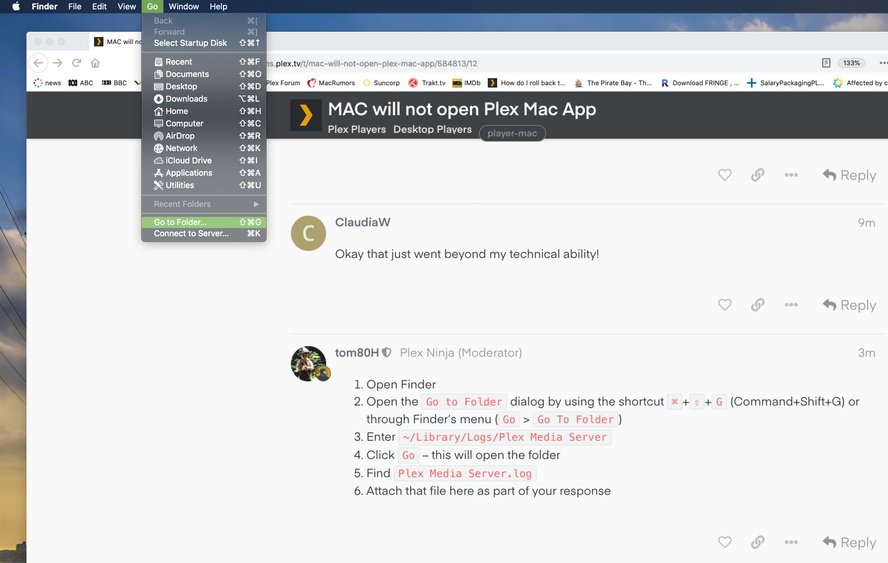
- Open Finder
- Open the
Go to Folderdialog by using the shortcut⌘+⇧+G(Command+Shift+G) or through Finder’s menu (Go>Go To Folder) - Enter
~/Library/Logs/Plex Media Server - Click
Go– this will open the folder - Find
Plex Media Server.log - Attach that file here as part of your response
Jul 18, 2020 16:36:47.262 [0x70000e6f2000] INFO - Plex Media Server v1.19.4.2935-79e214ead - Apple Mac x86_64 - build: darwin-x86_64 macos - GMT -07:00
Jul 18, 2020 16:36:47.263 [0x70000e6f2000] INFO - MacOSX version: 10.13.6, language: en-CA
Jul 18, 2020 16:36:47.263 [0x70000e6f2000] INFO - Processor Intel(R) Core(TM) i3 CPU         540  @ 3.07GHz
Jul 18, 2020 16:36:47.263 [0x70000e6f2000] INFO - /Applications/Plex Media Server 3.app/Contents/MacOS/Plex Media Server
Jul 18, 2020 16:36:47.513 [0x70000e87b000] DEBUG - BPQ: [Idle] -> [Starting]
Jul 18, 2020 16:36:47.522 [0x70000e87b000] DEBUG - Opening 20 database sessions to library (com.plexapp.plugins.library), SQLite 3.26.0, threadsafe=1
Jul 18, 2020 16:36:47.545 [0x70000e87b000] INFO - SQLITE3:0x101, 283, recovered 909 frames from WAL file /Users/claudiawood/Library/Application Support/Plex Media Server/Plug-in Support/Databases/com.plexapp.plugins.library.db-wal
Jul 18, 2020 16:36:47.563 [0x70000e87b000] ERROR - SQLITE3:0x101, 11, database corruption at line 65066 of [bf8c1b2b7a]
Jul 18, 2020 16:36:47.563 [0x70000e87b000] ERROR - SQLITE3:0x101, 11, statement aborts at 8: [] database disk image is malformed
Jul 18, 2020 16:36:47.563 [0x70000e87b000] ERROR - SQLITE3:0x101, 11, database disk image is malformed in "PRAGMA cache_size=2000"
Jul 18, 2020 16:36:47.567 [0x70000e87b000] ERROR - Database corruption: sqlite3_statement_backend::prepare: database disk image is malformed for SQL: PRAGMA cache_size=2000
Jul 18, 2020 16:36:47.567 [0x70000e87b000] ERROR - Error: Unable to set up server: sqlite3_statement_backend::prepare: database disk image is malformed for SQL: PRAGMA cache_size=2000 (N4soci10soci_errorE)
Mod-Edit: added code tags to make the log snipped easier to read
Hmmm… I’m worried things won’t get easier for you.
If you’re willing to travel deeper into the technology rabbit hole you could take a look at the support article on how to repair a corrupted database.
If you only recently started using Plex you might also try to delete the install and start over. That’s basically deleting 3 folders you can find within the Library folder you just “unlocked”:
~/Library/Application Support/Plex Media Server/
~/Library/Caches/PlexMediaServer/
~/Library/Logs/Plex Media Server/
and deleting the server preferences
~/Library/Preferences/com.plexapp.plexmediaserver.plist
When you start the server after deleting those folders/files, Plex should create a new database and you can re-create your libraries.
That being said… if you already have spend some effort in creating your libraries I recommend spending some effort and attempt to fix the database corruption (requires execution of some commands in the Terminal app).
1 Like
Totally agree with Tom, this might be one step too far into the MacOS abyss for someone that is not practiced in terminal. If there has not been an effort of manual entry metadata for Local assets or music, I would suggest nuking the instillation by using the following instructions exactly. Recent versions of Plex media server have improved to a point that it’s pretty well clean sailing. The only caveats are Naming and Agent ranking. If you spend the time with correcting any variances, life will be wonderful.
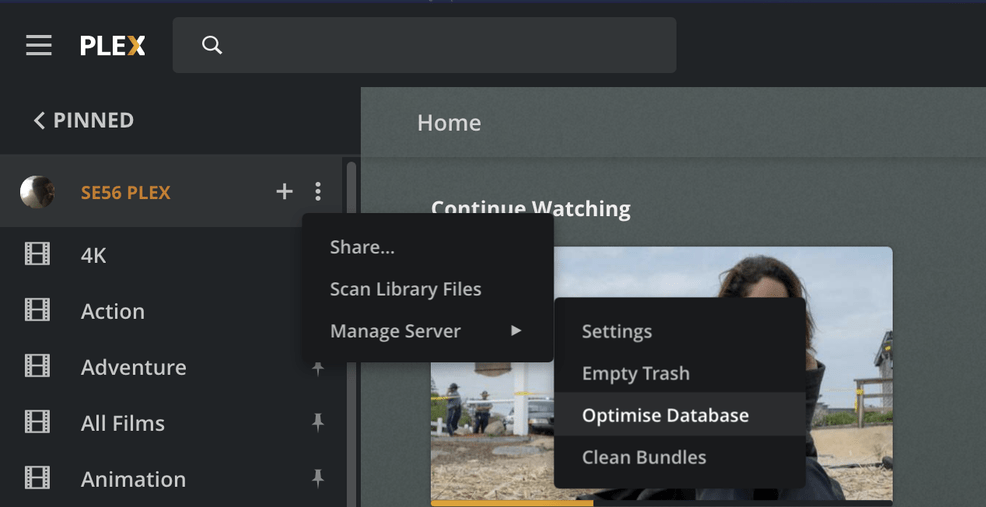
It may also help to exercise regularly the following. ( Optimise database and clean bundles after any medium to large entries or removals of Library titles) This should assist with limiting a corrupt database in the future.
https://support.plex.tv/articles/201941078-uninstall-plex-media-server/
https://support.plex.tv/articles/naming-and-organizing-your-tv-show-files/
https://support.plex.tv/articles/naming-and-organizing-your-movie-media-files/
Agents:
Demote ranking of a enabled Local media assets agent, like illustrated in screenshots below.

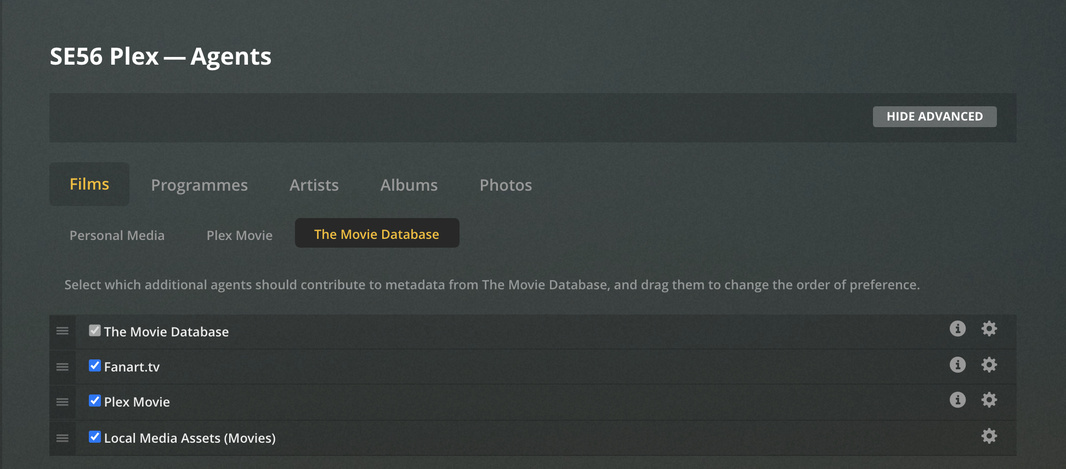
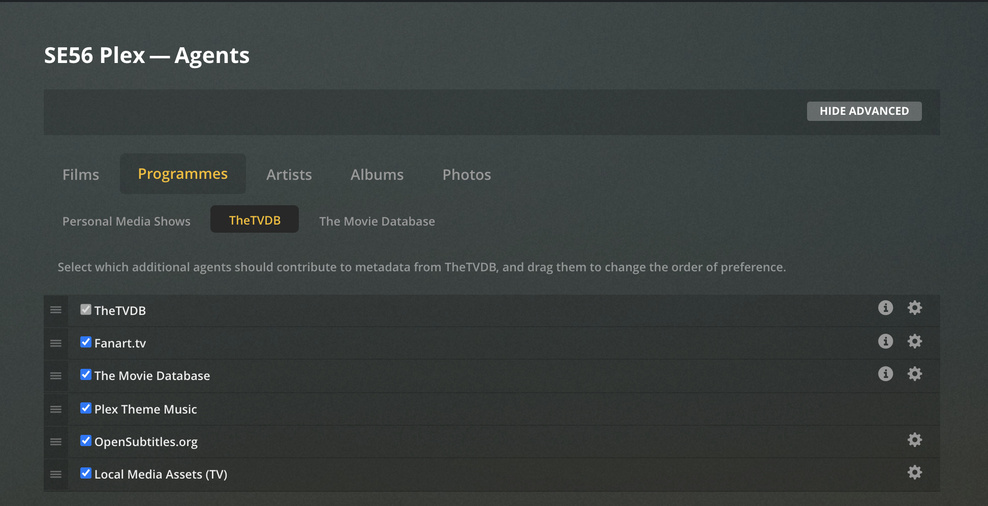

If all of this is exercised, your new instillation should be solid with very few metadata mismatches.
Haha, my eyes are glazed over! This is likely way beyond my Technical capabilities. I will try to follow the second set of directions and would be happy to uninstall this completely! Wish me luck!
PS rebuilding the library is no big deal. I haven’t got more than half a dozen things in it right now as I am basically rebuilding the content of this computer anyway.
