Server Version#: 1.42.2.10156
Player Version#: All current iPadOS, iPhoneOS, Web
<If providing server logs please do NOT turn on verbose logging, only debug logging should be enabled>
This all started after upgrading my MacMini M2 to MacOS26. I was no longer able to watch LiveTV from any device other than the Plex server (iPad, Web). This happened on wifi, cellular, and other non-local wifi networks. The error is CoreMediaErrorDomain error -12971).
After a boat ton of Googling, a recommendation was to delete the tuner (HDHomeRun) then re-add it. Easy, right??? Not for me.
After deleting the tuner, I killed the Plex server, then clicked to add a tuner. It finds my HDHomeRun, then I enter my ZIP, then select the EPG location (Verizon Fios Queens 785 channels). When I click Continue – error: There was a problem saving channel mappings.
Any thoughts on how to fix this??
I tried upgrading to the latest beta version, but that didn’t help….
I’m going into the hospital in 10 days for surgery - will be there for up to a week. My plan was to use Plex on my iPad to watch live TV from home. Not looking good with this problem though.
Here’s an update – if I choose a different EPG (Optimum rather than Verizon Fios), it goes through. Still unable to watch live TV on any device other than the server though.
When it imports the channel list it seems to hit a memory limit somewhere after 400 channels, you would need to deselect any unnecessary channels to be successful.
Not sure what you were doing here but not a good thing. You may have to go back to the last backup.
ERROR - SQLITE3:0x123655c50, 28, file renamed while open: /Users/jeffreylenkowski/Library/Application Support/Plex Media Server/Plug-in Support/Databases/com.plexapp.plugins.library.db
I was having a similar problem when streaming to AppleTV on my local network and also remotely (step-moms house in another state). Updating the AppleTV to tvOS 26 fixed my issue. For me, local files streamed great, however live TV from my HDHomeRun would pause, pixilate, go gray, and green then crash.
Interesting about the 400 channels. It’s been working fine for years, then after the MacOS26 upgrade, it broke. I took your suggestion and removed a LOT of channels (non-HD of course) and the EPG added. Thank you for that.
Unfortunately, I’m still unable to watch LiveTV - not even on the server itself. Hmmmmm.
That file thing - there was a process on the Plex forum to try renaming/deleting the .db file, which I did. I thought I closed Plex Server, but obviously didn’t.
Back to the drawing board with not being able to watch live tv.
I am also having this problem on all devices connected to my HDHomeRun Extend (Model HDTC-2US with most recent Firmware: 20250623) whether using Plex web interface or Plex app on: MacOS 15, MacOS 12, iOS 18, iPadOS 16, tvOS 18. But if I try to play a Live TV channel through the app I get Error 5000.
I have Plex server version 1.42.2.10156, which is most recent release. I believe the problem may have appeared when I installed this version, but have not yet attempted to install an earlier version.
This appears to be solely a Plex problem as I can play live channels perfectly when I use the HDHomeRun app on any of these devices.
I am having the same problem. I get a playback error after it try’s to buffer whenever I try and watch a channel on the web version. On the iOS app I get This operation couldn’t be completed. (CoreMediaErrorDomain error -12971.) I’ve deleted the DVR and set it up again but still get the error. The tuner works fine through the HDHomeRun app. Another problem I have run into lately is when it tries to record a show it gets stuck in the activity dashboard like its still trying to record long after it ended.
I’m on plex server Version 1.42.2.10156 on Mac OS 26.0.1 (25A362) on a new Mac Mini.
Could you please reply with a reason some M type Mac Mini need the above setting disabled. It’s my understanding it should not be required. My M4 Pro has no issue with it enabled. Could this be related to a setting in Live TV Device settings?
It has come to my attention M1 pro and M2 pro also have no issue. Use hardware Accelerated video encoding
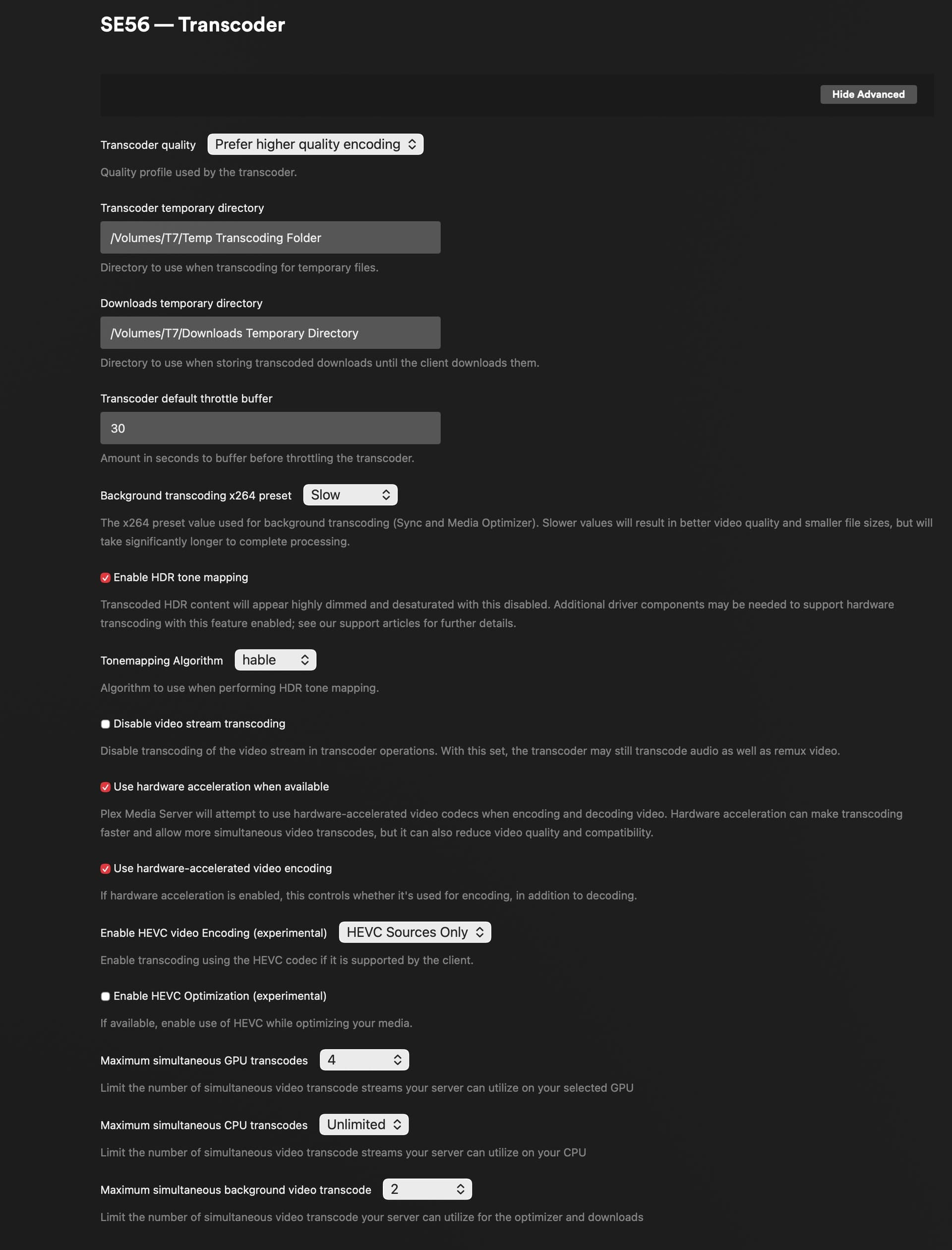
I have the same issue. Live TV only works if Use hardware-accelerated video encoding is disabled under Settings > Transcoder with the Mac mini (M1, 2020) on macOS 26.1 (25B78). Plex Media Server is on version 1.42.2.10156. Live TV & DVR > Device Settings has the Use hardware-accelerated video encoding option, but I don’t know if that’s ignored.
What I found when I was running on the 155h NUC is there were occasional issues with recording and setup a 2nd plex server on the Synology 100% only used for recording. I kept this setting when I moved from the 155h to M4 Max studio (I’m doing a bunch of other things on here such as a local AI server). IDK if that is 100% necessary anymore, I think most of my problems on Windows was it kept rebooting for updates and wouldn’t run Plex until I logged in. I got frustrated at missed recordings.
Mac Mini M2 user here running server Version 1.42.2.10156, Web App Version 4.156.0, and latest Mac OS updates. I can confirm the M2 (non-pro) has this issue, but only if I use the default hardware encoding and select MPEG 2 sources. If I enable HEVC encoding, hardware encoding works fine (see image for exact settings). Of course this requires clients with HEVC support. Ideally it’d be great to get the base functionality working again.
with transcode quality set to the default “99”. When the issue first occurred I removed and readded both tuners to my DVR. Not sure if this made a difference or not; I did this before finding the recommendation to disable hardware accelerated encoding.
There are select over-the-air channels which don’t have issues with the default (non HEVC) hardware accelerated video encoding, though most of the major network main channels have the issue.