I’m trying to understand what managed accounts in Plex-Home are supposed to be and from that what features they should be able to access.
The attraction of the Plex Home managed accounts is that I can layer on age-appropriate filters for my family on TV and Movies from my local library and streaming services.
My expectation, which may be incorrect, is that all the managed users are effectively using the account which is logged in to Plex, but allows separation of watchlists, history, Live TV and DVR recordings.
As such I’d expect the managed users to be able to use the premium features that come along with my Plex-Pass: PlexAmp, HW transcoding etc as well as being able to access all the paid for subscription content.
Am I correct in this? If not - why not? The Plex Media Server + Plex-Pass just don’t make any sense if the whole household can’t make use of it.
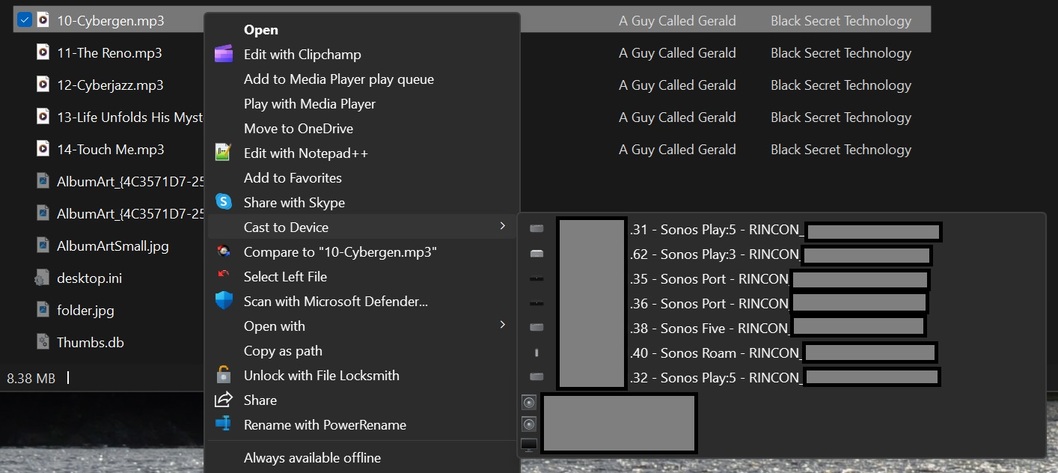
What I need is the ability to stream audio from Plex to Sonos devices. This has become much more important now that Sonos themselves have completely messed up their software to the point that it is completely unusable.
Here we have the disconnect… The main account can do it, but the other managed accounts cannot. Why? There seems to be zero technical reason behind the restriction. The Plex clients are all signed in with the main user account and password and so know that there is an active Plex-Pass.
What I’d really like is the ability to specify restrictions on sonos / DLNA targets for each managed user, much like the restrictions on which libraries they can access such that the kids cannot mess with the speakers in the office or other bedrooms.
there is no such thing as subscription “content”. I’m not sure if you meant “features”
they can
that is a server admin feature, anyone who streams from a server where the admin has a Plex Pass will make use of it. ( assuming the admin enabled it on their server)
So this is the disconnect then: ‘the Sonos service can only be linked with a “full” Plex account that has email’
Each device has to be signed in using that “full” account regardless of which managed account is utilizing it.
The “full” Plex account that has email etc. has to authorize the device to use the “managed account” e.g. a child or spouse, in order for them to be able to use Plex at all.
The managed account is entirely subordinate to and authorized by the “full” account, so any distinction that it cannot use the paid for premium features is utterly arbitrary on the part of Plex.
This is like Amazon or Max or Netflix etc saying I can’t have my child stream content from my account when they have a profile under the main account.
You’ve already indicated that managed users do already have access to some of the PlexPass features - so why not Sonos?
Managed users also have access to other 3rd Party content such as Netflix etc because the server is authenticated under a single account, so this is apparently OK for those, just not Sonos casting for an as yet unstated reason.
A managed account is a different account, not just some some profile of the home admin Plex account like Netflix or Amazon profiles.
For an secondary app to be allowed to control a Sonos the Plex account needs to be linked with the Sonos service. This is not some arbitrary thing just to punish managed accounts. It just won’t work. We have no reason not to let it work. You can add a regular account to your Plex Home and it will work because it is a regular Plex account. ( i know using a regular account won’t work for you due to you needing to set restrictions)
“A managed account is a different account” - if this is true, then how does one access the managed account on Plex / PlexAmp without first logging in to the main account?
It does not have an email or password but it is a separate account on the back end which is like that due to how library account access and such works. I understand it is confusing but they cannot access Sonos because of it due to how Sonos device linking works. We didn’t exclude managed accounts from Sonos to be mean, it just won’t work.
You seem stuck on the fact that the managed account doesn’t have an email or password. This isn’t actually necessary to cast to a Sonos device for several reasons.
The app (active control device) IS logged in as the main user account.
If it is the Plex Media Server that is enumerating the network devices then we still have the main user account initially logged into the device with the associated Sonos login information, so you should still have a validated user logged into the Plex Media Server and hence have the authorization for the Sonos login…
If it is the app that is enumerating the network devices then you can still retrieve the Sonos login information from the Plex Media Server as the main logged in user (remember the app is actually logged in as that user).
Yes, it means some rethinking of how that information can be exposed to the managed user, but this is not impossible. You have an authorized user logged into the app (can’t log in without this information).
Sonos speakers are DLNA targets that can be streamed to without login information. You don’t necessarily get the nice names, but you can target them.
You are welcome to make a request in the feature suggestion section of forum where folks can vote on the suggestion ( or I can move this topic to it), but this discussion where you just tell me it should, as if it is some sort of bug, is going nowhere.
It does not work because of the implementation. This to me indicates it is a bug. It may be a feature level bug, but it is a bug.
Saying it isn’t possible over and over again doesn’t negate that fact.
Logged in user = cached credentials that must be used to access the server and acquire the list of managed users.
These cached credentials can be used even if you then switch to a different managed user. In fact, they should be used to retrieve the current list of managed users available when you go to switch users.
Using the cached credentials to access the Sonos and other information isn’t a huge step.
Again if you would like to make a feature suggestion in that area of forums you are welcome to or I can move this topic to it. I believe this conversation is going no where