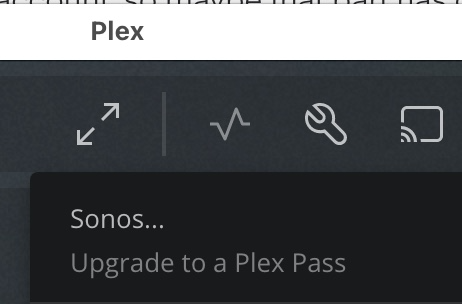
Controlling Sonos playback from within Plex apps requires that user to have an active Plex Pass. (It does not matter if other users or the server owner have a Plex Pass.)
I don’t think there’s any way to share in-app purchases between family members using Android, so it requires an additional purchase.
It is possible to connect multiple Plex accounts as music services within Sonos. The Plex interface can be used to create Playlists, and the Sonos app can play them - without an additional subscription.
Only one account on a Plex server is the admin account - the one that first created or “claimed” that server.
If your wife’s account uses Google credentials, it sounds like it’s a regular Plex Account.
So I would need another life time pass for my wife too? She lives at the same household. That’s bad :-((
PS: On sonos I added my wife’s plex account that worked, but did not solve the problem… so it’s the Plex pass. :-(( I family plex pass would be great…
I’d also love for this feature to extend to home users.
It doesn’t change Plex’s behavior. It does make playback available from within the Sonos app.
This is what I’m describing -
In the Sonos app, Settings → Services & Voice → Add a Service. She can add her Plex account, making it available within the Sonos app. Playlists that are managed in Plex will be visible in Sonos.
Multiple Plex accounts can be linked as music sources within a Sonos system, and accessed by all users of that Sonos system.
No, you shouldn’t need another Plex Pass for your wife. As long as her Plex account is in your Plex Home, this should extend to her. Make sure she links “your” Sonos account to her Plex account.
While logged into your wife’s Plex account using Plex Web, go tot he accounts page, then “other services”. Click the option to link a Sonos account.
I think I remember you once saying that only one Plex account could be linked to a Sonos account.
(Found it: Plex home user streaming to sonos (2020) - #2 by MovieFan.Plex. I was able to link the account, so maybe that part has changed!? But I don’t think that’s sufficient to enable Sonos control from within Plex apps. I think it’s gated behind a Plex Pass.)
No change in Plexamp - Sonos players aren’t visible.
(And for confirmation, other Plex apps are visible, and when signed in with a Plex Pass, the Sonos players are functional.)
Plex.app still displays “Upgrade to a Plex Pass” when Sonos devices are detected on the network.
I logged in on plex web with my and my wife’s account. both where linked to sonos at “other services” already. I started the plexamp app on my wife’s mobile again. Still no sonos devices available. I just see Chromecast. At Sonos app my plex account and the plex account of my wife both are set up… At sonos app I sent another request for authorization for my wifes plex account. Did not help.
Nothing has changed. Managed users are unable to cast to Sonos. If you would like to cast to your Sonos speakers, every managed user in your household would need to purchase a Plex Pass. This is bad, indeed.
I agree, this is nuts for a family. There’s no way I’m purchasing multiple Plex passes for this feature. By definition these are accounts that are in my my household and the users physically reside here. It needs to be addressed. That’s assuming it isn’t broken and it’s supposed to work this way.
Is it broken? I’ve gone into my wife’s account on plex.tv and linked MY sonos account in Other Services. Still, on the web app it says she needs a Plex Pass to cast to Sonos. @anon18523487 perhaps you could enlighten me about what’s happening here.