Server Version#: 1.15.4.919
Player Version#: 3.83.1
I searched, but have not seen this issue posted already, so here’s a new topic.
It would seem that a few weeks ago (must have been a recent update, I assume) matching of my current media broke. I don’t mean that I added anything new to the library and it was not matched. I mean that titles that have been there for a long time stopped having already been matched and started being unmatched.
I’ve got my media located simply:
/media/Plex_Media/Movies
I don’t usually rename my movies, either. I’ve only ever had to rename a few or manually match some. I’ve never had a problem with matching on this scale before, nor in this exact way. It appears to only affect movies (or at least, I have not noticed it elsewhere). Never before has a matched file later been unmatched.
I’ve always been able to freely move files around and rescan with no issues, either. Maybe I’ve just been lucky, idk. Any help would be appreciated (I really don’t want to manually fix every title with an issue and would also like to stop it from happening again).
Edit: Not all movies, only about 10% of them. They can be successfully matched manually (usually using the first choice in match results).
please verify: DEBUG logging on, VERBOSE logging off.
Please "Refresh all metadata " for your smallest section with problems.
When it completes,
Settings - Server - Troubleshooting - Download Logs - Attach the ZIP file here.
Thanks for the speedy response, Chuck.
I can attach the logs if you’d like, but I haven’t stopped searching for an answer, even after I asked for help. Wile I was packing up the logs for you, I wondered if it was only one file type. The error is only with mp4’s. Not all mp4’s, just some of them and it does not appear that any other file type is affected. I came back to the forums looking for a different path to take. A post suggested that the tags could be wrong.
I can’t find the specific post to reference now, but does this change your course of action and do you still want my logs?
MP4 files have embedded “Title” metadata. PMS only reads Title fields from MP4’s. It doesn’t read them from MKVs. This said, if the Title embedded in an MP4 is contradictory or confusing, PMS will not be able to obtain the 65%+ score required to match.
That might have been what the last post was talking about. Will the logs help us nail it down or do I need to edit that data? I’ll admit that I don’t know anything about that.
The program “Mediainfo” (windows and Linux) will show you these values.
I believe Windows will let you edit them directly.
Any files, once edited, will need to be manually matched or Plex-Danced to be properly evaluated again.
So, it would seem that none of that was necessary.
I have very little free time, so it’s taken me a bit to get back to the forum here. After working periodically most weekends since receiving your last reply to ‘fix’ the files, it still didn’t work. The same files weren’t matched at all, or at least not matched well after editing the info. It would seem to me that applying the ‘fix’ instead ‘broke’ something else. I’d meant to respond sooner, but I’ve been busy. Apologies.
I have not completed editing all of the files. Maybe 25% of the affected movies. But I would check back now and again, to see if matching would work. Still, it was hit or miss.
Today, I decided to have a look at Plex again, and without editing any mp4s, I just opened Plex. Very few files were unmatched. Opening the movie to the summary page would refresh the match. It matched properly. From the catalog page, choosing to Fix Match on each individual move which displayed a still from the movie, worked. 99% of unmatched movies were matched correctly on the first try.
Only one movie remains broken.
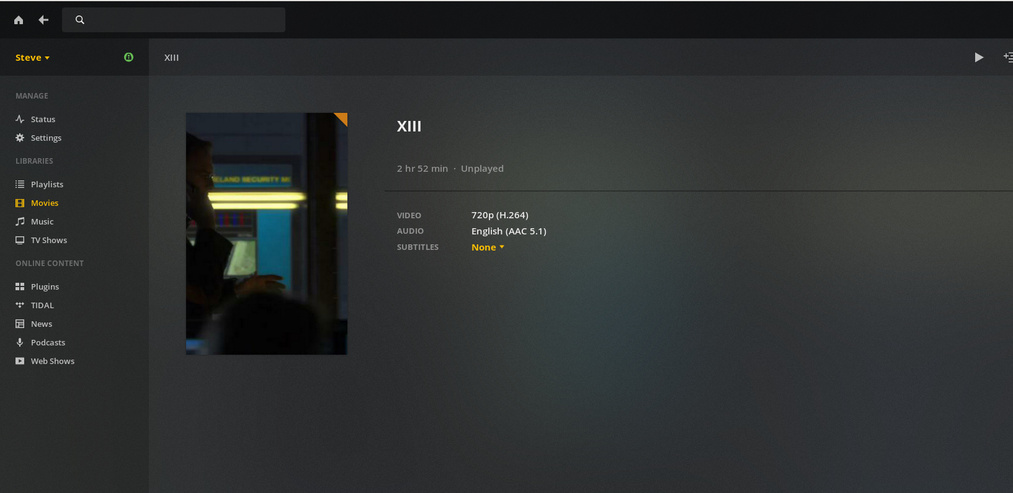
The movie is “XIII The Conspiracy.mp4” https://www.imdb.com/title/tt1117667/?ref_=nv_sr_5?ref_=nv_sr_5
It ‘matches’ according to the Plex Movie agent with a score of 100. There is no synopsis, cast or poster (besides a still from the movie).
I don’t know how or why the error corrected itself. It’s quite puzzling. I don’t know why this movie remains a stick in the mud.
Any ideas on this single movie? I have noticed a few movies (all .mp4) added since our last conversation were not matched, but I found that that was due to the naming structure of the file, once I changed that they matched fine. There didn’t appear to be any issue with any other info in the files.
Here’s how mine matched automagically:

NOTE: The ’ - BLU’ is a tag that I put on the end to delineate the original source. It should be ignored by the Plex metadata scanners.
Result:
I match Movies against the Movie Database and use that scanner in Plex. Had too many weird results with the Plex Movie scanner.
TMDb does not have a match for the movie; Plex does and “matches” it, but will not show the synopsis, cast or any image other than a still:
The movie is named simply:
And all of this is after I accessed the file from a Windows laptop on my network, edited the metadata there (which, curiously enough, Windows sees fit to allow us to do, but Ubuntu does not. Huh), then Plex-danced my way back into the library. When re-adding the movie, at first Plex recognizes the cover art. Then it does not. Below is a recording of the matching process, uploaded to my Gdrive.
Screen record of movie matching