Hi Guys
When accessing my plex server only newly added items are available to play remotely
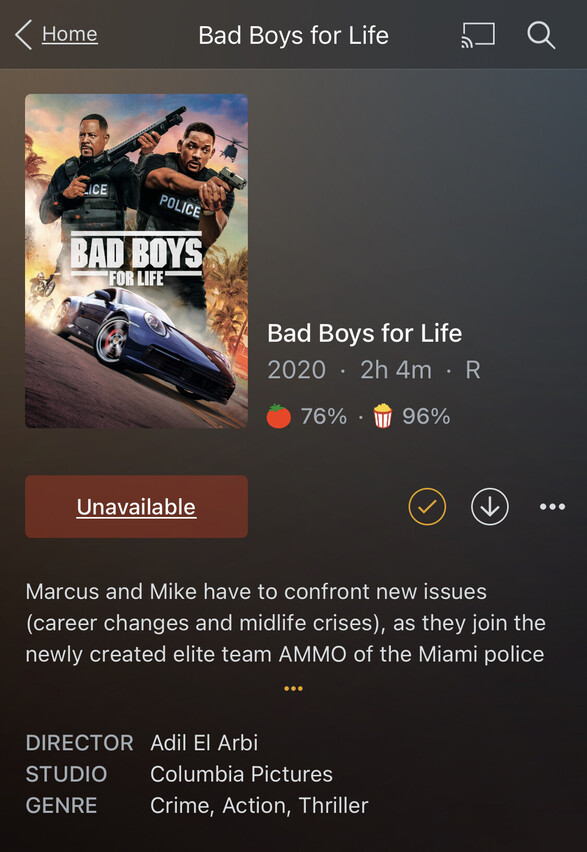
older films I have are showing as “not available” when I click on the button I get a message saying “the requested file is not available in the location” now I have attempted to resolve by removing the folder link and renaming my folder on windows then re-linking the folder to plex but it still says the same as above ?! All the films show as if they are there with cover art descriptions etc just not able to play them
Any tv shows I have on there will play fine
Any ideas how to resolve this?
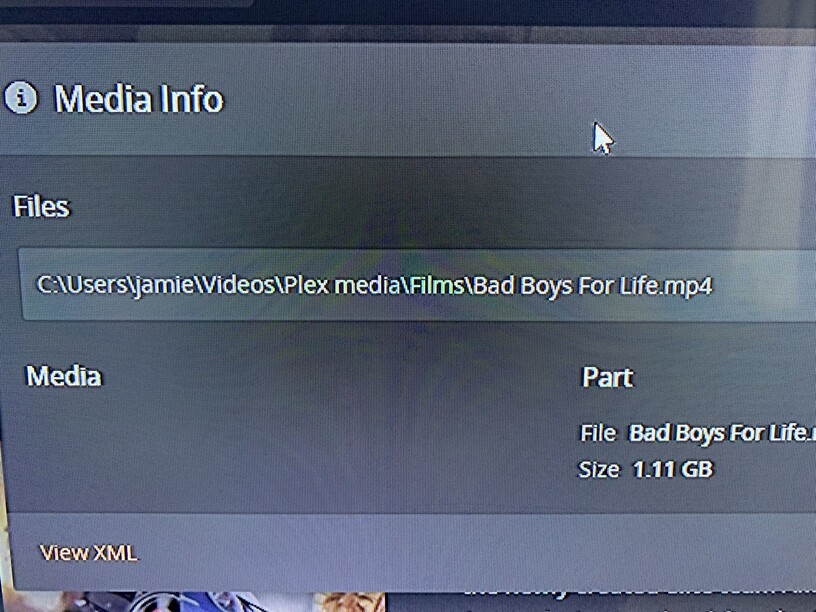
Images added to show exact issue on latest server version iOS 14.6 (I has been happening for a long time tho even before newest iOS and server updates)
Inspect the Plex media info of affected items, to see at which location Plex is expecting to find them.
Hi Otto
Plex is looking at the correct file in the correct location
I tried moving them to see if that helped but the end result was still the same
Still stumped on why/how it’s happening
Regards
Jamie
Trigger a library scan (“Scan Library Files”) and wait for it to finish.
Then enter again the Plex media info of an affected item and see if the “Unavailable” label is still there.
Just done that fella the file paths are still matching
Do you think completely removing plex from my pc and starting fresh will help?
I recommend you to:
- not use the Windows pre-defined folders for media which you want to add to Plex
- add at least the release year of a movie in parentheses after the title, to improve the chance of a successful match
Is this file a valid video file at all? i.e. does it play if you double-click on it?
I found out it only plays via VLC player?! so I’m guessing plex sees it as a “corrupt” file, the same goes for all the other films I had stored! Funnily enough they were all films I had stored on an external drive a while back before I upgraded my pc. So I got a bit annoyed and deleted the lot including VLC player as I don’t really use it, gonna download new versions of the films and see how it goes from there, will keep you posted on the results.
Will also take your advice regarding not using the native windows folders and adding year to the file name
Thank you for your help pal much appreciated