6 posts were split to a new topic: Excessive Plex Media Server process memory use
I agree with @Animazing. It looks like maybe the memory from the Photo Transcoder is never released. Below is a snippet from a 1 second period where the memory increases 33MB.
DEBUG - Request: [99.106.93.114:45175 (WAN)] GET /photo/:/transcode?width=240&height=360&url=%2Flibrary%2Fmetadata%2F125048%2Fthumb%2F1566771988&minSize=1&upscale=1 (19 live) TLS GZIP Signed-in Token (USERNAME REDACTED) (Memory Usage: 388.0 MB/197718.0 MB)
Nov 24, 2020 22:22:15.098 [0x7feeddffb700] DEBUG - [Transcode] Photo transcoder: Request for url [/library/metadata/125048/thumb/1566771988] (is local: 1 upscaled: 1)
Nov 24, 2020 22:22:15.497 [0x7feeddffb700] DEBUG - Content-Length of /config/Library/Application Support/Plex Media Server/Cache/PhotoTranscoder/58/586f8b53f60ecd5bae8141113ab71d45c1d08ede.jpg is 16705 (of total: 16705).
Nov 24, 2020 22:22:15.509 [0x7fef07194700] DEBUG - Completed: [99.106.93.114:45175] 200 GET /photo/:/transcode?width=240&height=360&url=%2Flibrary%2Fmetadata%2F125048%2Fthumb%2F1566771988&minSize=1&upscale=1 (19 live) TLS GZIP 410ms 16705 bytes (pipelined: 2) (Memory Usage: 388.0 MB/197705.0 MB)
Nov 24, 2020 22:22:15.815 [0x7fee8d7fa700] DEBUG - [Transcode] HTTP 200 response from GET http://127.0.0.1:42253/system/agents/media/get?guid=com%2Eplexapp%2Eagents%2Ethemoviedb%3A%2F%2F489999%3Flang%3Den&mediaType=1&url=metadata%3A%2F%2Fposters%2Fcom%2Eplexapp%2Eagents%2Ethemoviedb_f6d71fe4a9dbeba4c60d1c0308ab7a8e6b798572
Nov 24, 2020 22:22:15.815 [0x7fee8d7fa700] DEBUG - [Transcode] Calculated media file path for path [metadata://posters/com.plexapp.agents.themoviedb_f6d71fe4a9dbeba4c60d1c0308ab7a8e6b798572]: ["/config/Library/Application Support/Plex Media Server/Metadata/Movies/9/9c01152bcc58c5c5de2ec69535c21f31a74a779.bundle/Contents/_combined/posters/com.plexapp.agents.themoviedb_f6d71fe4a9dbeba4c60d1c0308ab7a8e6b798572"]
Nov 24, 2020 22:22:15.879 [0x7fef07995700] DEBUG - [Transcode] HTTP 200 response from GET http://127.0.0.1:42253/system/agents/media/get?guid=com%2Eplexapp%2Eagents%2Ethemoviedb%3A%2F%2F555974%3Flang%3Den&mediaType=1&url=metadata%3A%2F%2Fposters%2Fcom%2Eplexapp%2Eagents%2Ethemoviedb_7feffabbc64d2004243948d06d2136702cc4e2cd
Nov 24, 2020 22:22:15.879 [0x7fef07995700] DEBUG - [Transcode] Calculated media file path for path [metadata://posters/com.plexapp.agents.themoviedb_7feffabbc64d2004243948d06d2136702cc4e2cd]: ["/config/Library/Application Support/Plex Media Server/Metadata/Movies/a/f48aa7458323381ade8fc4b73938fea871c4b0d.bundle/Contents/_combined/posters/com.plexapp.agents.themoviedb_7feffabbc64d2004243948d06d2136702cc4e2cd"]
Nov 24, 2020 22:22:16.110 [0x7fef07995700] DEBUG - [Transcode] Calling back into ourselves for photo to transcode, optimizing the process (status: -1)
Nov 24, 2020 22:22:16.110 [0x7fef07995700] DEBUG - [Transcode] Photo cache obtained 438220 bytes from /library/metadata/183585/thumb/1585874499
Nov 24, 2020 22:22:16.110 [0x7fef07995700] DEBUG - [Transcode] Saving original media file to /config/Library/Application Support/Plex Media Server/Cache/PhotoTranscoder/b0/b072bd4121da56167bc2c5bf79766c19104a99f8.jpg
Nov 24, 2020 22:22:16.180 [0x7fee8d7fa700] DEBUG - [Transcode] Calling back into ourselves for photo to transcode, optimizing the process (status: -1)
Nov 24, 2020 22:22:16.180 [0x7fee8d7fa700] DEBUG - [Transcode] Photo cache obtained 541573 bytes from /library/metadata/125623/thumb/1566772618
Nov 24, 2020 22:22:16.180 [0x7fee8d7fa700] DEBUG - [Transcode] Saving original media file to /config/Library/Application Support/Plex Media Server/Cache/PhotoTranscoder/7c/7cd01dd1f778f430965ed51a1863ac15494c1f8d.jpg
Nov 24, 2020 22:22:16.192 [0x7fef06993700] DEBUG - Auth: authenticated user 12170158 as USERNAME REDACTED
Nov 24, 2020 22:22:16.196 [0x7feeedffb700] DEBUG - Request: [99.106.93.114:45175 (WAN)] GET /library/sections/8/all?actor=154&id!=190432&excludeElements=Actor%2CCollection%2CCountry%2CDirector%2CGenre%2CLabel%2CMood%2CPart%2CProducer%2CRole%2CSimilar%2CWriter%2CPhoto%2CVast%2CTopic&excludeFields=file%2Ctagline%2Csummary (19 live) TLS Page 0-9 GZIP Signed-in Token (USERNAME REDACTED) (Memory Usage: 399.0 MB/197719.0 MB)
Nov 24, 2020 22:22:16.200 [0x7feeedffb700] DEBUG - Setting container serialization range to [0, 9] (total=-1)
Nov 24, 2020 22:22:16.264 [0x7fef07194700] DEBUG - Auth: authenticated user 12170158 as USERNAME REDACTED
Nov 24, 2020 22:22:16.264 [0x7feeeffff700] DEBUG - Request: [99.106.93.114:45177 (WAN)] GET /photo/:/transcode?width=240&height=360&url=%2Flibrary%2Fmetadata%2F127935%2Fthumb%2F1566776052&minSize=1&upscale=1 (19 live) TLS GZIP Signed-in Token (USERNAME REDACTED) (Memory Usage: 412.0 MB/197735.0 MB)
Nov 24, 2020 22:22:16.265 [0x7feeeffff700] DEBUG - [Transcode] Photo transcoder: Request for url [/library/metadata/127935/thumb/1566776052] (is local: 1 upscaled: 1)
Nov 24, 2020 22:22:16.267 [0x7fef07194700] DEBUG - Auth: authenticated user 12170158 as USERNAME REDACTED
Nov 24, 2020 22:22:16.267 [0x7feeddffb700] DEBUG - Request: [99.106.93.114:45176 (WAN)] GET /photo/:/transcode?width=240&height=360&url=%2Flibrary%2Fmetadata%2F174422%2Fthumb%2F1575124407&minSize=1&upscale=1 (19 live) TLS GZIP Signed-in Token (USERNAME REDACTED) (Memory Usage: 412.0 MB/197735.0 MB)
Nov 24, 2020 22:22:16.267 [0x7feeddffb700] DEBUG - [Transcode] Photo transcoder: Request for url [/library/metadata/174422/thumb/1575124407] (is local: 1 upscaled: 1)
Nov 24, 2020 22:22:16.275 [0x7feeedffb700] DEBUG - It took 90.000000 ms to retrieve 9 items.
Nov 24, 2020 22:22:16.276 [0x7feeedffb700] DEBUG - Setting container serialization range to [0, 9] (total=9)
Nov 24, 2020 22:22:16.277 [0x7fef06993700] DEBUG - Completed: [99.106.93.114:45175] 200 GET /library/sections/8/all?actor=154&id!=190432&excludeElements=Actor%2CCollection%2CCountry%2CDirector%2CGenre%2CLabel%2CMood%2CPart%2CProducer%2CRole%2CSimilar%2CWriter%2CPhoto%2CVast%2CTopic&excludeFields=file%2Ctagline%2Csummary (19 live) TLS GZIP Page 0-9 84ms 2122 bytes (pipelined: 3) (Memory Usage: 412.0 MB/197723.0 MB)
Nov 24, 2020 22:22:16.320 [0x7feeeffff700] DEBUG - Content-Length of /config/Library/Application Support/Plex Media Server/Cache/PhotoTranscoder/3e/3e996232d2369acb42b368230a3cf972b1ba1ef3.jpg is 13177 (of total: 13177).
Nov 24, 2020 22:22:16.334 [0x7fef06993700] DEBUG - Completed: [99.106.93.114:45177] 200 GET /photo/:/transcode?width=240&height=360&url=%2Flibrary%2Fmetadata%2F127935%2Fthumb%2F1566776052&minSize=1&upscale=1 (19 live) TLS GZIP 70ms 13177 bytes (pipelined: 2) (Memory Usage: 421.0 MB/197729.0 MB)
Here are the full logs:
Logs
For my system I believe the memory leak is in Analyze audio tracks for loudness. I changed the setting to never and haven’t seen the issue for a few days.
2 Likes
I have moved the posts by @SpinCharm into a separate topic here Excessive Plex Media Server process memory use as the reported problem appears to be different from the other reports here
Is there still a problem on the latest release of Plex Media Server ? version 1.21.2.3943-a91458577 ?
I would need evidence of the issue causing failures eg hitting OOM crash on reaching 2Gb or 4Gb or higher and with the LogMemoryUse preference set (see Advanced, Hidden Server Settings | Plex Support )
Suggest also increasing the number of logfiles - see preference LogNumFiles on the same linked support page - suggest setting it to 15

I’ve resorted back to restarting the Plex container every couple of days.
Judging by the shape of the graph…it looks like it is still leaking.
1 Like
Just out of curiosity, does this occur with any other docker containers? eg; the linuxserver.io container GitHub - linuxserver/docker-plex
I tried all of them on unRAID: official, linuxserver and binhex. All presented this issue.
hold up…when i said container i meant LXC, not docker container.
Hi - I’m on the linuxserver docker with DNLA disabled, running on Unraid. Unraid is reporting 3.8GB memory usage for Plex, and a docker restart will bring it down to normal (happens every Monday night as part of a backup).
HW transcoding via a nVidia card, and DVR from a HDHomerun.
Happy to help test, as it shouldn’t be hogging this much.
1 Like
Glad I’m not alone in this one. I’ve installed natively on a VM (Ubuntu 20.04) in ESXI, Passthrough Intel GPU and had to set up a cron to reboot every 3 days or the whole VM becomes unusable
1 Like
I have the same issue as well. Seems like memory usage keeps going up .I am using Plex on ubuntu 20.04 LTS.
The development team are waiting for updates to the build process to be in place and will look into this when the new tooling is available
Meanwhile - as most users have done, schedule periodic restarts of the server
Still eagerly awaiting a resolution to this issue after so many months and finally an acknowledgement from Plex.
1 Like
As a data point, I am interested to know if the memory leak issue still occurs with our new updated toolchain builds of PMS here Plex Media Server - Forum Preview: Faster and smaller builds with new toolchain!
1 Like
Hi, just had time to do some testing with newest PMS beta ( 1.23.0.4482) which is already based on updated toolchain if I’m correctly informed. I had the DLNA memory leak for years with my QNAP TS-453Be. I have activated DLNA for some hours and for now I couldn’t reproduce the memory leak. Usually the RAM usage was increasing immediately.
I will report if the memory leak returns on my side. Thank you!
Edit: Sadly after I continued watching my current series my nas became completely unresponsible after a while. I couldn’t even check the ram usage since the nas wasn’t reachable anymore. Before that I played music via dlna without problems. Seems like memory leak is still there.
2 Likes
The latest Plex Media Server beta 1.23.1.4528-c0513eb4c has the changes introduced for new toolchain. Would like to know from all who had issues with persistent climbing memory usage if this has resolved some / all
If problems remain - please provide fresh logs with the LogMemoryUse = 1 setting covering period since launch - see Advanced, Hidden Server Settings | Plex Support
1 Like
Hi, memory leak is still present for me on newest PMS 1.23.1.4571. So I added LogMemoryUse = 1 to my preferences.xml. Afterwards I restarted the server (DLNA enabled) and start a random movie on my LG OLED with official Plex app for LG. I’ve monitored the ram usage and stopped the DLNA server before memory usage went to critical values. When I made a backup of the plex logs folder. Please tell me which log files you need and how I can provide them (there are several Plex DLNA Server log files with around 10 MB).
Thanks for your investigating in advance!
1 Like
Just updated to 1.23.1.4602 and tried to reproduce leak the way I was able before and it looks promising, RAM usage only went up couple dozen Mb instead of hundreds as before. So, I am disabling daily restart cron job to confirm and will report in a week or later.
1 Like
Upgraded a few days ago from 1.22.3.4523 to 1.23.1.4571
Memory issue looks like it has finally gone!
Graph attached with 30 days of monitoring, with drops at daily process restart at 4am.
Last 3 days, no server or process restarts and usage is super low.
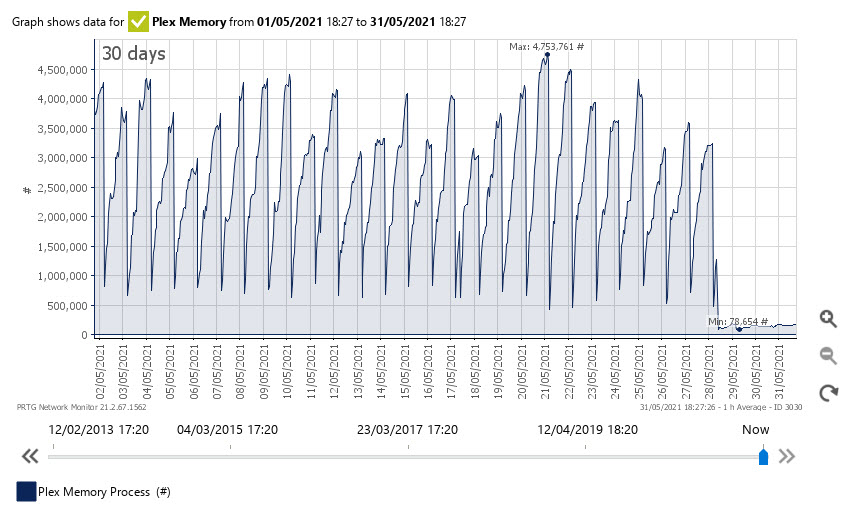
2 Likes
Excellent News - Thank you @garypower @InQuize for the feedback
@Animazing - do you still see persisting memory usage issues / leaks?
@Danko_Jones - there may well be DLNA server related issues. Is the memory use issue for the Plex Media Server process or Plex DLNA Server process ? With regards to logs - just attach the zipped logs as provided by the Plex Web Server Settings Troubleshooting Download logs interface
See Server Logs support page
2 Likes
