Same issue here. Version 1.17.0.1709 running on Debian 10.1 VM on ProxMox. VM continues to chew up ram to 3.7gb out of 4gb. Reboot resolves it temporarily.
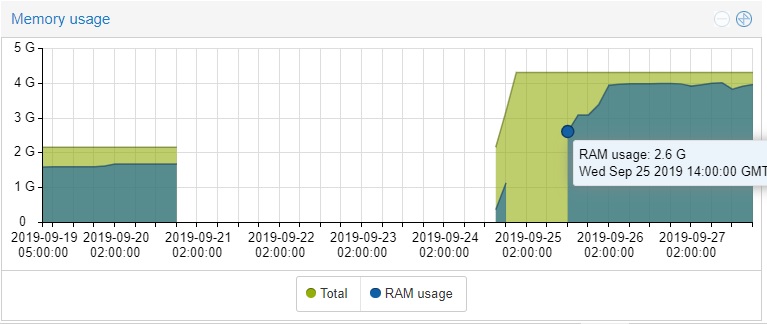
Trevor, try just disabling DLNA server in Plex settings. When I do that the memory usage drops immediately and stays down.
1 Like
@frankvw62 I will try that! Thank you!
PLEX SUCKS!!, I just shut it down…, lets look for a better option…
running plex on a 10 year dell 2950 freenas box, 8 x 2160 screens and 2 remote users on 32gb, never had any glitches, suggest local hardware / version may be your problem.
Nope, there is definitively something wrong with the DNLA feature on QNAP (and maybe other NAS).
Happy to provide logs to the Plex team to help , this is 100% reproducible and indeed disabling DLNA fixes the problem (unfortunately I use DLNA to stream my music…).
Looks to me this is well known at Plex Team since the issue is reported since more than a year now on different topics of the forum.
Looks to me it just doesn’t have any priority at Plex.
Still would be nice they clearly say it, we’re all big boys and can understand Plex has more important thing to work on but just stay silent and acting like nothing happens is very frustrating…
It’s not just DLNA. I’ve always had DLNA disabled and I still get the problem.
Still a issue on 1.18.x:
[Mon Oct  7 18:13:47 2019] Memory cgroup stats for /docker/67aa47a6278e606e0e6e10e4c824e6a78684b6e5528d6c9ca9533e37338218d3: cache:3456KB rss:16704168KB rss_huge:0KB shmem:0KB mapped_file:264KB dirty:0KB writeback:264KB swap:0KB inactive_anon:1302736KB active_anon:15401996KB inactive_file:2692KB active_file:664KB unevictable:0KB
[Mon Oct  7 18:13:47 2019] Tasks state (memory values in pages):
[Mon Oct  7 18:13:47 2019] [  pid  ]   uid  tgid total_vm      rss pgtables_bytes swapents oom_score_adj name
[Mon Oct  7 18:13:47 2019] [  23110]     0 23110       48        1    32768        0             0 s6-svscan
[Mon Oct  7 18:13:47 2019] [  23151]     0 23151       48        1    32768        0             0 s6-supervise
[Mon Oct  7 18:13:47 2019] [  23322]     0 23322       48        1    32768        0             0 s6-supervise
[Mon Oct  7 18:13:47 2019] [  23324]  1000 23324     1125       17    57344        0             0 sh
[Mon Oct  7 18:13:47 2019] [  23331]  1000 23331  1244799   340271  4882432        0             0 Plex Media Serv
[Mon Oct  7 18:13:47 2019] [  23354]  1000 23354   464686    30009   655360        0             0 Plex Script Hos
[Mon Oct  7 18:13:47 2019] [  23401]  1000 23401  4533932  3743428 30887936        0             0 Plex DLNA Serve
[Mon Oct  7 18:13:47 2019] [  23404]  1000 23404   109609      420   266240        0             0 Plex Tuner Serv
[Mon Oct  7 18:13:47 2019] [  23439]  1000 23439   436434    41702   806912        0             0 Plex Script Hos
[Mon Oct  7 18:13:47 2019] [  23913]  1000 23913     9734      213   122880        0             0 Plex Relay
[Mon Oct  7 18:13:47 2019] [  22852]  1000 22852     4263      194    77824        0             0 EasyAudioEncode
[Mon Oct  7 18:13:47 2019] [  18705]  1000 18705   110808    19569   446464        0             0 Plex Transcoder
[Mon Oct  7 18:13:47 2019] oom-kill:constraint=CONSTRAINT_MEMCG,nodemask=(null),cpuset=67aa47a6278e606e0e6e10e4c824e6a78684b6e5528d6c9ca9533e37338218d3,mems_allowed=0,oom_memcg=/docker/67aa47a6278e606e0e6e10e4c824e6a78684b6e5528d6c9ca9533e37338218d3,task_memcg=/docker/67aa47a6278e606e0e6e10e4c824e6a78684b6e5528d6c9ca9533e37338218d3,task=Plex DLNA Serve,pid=23401,uid=1000
[Mon Oct  7 18:13:47 2019] Memory cgroup out of memory: Kill process 23401 (Plex DLNA Serve) score 894 or sacrifice child
[Mon Oct  7 18:13:47 2019] Killed process 23401 (Plex DLNA Serve) total-vm:18135728kB, anon-rss:14973712kB, file-rss:0kB, shmem-rss:0kB
[Mon Oct  7 18:13:48 2019] oom_reaper: reaped process 23401 (Plex DLNA Serve), now anon-rss:0kB, file-rss:0kB, shmem-rss:4kB
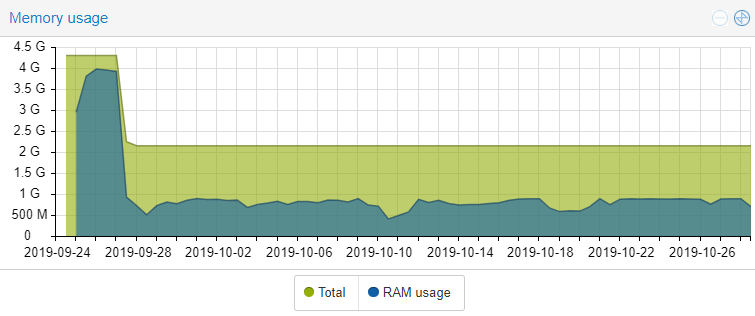
Just wanted to report back on the Plex server running on Debian 10.1. I disabled the DLNA server as frankvw62 recommended and i have not had a day where the ram usage was over 900mb since Sept 28. May not be the fix for all but it definitely worked for me.
1 Like
i Have the same Problem also without DLNA acitvated.
Plex Server 1.18.1.1973 Ubuntu 18.04 LXC Container.
Sometime Plex uses 4GB and swapp. Sometimes it works fine with 150mb… i dont get it.
I think one of these memory leaks (again, the 3rd / “other” category described by @Animazing) is in the Scanner. When I start my server (no DVR, no DLNA) it sits around 223MB of RAM and then at some point increases by another ~60MB when my background tasks kick in to optimize/etc. and never goes back down.
My background tasks do not include scanning though. When I run a library scan to add some new items to my library, Plex easily eats up 100s of MB of additional RAM, and never releases it all. This only appears to be when new media is added - if I run a scan without the on-disk contents changing, Plex memory usage increases by maybe 30MB (again, never goes down from here, but at least this isn’t as large).
I am running kernel 5.0.21 on my Debian host, with a Ubuntu 18.04.3 LTS LXC container for Plex ( 1.18.1.1973).
1 Like
I recently posted this in the Synology forums:
"Same Problem on Synology NAS, here’s my info;
Server Version#: DS1019+
Player Version#: 1.18.1.1973
DSM Version: 6.2.2-24922 Update 3I Have checked everything in my Plex settings but as soon as Plex “scans library files” or I “optimize database” the RAM usage will jump to 80+%(~4.7GB of memory) and will stay there. Or if Plex is left running on it’s own, within 24 hours the memory usage will creep back over 80%."
A kind forum member, ChuckPA, suggested that I disable DLNA services and my memory usage dropped from 72% to 19%. Not sure why Plex would eat up 4.7GB of memory and not release it. Fortunately for me it will climb to about 90% and kindly stop. Not sure if Synology DSM stops Plex or Plex itself sees a problem and stops the memory leak/usage.
Like all of you, I really do want Plex to find a solution. I’ve been using Plex for years and haven’t really found a Media Server/Player that I like as much.
Keeping my finger crossed.
1 Like
Do you just do this by unticking this box in Plex? Or is there more to it?

Uncheck to disable.
Thanks, already done that, still a problem. 
So sorry for the late reply.
Yes, under your Plex Server Settings>DLNA>Disable (as I recall).
It really did help with the memory usage. Within a minute it had noticeably improved.
Good luck.
No improvement for me, thanks anyway.
1.18.2.2058 released and still no fix!!!
1 Like
I gave up and went from 4GB of ram to 16GB.
same problem here and it will climb to 32GB if I let it, on 1.18.2.2058, DLNA disabled.
