i have same issue!!! 8GB RAM and plex eat half of that…1year after the first hit… Why this DLNA RAM eatink so big problem?
1 Like
Still no news?? Come on guys, the first time I had a problem with Plex’s DLNA and memory leaking was 2014. And the official response is always “We are working on it” 
2 Likes
I have this issue al well. Servers keeps crashing due to memory shortage.
1 Like
I have idea… I have 3000 movie 50 full series and 24000 music… I think the dlna Cache into the ram some data but its so much… Database optimising?
Just so I can help seperate out issues, if you disable the Plex DLNA service does the issue go away?
If not, are you using Hardware Transcoding with a supported Intel processor? Does disabling HW transcoding stop the mem leak issue happening?
The issue still exist with DLNA and HW transcoding not available.
4 Likes
For me, disabling the DLNA server resolves the memory leak issue. If the server is enabled, by the end of the day almost all my QNAP’s memory is in use by the service. Stopping the DLNA server releases the memory almost instantaneously.
@Animazing Could you please outline your setup and steps to reproduce this when DLNA and HW transcoding are disabled?
I’m managing Plex servers with a couple of default options:
- I always use the latest plexinc/pms-docker Docker image.
- I use Docker Cgroups to limit the CPU affinity for these containers.
- I used to have Cgroup memory limits as well but I had to turn them of when this issue started happening as the servers kept being killed.
- I setup the following configuration options:
FSEventLibraryUpdatesEnabled: 1
FSEventLibraryPartialScanEnabled: 1
ScheduledLibraryUpdateInterval: 21600
ScheduledLibraryUpdatesEnabled: 1
PublishServerOnPlexOnlineKey: 1
ButlerStartHour: X
ButlerEndHour: X+2
GenerateChapterThumbBehavior: Never
ButlerTaskDeepMediaAnalysis: 0
ButlerTaskUpgradeMediaAnalysis: 0
ButlerTaskGenerateAutoTags: 0
ButlerTaskRefreshEpgGuides: 0
ManualPortMappingMode: 1
TranscoderQuality: 1
GdmEnabled: 0
DlnaEnabled: 0
Hardware transcoding is not specifically disabled however as this is running on Intel E5 and Scaleable there is no HW transcoding available.
It’s quite common for Plex to sit around 1.5GB after two days of being online. I have not been able to find out what is causing the spike and why for some members it’s going faster than for others. I restart all servers every five days, right now on one server the top 20 processes all take over 700MB with the largest being 1.8GB while not doing anything.
If I can supply any more specific information please let me know.
1 Like
I’m still having this memory leak. My system have been memory stable for the whole week, so early today i have moved some movies around and recreated the library.
This is what’s happening now:

When the memory reaches full capacity i will issue the following command to free the memory:
sync && echo 3 | sudo tee /proc/sys/vm/drop_caches
But this won’t go away and i’m not even watching anything.
I think that’s related to this deep analyzer and for some time now, everytime it runs it will completely use all the ram i have, and everything will start swapping to the point i can’t use anything anymore.
The plex process follows:
/usr/lib/plexmediaserver/Plex Media Scanner --analyze-deeply --item <library item number here for each process> --log-file-suffix Deep Analysis
I think you should look into this analyzer as it seems broken.
2 Likes
How is this still a thing ?
1 Like
Info:
As from Plex Media Server version 1.20.2 we now have a preference for built-in memory usage diagnostic logging for the Plex Media Server process
See Advanced Hidden Server Settings support article - preference is “LogMemoryUse”
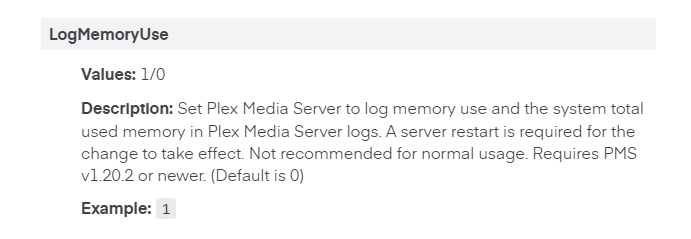
Server logs with this enabled covering whole period from launch may help getting closer to the cause of the problem
(I have come across logs showing high memory use eventually coming down many days later)
1 Like
added LogMemoryUse="1" to /var/lib/plexmediaserver/Library/Application Support/Plex Media Server/Preferences.xml.
And have stopped the VM that is hosting Plex from rebooting on nightly basis.
Hope it helps diagnostics.
1 Like
My corner case for memory leak:
I’ve been running Plex on Ubuntu for years and typically update within days of a new plex media server release being available without issue. ~2 weeks ago Plex started experiencing a memory leak every morning during its 2-8AM ‘task time’. OOM would be invoked multiple times during that window.
Oct 18 02:10:09 newbox kernel: [351001.514898] Out of memory: Killed process 196825 (Plex Media Serv) total-vm:27845324kB, anon-rss:13392196kB, file-rss:0kB, shmem-rss:4kB, UID:5000 pgtables:27004kB oom_score_adj:0
2 things had happened around the time I started OOM’ing every morning:
I dist-upgraded the hosting server from 18.04 -> 20.04
I upgraded plex media server to 1.20.3.3437
I know it’s bad form making 2 changes at once. I really thought one of those was the root cause.
I run Plex DVR with ComSkip and Intro detection. One of my channels (PBS) I’m on the fringe for and depending on weather conditions I get about a 90% success rate. I have ‘No Partial Recordings’ but it appears one slipped past the goalie.
This morning I watched Plex and sure enough it was consuming all available RAM until linux shot it in the head. Each time plex was attempting intro skip analysis on the same OTA recorded TV episode from my fringe PBS channel.
I deleted the episode/rescan lib/analyze and all worked well. In hindsight I should have kept the episode for your duplication. If it happens again I will do that.
Anywho, just my data point that was coincidental with my plexmediaserver and OS upgrades.
Cheers!
Lee
Can I safely enable this future for new Plex installations so it’s on by default on my cluster or would this degrade server performance somehow?
I have not run any performance comparisons. It does add to the processing of every request but i would expect this to be minimal
Info: From latest diagnostics with the memory use logging provided by @animazing - a memory leak in FreeImage code is suspected. Plex Media Server was updated in version 1.16.4 to use the current version of FreeImage.
As this forum thread refers to memory issues before PMS 1.16.4 release, there may be more than one memory leak bug and I would like to see more examples with the new memory use logging server setting with logs covering from launch time
2 Likes
I can still replicate this on Plex Media Server v1.20.3.3483-211702a9f, the logs I supplied earlier were from 1.20.3.3437.
I assume this version should have the upgraded FreeImage?
Version 3.18.0 of FreeImage has been in PMS since Plex Media Server 1,16.4. There are no updates to FreeImage beyond 3.18.0.
There are plans to replace FreeImage - but I have no timescales for that,
So until FreeImage is replaced the leak will continue to be there?
