Metadata Not Being Recognized Anymore

Hello,

Wondering if anyone can help. For some reason, within the last couple of months, Plex has essentially been ignoring all of the PAINSTAKING work I put into individually editing the metadata in the nearly 12,000 songs I have in my music library. It was working one day and then it wasn’t the next. (I did have to do a wipe of my computer and reinstall Plex, etc. at one point) With that being said, I’m not sure if when I reinstalled and signed back into Plex whether my previous settings weren’t saved or what the case is. Although I’ve used Plex for a long while now, the technically intricate stuff is still not my strong suit (ex: tweaking settings for a desired result), so I’m thinking maybe years ago someone on the forum assisted in me putting my settings to exactly where they needed to be for what I was looking for at the time. Hoping someone can help in this way again. If I can maybe send a screenshot of some sort and someone here on the forum can direct me to what settings need to be changed so that Plex starts recognizing all of the embedded metadata, that would be awesome.

Thanks!

I MAY HAVE INCORRECTLY PLACED THIS EXACT POST ALSO UNDER ANOTHER CATEGORY MISTAKENLY, I APOLOGIZE IF SO.

In general, I would refer you to this How-To:
[HowTo] Configure Plex to use embedded metadata (music)

A couple questions:

  1. What do you use to edit the embedded metadata in your music files?
  2. Are your files on an internal hard drive in your Mac, or an external drive, like an NAS or external USB drive?

You can also look back through your history on the forums to see if the advice you received in the past is relevant:
https://forums.plex.tv/u/najsinger/activity/topics

1 Like

To answer your questions:

  1. I use a program called Tag Editor.

  2. All of my files are located on an external NAS drive. (WD My Cloud Home)

& Thanks so much! I’ll check both out.

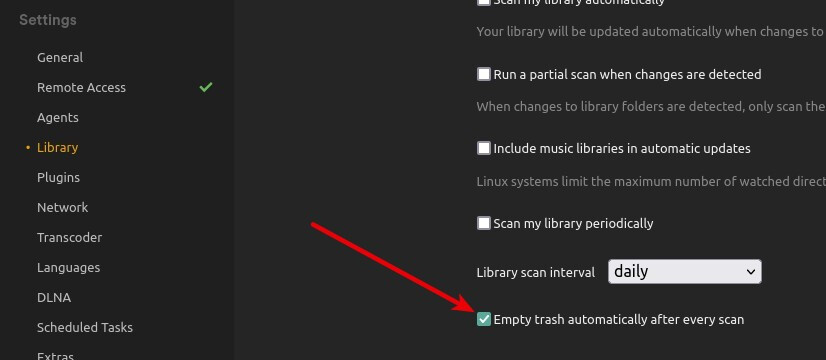
In this case, make sure to disable the “Empty trash automatically after every scan” option. External drives may be asleep when Plex periodically scans for media, and this will cause Plex to think the media has been removed. If that option is enabled, Plex will automatically remove that media from the libraries. Disabling will prevent this.

1 Like

Thank you. I will do this now.

You need to make sure the NAS isn’t using SMB1, change to NFS if it doesn’t support SMB2 or 3.

1 Like

Thanks, I will look into this.

This topic was automatically closed 90 days after the last reply. New replies are no longer allowed.