Server Version#: 1.23.6.4881-6000
I recently had to reinstall my PLEX due to it being unresponsive and that was where the troubleshooting took me to after all other options did not work. In the previous version, when you were matching movies and TV shows you had a drop-down option to match metadata drop-down to use different sources or you could use the embedded metadata in the file. Where did that option go? Now the only options are to use automatch or PLEX movie. Did this option get moved somewhere else and it now needs to get turned on? All of my files get embedded with metadata prior to me uploading them onto the PLEX.
Plex movie uses already a combination of metadata from various sources. Therefore you cannot match a media item to different agents anymore.
If you have trouble with mismatches
- stick to the recommended naming scheme
- and in particularly difficult cases include the IMDb or the TMDB ID number in the file and/or folder names. Naming and organizing your Movie files | Plex Support
Plex rolled out new movie and TV agents several releases ago. They are now the default for new libraries.
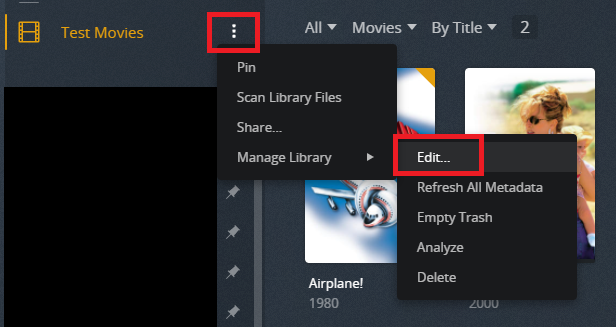
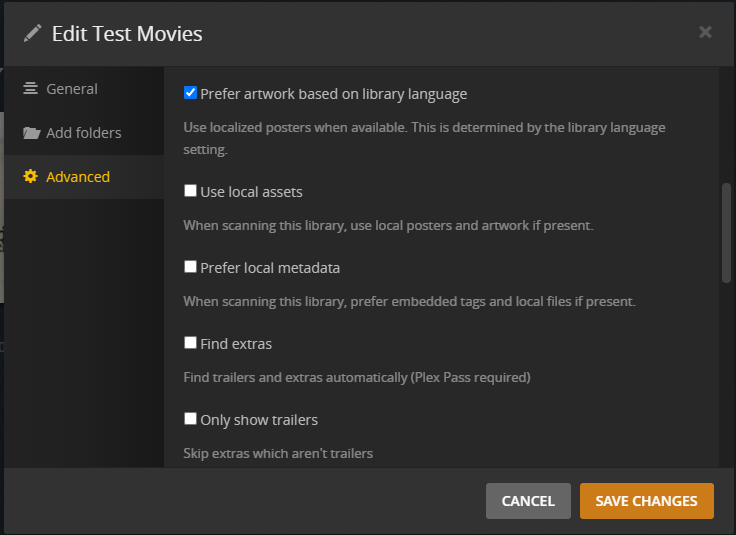
The settings for the new agents are stored for each library, not in Settings → Agents.
Edit the library and choose Advanced to see them.
FYI, as OttoKerner mentions, you can now add IDDb/TMDB IDs to folder & file names. I’ve used that with a few movies in my library and they matched immediately. It is a very useful feature.