trying to set up surround but i am missing audio setting from player. Help please

that is missing. I have tried uninstalling and reloading with no change
The whole “player” settings is empty? or is player not even an option? can you take a screenshot of what you see?
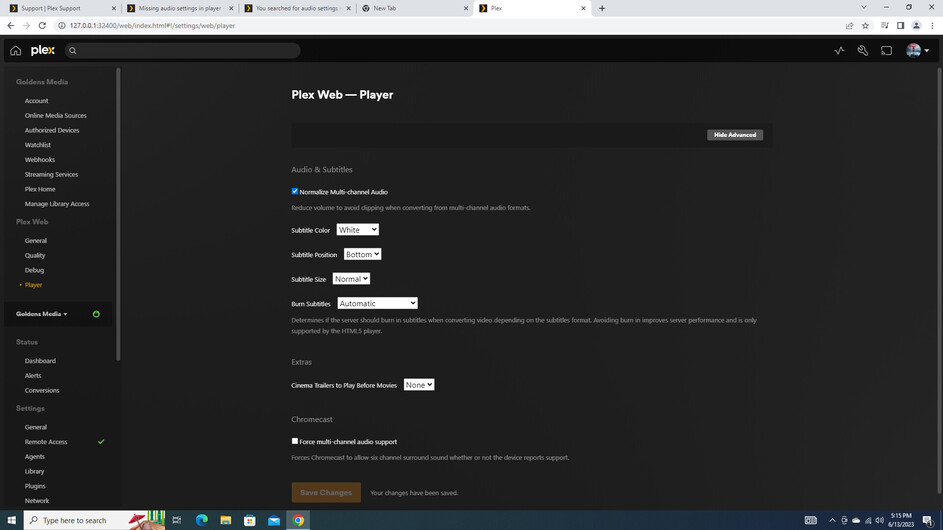
That’s Plex Web. It does not support passthrough for multi-channel audio (browser limitation).
You’ll need to use Plex Desktop or Plex HTPC (download). You’ll then see the settings like in BigWheel’s post.
Plex Desktop docs: https://support.plex.tv/articles/categories/player-apps-platforms/windows-mac-desktop/
Plex HTPC docs: https://support.plex.tv/articles/categories/player-apps-platforms/plex-htpc/
thank you very much for your help. Why does my my plex server on my pc go to the web version, is it the version i downloaded?
that was it…you are the BEST!!!
the server comes with a local version of the web player that is needed at minimum for management. That is what the Open Plex option for server uses since the server itself technically does not have an interface.
The desktop app you downloaded is separate and you would need to open in Program Files
Hate to bug you but you were so helpful before. I am trying to get my 5.1 channel surround to work through my plex but it is only playing the 2 front speakers. No rear or center. Any suggestions. I am using a yamaha surround system and have tested it through firestick and it works on netflix but not plex…any suggestions?
Thanks
How are things connected?
If FireStick connected directly to the Yamaha, make sure HDMI Passthrough is enabled in the Plex app on the FireStick.
You may also have to modify the FireStick (not Plex) audio settings. In general, you want Best Available if that is an option (different FireSticks have different choices).
firestick is connected to yamaha
I enabled hdmi passthrough on the plex on firestick with no change
What model Yamaha? Wondering what audio formats it supports - Dolby Digital, Dolby Digital Plus, etc.
Which FireStick?
Look in Authorized Devices: https://app.plex.tv/desktop/#!/settings/devices/android
You’ll see something like AFTKA, AFTT, etc. That tells what model.
Play a movie/show (no subtitles). Monitor playback via Plex Dashboard → Now Playing + Expanded View.
That will show if the video/audio is direct playing, etc.
Take a screenshot and upload to the thread.
EDIT: Here’s a 5.1 Channel Check video you can use for testing. It is AC3 5.1, H.264. 26MB.


Thanks for the info.
You’re playing AAC 2.0 (stereo) audio. That is just the L+R channels.
Use the demo video I added to my last post.
Wrong place.
Those are the settings for Plex for Windows.
The Plex app on the FireStick has its own settings. That is where you need to enable passthrough = hdmi.
Launch the Plex app on the Firestick. Settings should be at the bottom on the left, below your list of libraries.
I did set that for passthrough with no luck. Can i change that acc2.0 in plex or am i stuck with that?
That is the audio track in the movie. Nothing Plex can do about that. You will need to acquire a version with 5.1 audio.
Use the test video. Put it in a “other videos” library.
Also check FireStick settings.
Display & Sounds → Audio → Surround Sound = Best Available.
your video works great. That explains my dilemma. Once again you came through and solved my problem. Thank you
