Server Version#: Recently installed
Player Version#: Recently installed
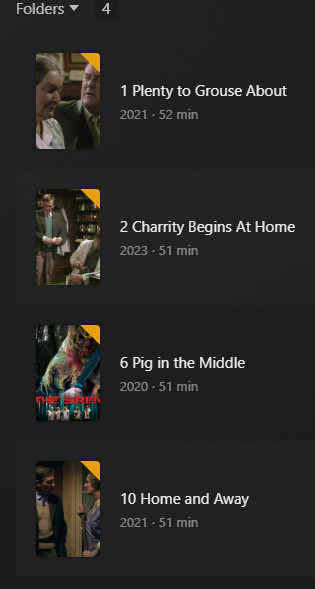
I have a single library for all of my movie files. There are eight folders in that library and two of those folders have sub-folders containing up to 15 MP4 files for various seasons. For one folder in particular (that has six seasons in their own sub-folders) there are two of those sub-folders that are not listing all of the files in their source folders on my Windows 10 PC. The other four subfolders are listing all of their source files just fine. It’s only those two sub-folders that are not displaying all their source files. One subfolder is listing only 4 of 14 source files and the other subfolder is only listing 5 of 10 source files. All of the missing movie files play normally when viewed on my PC with VLC Media Player. Nomenclature (a common plex warning) is fine. Movies in all six sub-folders follow the same pattern. I have spent HOURS trying to figure this out without success. I have played with all sorts of settings but I can’t find any that would impact only specific files in two sub-folders. I can sure use some help! Can anyone point me in the right direction? Fine to contact me: steve@fiskonline.net
Are these movie files or TV shows? You can’t mix and match these in a Plex library. You need dedicated libraries for each, and each type of file should be named accordingly. These are explicitly excluded from each other.
These are all files ripped from DVDs I own. All files in a sub-folder are from the same source. They are all MP4 files. As I mention above, there are six sub-folders. Each is a set of set of eposodes (files) for a season. Four out of six subfolders are displaying fine - it is only two that are only displaying a portion of the files they should be listing. I am mystified.
Would need to see your exact folder structure and filenames to know what’s going on, but check with our guide first to make sure you are doing it as reconmended.
It is also quite confusing to put a tv show inside a folder named “Movies”.
You better create a separate toplevel folder for all tv show-type of media and connect only the TV Shows library in Plex to this folder.
Don’t store this folder inside your general folder for movies. It must be completely separate.
I guess I am still confused a bit. The series may have been for TV but the files were all on DVDs that ripped to MP4 just fine and four out of six of the seasons made it just fine. I also have other made for TV series that are also doing just fine in the Movies library.
I will give your suggestion a try and let you know how that goes.
TV shows go into a TV library, Movies go into a Movie Library. The naming schema is important. If its been working, consider yourself lucky, when you dont follow the naming schema it may work until it doesnt.
Sort out your movies/tv shows, and then fix the naming. I bet your issues will go away.
In some cases all I have are DVDs. I am not sure whether some were made for TV or not. Is there a way to tell?
Also, if a seson DVD has more than one disc, I assume that’s where naming become important, but what about years? I Have some Season DVD that have more than one year on the back.
The year is not for the episode, but rather for when the SHOW first aired. Take a look at Search - TheTVDB.com for The Flash the 2014 show has the year in the title, but the 1990 one doesnt. By adding (<Year>) to the folder name it lets plex properly match them automatically.
As for TV vs Movie. I look at TheTVDB for a series, and if I cant find it there I will reference IMDB. (I always include both year and imdb id in my movie filenames)
Ill also note that DVD rips do not always align with episodes or even episode order (Ive seen them bunch 2-3 episodes into 1, and I’ve seen the order go 1,3,2,5,4 too)
The differentiation between Movie and TV Show in Plex is not the source, but whether it is “episodic” or “one-off”.
If there are several parts and (usually) no longer playtime than 1 hour for one part, it is usually a “TV Show”.
If you want to know for sure, look it up on either TheTVDB.com, TheMovieDB.org, or IMDb.com
These sites deliver the metadata for Plex, and they tell exactly whether it is classified as a series or a movie.
Great information. Thanks! I am a Plex neophyte and there are so many settings and behaviors to follow that I just got tired of digging and started out on the wrong track because some thing were working for me. Now that I understand Plex nomenclature requirements better I should be OK, but that doesn’t mean I won’t still get lost at times.
Perhaps what would make it easier for newbies would be a very basic step-by-step “introduction for dummies” that would possibly head off common mistakes made by folks new to the process. Sometimes the info I found online was written by folks who are advanced tech types. It was so advanced I gave up trying to use it.
For me at least, the nomenclature issue would have been easier to undertand if a simpler, concept-driven guide had been available. I admit I failed to understand the current guide until I posted this topic and got the explanations offered, which I very much appreciate.
I think Plex is a bit like Adobe apps - so wide and so deep that it takes special training and a long time to become an effective user.