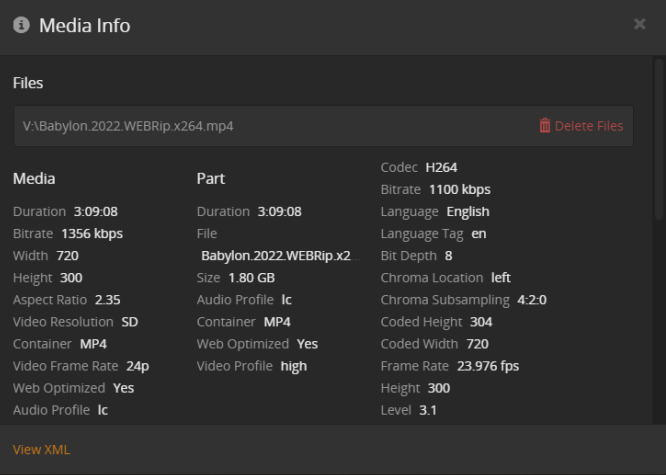
I see on the Yes Subs xml there is an srt section, assuming thats the subtitles section - but on the No Subs that section is completely gone. No error etc …
any ideas?
I am not a programmer but i am in the technical field so i can play around with this a little bit but this is beyond me …
Your video files don’t bring their own subtitles. Instead, you are relying on an old, now deprecated Plex metadata agent to automatically find and fetch subtitles from opensubtitles.org
Depending where you are located in the world, Plex might be no longer able to use the domain name opensubtitles.org as it is blocked in some countries.
And thus, the old agent won’t be able to fetch subtitles for you.
For this movie specifically i have the srt files but when i enable them Plex studders and delays and then drops - is that a PC performance issue? or a setting? anything i can do?
It might be.
Maybe start by explaining what you mean when you say “enable them”.
Then it is very important what kind of Plex client you are using and
whether the playback is local or remote.
Open a second browser tab with the plex dashboard in it. During playback it should show you whether the playback is local or remote and whether it is transcoded or not.
Just getting back to this post here.
I am not using a VPN
I am in the USA
My buddy lives 5 blocks away and has no issues obtaining the subtitles for the same file
I am running Plex Server on a PC in my house (local) and accessing Plex in my house (local)
I don’t believe there is any remote scenario here. but hopefully the screen shots can help. As far as I know, this is a 100% local set up. Unless i configured something incorrectly and it is playing remotely. But i am installing, running and playing all local in one house. PC> Plex Server on the PC> and trying to play 1923 with subs.
Hopefully this helps to help me.
This is really odd stuff here … some titles have the option for subtitles others dont.
(Soft) subtitles can be integrated into the video files. Whether they are, depends on who created them, how, and where.
Use the Plex media info to determine whether a video has any subtitles available, and whether they are internal/embedded or external.
If it shows “external” without a corresponding subtitle file being present in the folder, it means that the subtitle has been downloaded by Plex. https://support.plex.tv/articles/categories/your-media/using-subtitles/