Server Version#:1.25.2
Player Version#: Google Chrome!
Why does the server not download and place the files (SRT) in the appropriate folder so that this never happens anymore.
Ive been busy the last hour or so to find subtitles for a lot of files, and I still don’t understand why this still is not implemented
PMS is able to DELETE remotely from Google Chrome content! It has no problem doing that!!!
Why does PMS not has the ability to put a simple few kilobytes in the right folder?
Why do I have to do the search again?
And if you ask me if settings has changed? Well, NO! I have not changed anything except periodic updates YOU guys push! So, if there is a problem, fix it please…
Now I have to check thousands of folders through Chrome to see if the subtitles are still there… so annoying!
I looked at the agents and at the point where agents should be, the default setting was pointed at a random folder on my server, and that is a dumb setting I would never do, as I know there is no subtitle material inside that root folder. So wtf is plex doing?
And why can’t I pick a default agent? there is no [APPLY] or [SAVE] option in agents!!!
Something the team surely has to change. Because of this all the server does is looking for subtitles in a folder where there are no subtitles… STUPID!!!
This is just such an update that assumes we are new - (PLEXSERVER SOFTWARE TALKING:) Lets install! and set everything DEFAULT!!!
Find that so hard to imagine that something so significant does not look into the already painstaikingly made settings before pushing an update… looks like Microsoft!
This is really something weird, that’s all I’m saying, no warning, nothing…
I just added a new movie with two subtitles in the folder, Plex does not see them, I even named them after the movie, with the 2_english and 3_english in the end.srt…
Now why does plex not see them? Even opening that movie in VLC Player, it sees directly the two subtitle tracks…
Why is there at staff nobody to respond to my plea?
Do you think I act too harsh? Yes, that might be, but if you consider the time and effort I took into this whole library, to keep it neat and clean, maybe then you understand that seeing so much work being torn away, maybe then…
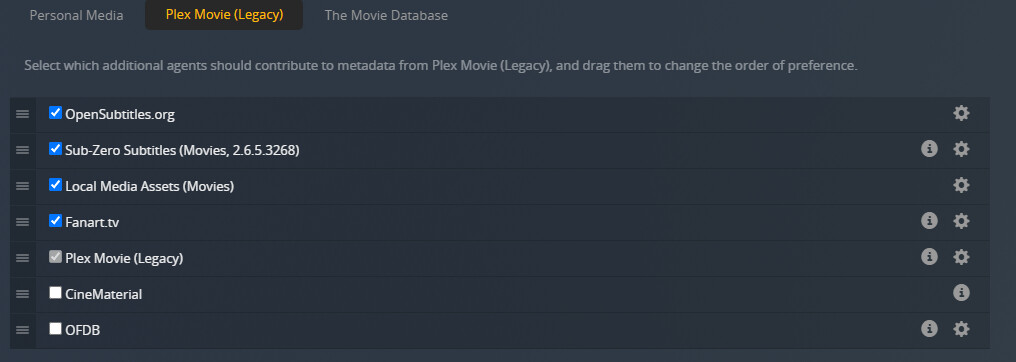
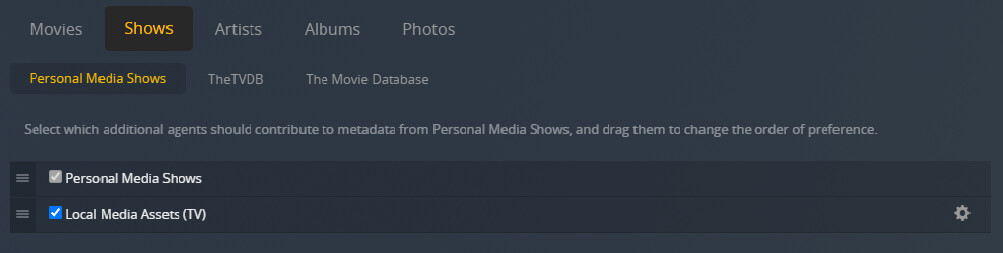
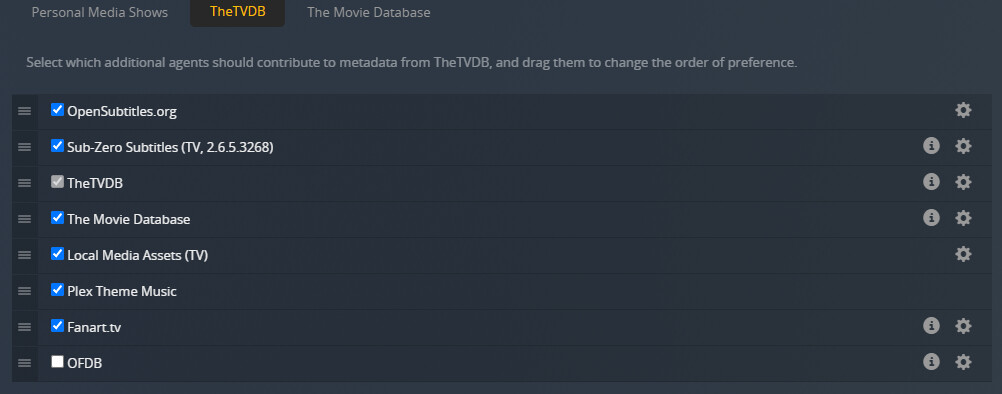
I had a nice reply made up, forgetting to shade out some things for security reasons, but the thing is that when I go to AGENTS and start with MOVIES, there are three sub categories, starting with PersonalMedia. In there the settings to change gives me this:
???Local music video path???
I had not expected this, but if you are willing to explain this, then we can go forewards with this problem…
I’m confused… you directed me to a link (/articles/200471133-adding-local-subtitles-to-your-media/) and then you say everything under agents is not relevant?
Then how should I proceed here?
As it is possible I want Plex to fetch them, if I have them not then it would be very usefull.
Before this update, I blame it now but not sure if I should blame this update, I have no reference, but before Plex used to fetch them for me. About say 20 % was not done and now it looks like much more.
But the two pictures I showed, is that as I said? that it makes no difference who shows first as long as it is ticked off? and does that go for all three? (personal media/plex movie/the movie database) ?
So did you mean all this info? and if you ask me why so much, or rather why are there so much, I really thought that it would not hurt to tick almost all of them on, because they represent a name for me, I really don’t see what they actually contribute.
But my very first question has not been answered at all, why can’t PMS put SRT files in the right folder corresponding the movie or series? That would make things a lot better.
Ps. as I said, choosing one of three of them, they do not stay this way, they fall back to the first. Movies (second picture) fall back to only two, even if I choose Plex Movie (Legacy). Checking if it is still on that choice, reverts back to the second picture - Personal Media. there are ample subtitles in to find on the internet(if I am correct)
Precisely!
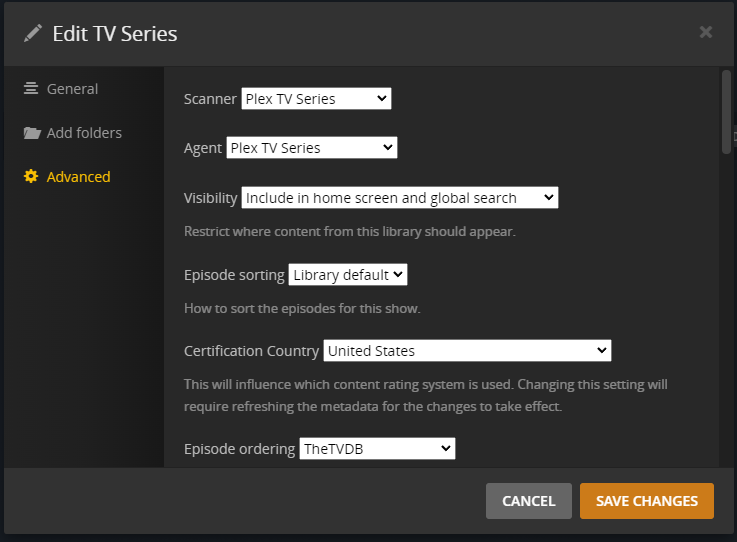
As we can see here, this library is already using the new agent “Plex TV Series”.
Which means none of the things shown under Settings - Server - Agents are relevant for this library.
Any agent settings can be found on the same tab, just under the Agent selector.
Unfortunately this means also, that Plex won’t fetch subtitles for this library in one swoop.
You can either only download a subtitle for each episode separately (by opening the subtitle selector of the episode and then use “Search”)
or obtain the subtitle files by other means and then place them beside the video files yourself.
Thanks for confirming the things I did right (or if I did)
I am so tired of having subs that are just running off, forwards or backwards, and that I hate that the plex app in Kodi is unable to do this with an attached keyboard simply using two keys to press to go backwards or forewards, it is killing me…
Until there is a system invented that clocks the right time at the shown picture(as in movies and tv-shows) and keeps it in synch, we will have to struggle our way… but that is something I complained before about, apps that are unable to support the user in a lot of ways…
Well, happy new year… until later…