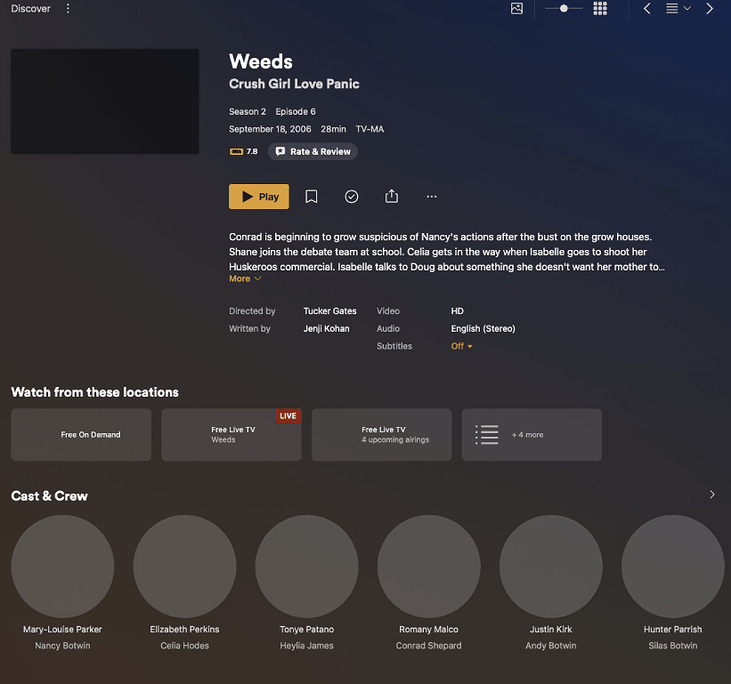
but when you click into the item there is missing posters for the cast and all. This is not an issue for locally stored content that all shows as desired.
Since this appears to affect all pictures for you, I assume either
a web browser add-in blocking requests to some of plex servers
a firewall/internet filter/privacy-something (either on the computer, or the router, or some other appliance) doing the same
some blocking rule/or proxy someplace else in the path between plex servers and your home network (ISP?)
First step would be to open the developer tools of your web browser and inspect the console output for error messages. These could provide a clue what address the browser is trying to access to fetch those pictures.
Then try and ping that address from the command line.
Another test would be to use the Plex app for mobile. Try it both inside your home network, as well as outside while using a public hotspot or a friend’s WiFi.
See if there’s a difference.
1 - none verified
2 - none that I’m aware of
3 - none that I’m aware of
if any of the above may be true then why are some posters showing up in the plex provided content not all? Also, if all the personal content is showing everything how can any of the above suggested issue be true?
if any of the suggested issues were true then:
Why is all the personal media not showing these issue?
why is some of the plex content showing main poster boards? including some of the detail plex content showing some not all of the same content posters.
Nothing has been changed but some content is appearing not others. All personal media content is showing as desired.
The pictures of your personal content are on your server. So they don’t need to travel over the internet to reach your browser (if you are located in the same local network as the server).
Also, it can be allowed to fall back to unencrypted transmissions from personal servers, within the same local network. So anything that interferes with encrypted communications cannot interfere as well.
First step would be to open the developer tools of your web browser and inspect the console output for error messages. These could provide a clue what address the browser is trying to access to fetch those pictures.
Then try and ping that address from the command line.
Another test would be to use the Plex app for mobile. Try it both inside your home network, as well as outside while using a public hotspot or a friend’s WiFi.
See if there’s a difference.
Do also verify that all your devices are automatically synchronizing their time/date setting. This is crucial for encrypted communication. If the time is off for just the right amount of time, it can lead to encrypted data packets getting dropped.
I tried another browser chrome based and all content displayed as desired with no missing elements.
this issue is occurring on safari Version 15.5 (17613.2.7.1.8), might be a lack of safari support in this version. Had another issue where content (plex trailers) didn’t play on safari as well and was verified by plex rep that it was a bug on the latest version of plex.
Troubleshooting
tried it with another browser on the same system was working.