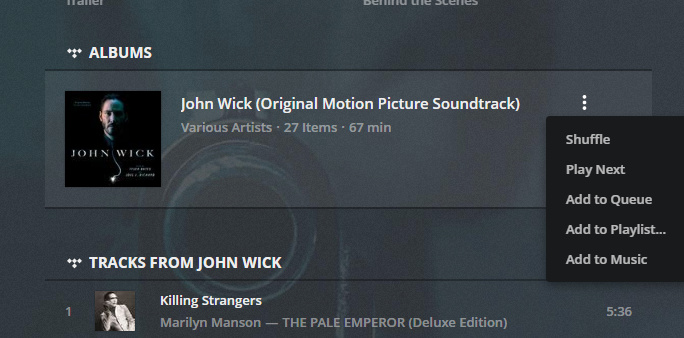
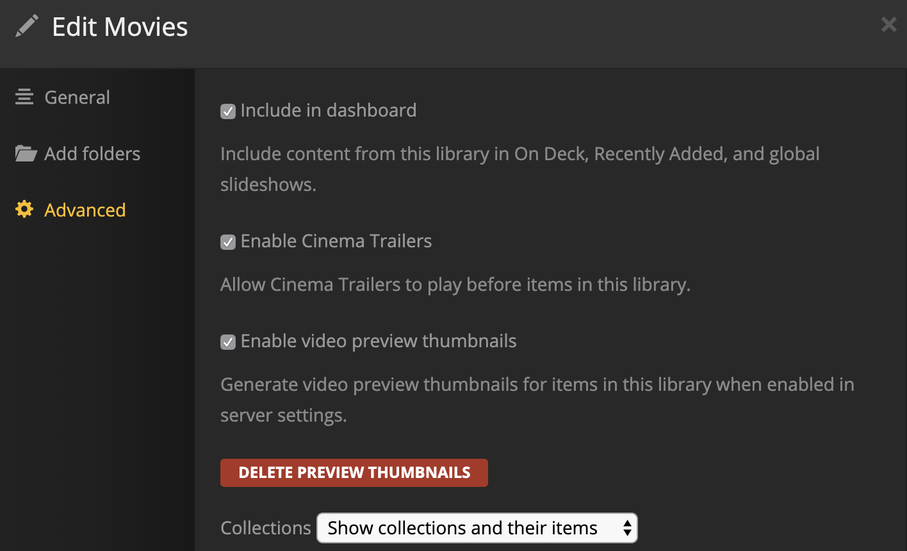
but somehow my libraries (Music and Films) got stuck with the “features” of an older version, somewhere before the TIDAL integration (“augmenting”).
So my TIDAL account is linked to my Plex account, the online media source in my account is enabled and TIDAL is browsable for example via the Plex Web App. Unfortunately I cannot add any Artist, Album, whatsoever to my own music library nor do I see any “augmented” features on an artist page.
I double checked with a fresh server install on macOS (the TIDAL option for a newly created library is available) and reinstalled afterwards the server on my main linux system but there it remains missing.
Any ideas for “how to fix this” are much appreciated!
I’d really like to see the advertised augmented TIDAL integration for movies, music etc on my very own Plex instance.
Disable the Include related TIDAL content option and save the library
Disable Access to TIDAL in General
If you’re not interested in TIDAL at all, you can disable the provider altogether for your account as a whole. That can be done from your account’s Online Media Sources settings.
it’s the same version. 4.18.1.
I just gave it another try… disabled, enabled, unlinked, linked again, including multiple restarts but nothing changed. The day before I even reinstalled the server.
Somehow the libraries won’t update, I guess.
Is there a command to force an upgrade or just simple to check libraries if they are on the current version?
I just moved the old PMS as you described and (re)installed the latest deb-package (again)… got no luck. The libraries still don’t show the “TIDAL option” in the advanced section.
Maybe I have to delete some cache files in the data folder ($PLEX_HOME/Library/Application Support/Plex Media Server/Cache or $PLEX_HOME/Library/Application Support/Plex Media Server/Plug-in Support/Caches) for rebuilding?
renaming the database file in $PLEX_HOME/Library/Application Support/Plex Media Server/Plug-in Support/Databases and creating a temporary one did not do the trick. Also the newly created database with one “Films” library did not show the “TIDAL option”.
Also cleaning up the several Caches-Folder did not help.
Anything to alter in the Preferences.xml maybe?
And… in Settings > Plug Ins I only got the iTunes Channel but ithe Photo and Aperture-Channels are missing… I guess it’s somehow related.
renaming therefore resetting preferences.xml and starting with a fresh database I’ll get the “TIDAL option”… but putting it both files back, no surprise, the option is gone…
A diff of the newly preferences file with the old one, did not show up any big differences (except the ids) so there must be something wrong with the database… maybe something is missing?
Unfortunately at the beginning of the holiday is probably going to be difficult getting some insight or help that can perhaps identify or fix the issue.
I played a little bit with the Preferences.xml and a the database.
Backing up both files and creating for each a new one, suddenly I got the “TIDAL option”. So putting back the original database with my libraries the option remained… And now everything is spiced up with TIDAL content. Finally.
So at the end, it seems somehow the Preferences.xml was broken. Creating a new one did the trick, I guess.