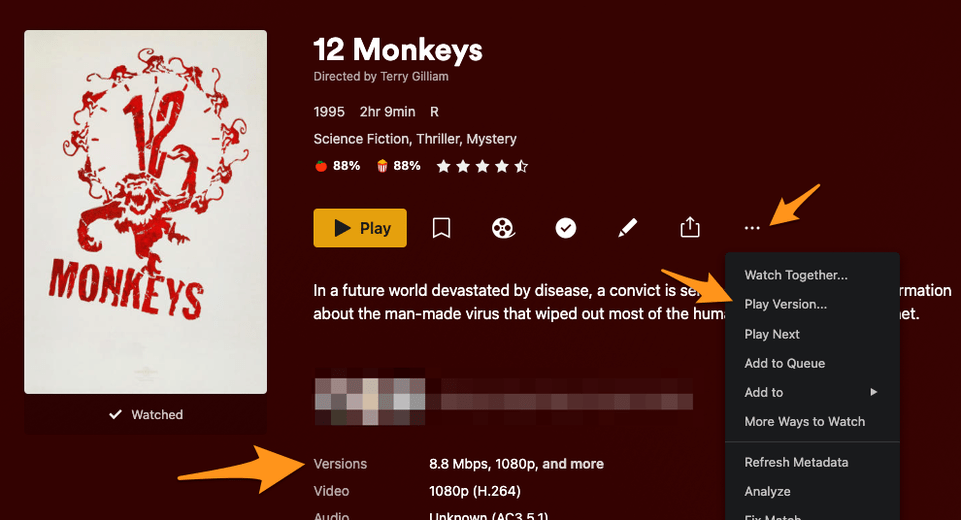
If I have two or more movie files (say with different quality) of the same movie in one folder, does plex show me both versions? If not, how can I do that?
right now it looks like this:
Folder:
Moviename (year)
Files:
Moviename (year).mkv
Moviename (year).mp4
Moviename (year) 2.mp4
I would keep the higher resolution and just let Plex transcode otherwise you are going to have duplicates and wasted space.
MP4s are typically going to cause more CPU and memory use on both ends.
If it were me, I would get rid of the MP4s and keep the MKVs.
They will be a version you can display from based on bitrate and basic resolution .
https://support.plex.tv/articles/200381043-multi-version-movies/
not sure if what you really want is editions. https://support.plex.tv/articles/multiple-editions/
I’d like to expand on BigWheel’s point. There are 3 ways to display multiple versions of a movie:
- If you leave it as-is, then you will see what BigWheel showed. You need to manually select the version you want to watch. If you do not, the client will auto-select the best version for the player, and you watch that one.
- You can click the triple dot
... menu on the movie, and choose Split apart to split the movie into multiple entries. If you want to manage multiple copies with their own poster and metadata/description, this would be a decent way to go. You will want to Edit each version to have a different name if you want an easy way to figure out which copy is which. Once you watch one copy, all the other will be marked as watched as well. If you stop watching and resume later, Plex might just choose one of these items to display in the Continue Watching hub, and it might not be the one you started watching on.
- BigWheel mentioned Editions, which is a way of automatically keeping these movies separate. The bonus to using Editions is that watching one Edition will NOT mark the others as watched. These are typically used for movies in which the content is VASTLY different between the two, such as Extended cuts like the recent Justice League Snyder cut. But if you want, there is no reason not to call one edition “1080p” and the other “720p” for example.