I think I am starting to like you Mr @ChuckPa but I think our criterieas are very different
and I respect your personal views, so here are my personal views/criterias for why I really like Synology (I greew out of my QNAP)
Stability - After going to ECC memory and BTRFS (I know!) wich supports background data integrity checks. I havent had any problems whatsoever on all my volumes! (Knock on wood)
Technical support! - Having had multiple crashes using (EXT4) on my DS3611 I really value their excellent support they login and get my volume up and running quickly!
Hardware support! - Express shipping any part to me under 24 hours under a 5 YEARS WARRANTY! (I tried this and they actual delivered the next day,also why I think build quality is excellent.
The NAS needs to be stable and have a low TDP (Running 24/7) - I dont want the last bleeading i7 tech CPU in my NAS
I personally think QNAP is trying to cover to much and have way to many variants that they need to support! (I want a NAS not a box with a remote or a HDMI output to my flatscreen)
Connectivity to a NAS is everything and should be easy and without any hasle (MAC’s and QNAP have always strugled to do this)
Multiple room for more disk space 12-24-36 drives and not in a rack with a 40DBA fan! - Much cheaper to add storage than to replace storage with even larger drives (Speed is not a problem the RAID volume delivers more than my receiving drives can muster over gigabit!)
I love the UI, it just seems more polished than the one on the QNAP - again all my personal views
I have heard this from more than one person “Synology seems or are considered to be more stable and reliable” and my older 3611 served me very well for many years!
(Great times where security updates didnt come every month! and your NAS would run for 6 months without the interruption of these updates!)
My CPU have a low TDP and can still do 4-5 transcoding streams, wich is fine for now.
in the future I will look into a dedicated PMS for transcoding and virtulization. I like the split of functions.
I have been reading allot of your posts Link
Are you still using Xen hypervisor implementation? or have you moved to something else?
I run everything in dockers except Plex (naitive install) and my PC is on the new Synology Virtual Machine Manager, works perfectly
Future - Seperate storage and Plex:
To build a PMS with a maximum TDP of 100W and around 20.000 passmark and minimum 2000 in single thread rating
I am hoping that the new Intel Core i9-9900K (8 core/16 thread) can accomplish that?
(And that Intel drop pricing to fight AMD)
I think we are well on our way to a very healthy technical respect for each others’ positions and thoughts indeed!
If I may?
Why would you put unbuffered RAM in a server? Are you mad? My TVS-1282 ships with ECC. Both Synology boxes shipped with unbuffered. The brand new DS918+ ships with, for which Synology sells, unbuffered RAM. “Houston, we have a problem.” If you can find ECC RAM for it on the Synology store, would you point it out to me?
Multiple crashes. I haven’t had a single crash of ext4 on either DiskStation. Are you using a UPS? If you aren’t, shame on you
I haven’t had the (dis)pleasure from either with warranty (knock on wood)
If you want a NAS, for the NAS sake, low Passmark with corresponding low TDP, Synology is the way to go unless you select the lower-end QNAPs. Both offer the passive-cooled ARM series processors. This does seem to be the Synology philosophy. I have both; the DS1815+ is my backup image with my TVS-1282 as my i7-6700 server (desktop/server combo machine in a NAS form factor)
QNAP is the new kid on the block and catching up. I wouldn’t say they’re covering too many things at once. I see them growing out of their infancy into the more mature provider. We all know growing pains can be awkward and as we remember from our own personal teenage years, very confusing
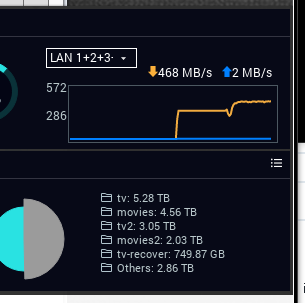
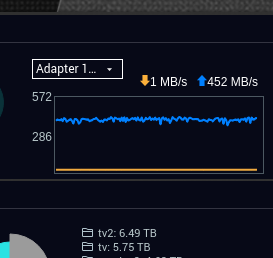
I have zero difficulty with connectivity in QNAP QTS 4.3.4. Are you holding it wrong? My syno can push 468 MB/sec from the volume onto my LAN (all 4 ethernets). My QNAP can receive and write without performance loss. (Both systems use mdadm software RAID) . My Synology cannot sustain above about 320 MB/sec write speed. Occasionally I am surprised with higher
Syno → QNAP
QNAP → SYno
QNAP has a nice 24bay. QNAP TVS-EC2480U-SAS-RP-8GE-R2 24-Bay Rackmount NAS Diskless
For a company, at this stage in their development, I think they are doing very well. As comparison, i invite you to go back to Synology’s youthful days and those first models. haha
UI. Yes the Synology UI has an entirely different feel to it. IMO, it’s very much for the MAC user who needs one and only one way of accomplishing a task. The QNAP UI is more open (like a Linux box) with more ways to achieve the same goal. What’s your flavor? I will never begrudge anyone who wants "Mac UI’ over “Linux UI”.
While Synology seems more stable, my personal dealing with their tech support has been less than optimal.
I needed to roll back DSM. They insisted to have access to reset it. I granted the access.
When I was informed the device was ready for restart, I restarted it.
The DS1815+ restarted and the same DSM version remained.
I find them arrogant. Sure they will listen but then patronize.
With QNAP, I had an issue with the volume not remounting. While on the phone with tech support, QNAP used teamviewer and repaired it on the spot. They also taught me how to do it since I’m capable of handling it. In all, QNAP’s smaller size means they will naturally be more responsive to individual customer issues. It’s the law of critical mass
I have two Docker containers. QNAP does need to fix their UI. Syno has them in spades on this one without issue. It’s not a big change either so clearly must be an engineering resource prioritization / shortage issue. (that darn scrappy size issue thing again )
All my VMs have moved to the QNAP. I now have the resources on it to use it as my second desktop without adding a third display to the desk.
Well, been 4.5 years and today I took a plunge. First I stopped the Plex app, then I moved the Plex share from vol1 to another volume using the Synology Control Panel - Shared Folders widget.
Next I edited the plex_libraries_path file in /volume1/@appstore/Plex Media Server to the new location. Started Plex et voilà, everything still works. Checked volume1 (with MC) to see if a new Plex folder/share was created, but no. So far so good.
 but I think our criterieas are very different
 haha
haha )
)