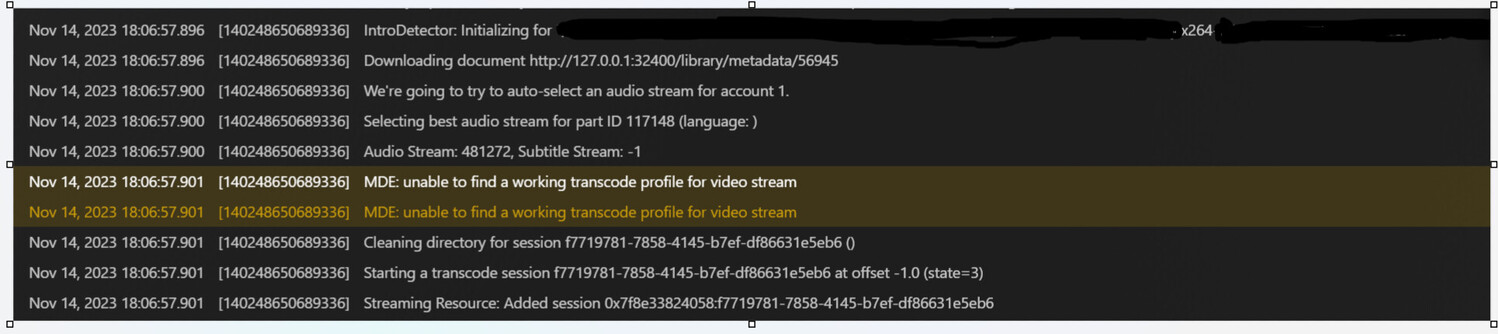
So I moved my plex server (from DSM 7.2 to another Synology NAS on the same DSM version and had issues with the EAE crashing during intros. I shut down plex and deleted the codec folder, when I turned the server back on it seemed good. It made it through the intros for the files it was crashing on, but now a while later it’s crashing on different videos due to not finding the video codec during intro detection.
It’s an x264 video file. Not sure where to go from here.
Thanks
After you moved the PlexMediaServer shared folder to the new machine, and PMS reinstalled, Did you fix the permissions on all the files inside the shared folder?
(They can change from NAS to NAS because of how DSM 7 defines them)
I forgot to mention yes I did have that problem on Sunday which led me to that article. I did setup and run that task which fixed some other issues I was having.
Edit: I went ahead and ran it again to be sure. Here is a copy of what I ran the first time around on the 12th as well as the report it emailed me.
Edit 2: I don’t know how the intro transcode vs. transcoding a playing movie differs but I watched one of the files in question and it transcoded with out any errors.
Update:
Trying to play a video from outside my network and it won’t transcode. Just keeps spinning. I was able to transcode and watch the previous episode yesterday which had the same codec, so that’s a little strange.
I do have a Synology with a Ryzen 1780B and had hardware transcoding checked. I unchecked it but that didn’t seem to fix the problem.
Edit: My old Synology NAS was an Intel CPU my new Synology NAS is an AMD CPU. Will this cause problems with me moving the server?
Most recent error when scanning library.
TimeNov 15, 2023 12:32:36.000
LevelError
Thread139652329933624
Message[Req#4a94/Transcode/42f13996-9664-40b5-b757-b2f3625a6ca9/9dde44f8-eeaf-4d07-ada9-9ec9620ab991] [eac3_eae @ 0x7f59b01b3700] EAE timeout! EAE not running, or wrong folder? Could not read ‘/var/packages/PlexMediaServer/shares/PlexMediaServer/AppData/tmp/pms-d1a04f47-2809-40f6-a797-a020f36a661f/EasyAudioEncoder/Convert to WAV (to 8ch or less)/42f13996-9664-40b5-b757-b2f3625a6ca9_10647-0-16.wav’
I actually just went through that portion of the article. I only had around 9,500 directories. But I adjusted the inotify to the 65,536 block size.
The error I posted above was after adjusting this.
This is the result I got in email… maybe you can tell if it responded correctly.
Have you restarted DSM after making the setting change.
DSM only loads those size settings at startup.
By the time PMS gets started, those table sizes are fixed.
The other thing possibly happening here, which isn’t obvious in your logs (unfortunately) is PlexMediaServer not having permission to a customized Transcoder Temp directory.
Yes that is correct I have ran both scripts as the “root” user.
And no problem, ask anything even if you feel it may be dumb.
I feel like a total rookie when messing around with DSM stuff on this level.
Case in point: I only stopped / started PMS after the inotify script. I didn’t reboot the NAS.
No, it still won’t play a file remotely and the intro transcoding is erroring out.
Here is 1 set of errors that it throws before moving on to repeating the error.
Nov 15, 2023 13:59:38.001 [140654731148088] Error — [Req#4afd/Transcode/d7c20c4c-1a83-468c-80d5-40ae68f5a6ba/89e22264-ac2c-4342-b1cb-9e3c31701de2] [eac3_eae @ 0x7ff7bce26700] error reading output: -5 (I/O error)
Nov 15, 2023 13:59:38.001 [140654727977784] Error — [Req#4b01/Transcode/d7c20c4c-1a83-468c-80d5-40ae68f5a6ba/89e22264-ac2c-4342-b1cb-9e3c31701de2] Error while decoding stream #0:1: I/O error
Nov 15, 2023 13:59:43.000 [140654731148088] Error — [Req#4b03/Transcode/d7c20c4c-1a83-468c-80d5-40ae68f5a6ba/89e22264-ac2c-4342-b1cb-9e3c31701de2] [eac3_eae @ 0x7ff7bce26700] EAE timeout! EAE not running, or wrong folder? Could not read ‘/var/packages/PlexMediaServer/shares/PlexMediaServer/AppData/tmp/pms-47b3dce2-eebb-42a5-88d7-db69208404ac/EasyAudioEncoder/Convert to WAV (to 8ch or less)/d7c20c4c-1a83-468c-80d5-40ae68f5a6ba_27501-0-43.wav’
Ultimately what I care about with my library is the watched / user data.
Is there an easier way to do a clean install and only copy over the library & user data?
This time around I followed the plex info to move my entire library including cache & metadata. But I don’t care if I have to reacquire all that stuff.
Unless there is something else for me to try of course.
I stopped PMS, restarted it and then grabbed logs a couple minutes after it booted up.
Reading through the article that may show something that my previous ones wouldn’t due to how long the server was up for.
If I am understanding that correctly.
I noticed there are some “critical” & “error” all over the place in this with requesting the 127.*is that because PMS hasn’t fully booted up yet? Or could it be my router / switch is blocking something?
given the Codecs are the only actual ‘binary executable code’ in the AppData directory,
You moved from a different NAS of unknown architecture (ARM64 / ARM32 / Intel 32 ?)
I would like to do a hard reset on the codecs
Stop Plex
Using FileStation, Navigate to PlexMediaServer / AppData / Plex Media Server
Totally delete Codecs
– This will delete your license key for PMS.
Now start PMS
Give it a good 3+ minutes before opening PMS
– Allow it to realize there are no codecs; get your license key updated; download new codecs for that X86_64 machine
You can download logs and attach at this point if you wish but not required
Attempt to play something. The first 30 seconds is all we need.
Note: You can turn off the “Use Hardware Acceleration when available” options in Settings - Transcoder. This AMD CPU does not have the capability.
Thanks for the information.
Yes I moved from Intel Celeron J4125 4-core 2.0Ghz.
Ok, so I must’ve done something in the last day or two because I did delete the Codecs folder a couple days back at which point streaming worked but Intro detection didn’t.
Perhaps the directory structure was too large and somehow I corrupted my codecs trying to fix that.
Streaming does now work, and as far as I can tell intro detection is working also.
Thank you for your patience helping me to get this working.
-9r
Your Plex server will run better on the J4125 CPU. It has full HW transcoding and tone mapping capability where the AMD does not.
One thing you can do (DSM does this well), is mount the media from one NAS onto another NAS where PMS runs. If you check the box, DSM will automatically remount the other NAS at every startup.
Given you have “PlexMediaServer” user on both now. this is ideal.
If you wonder how it can be done / need help (assuming you still have the J4125), please let me know and I’ll show you.
I was wondering if that would work. I did actual mount the DS920+ to the RS2423+ in order to get my PMS directory copied over originally.
I was wondering if it would work that way.
So the old processor will run it better huh.
Sheesh, now that I just got it all setup and working correctly.
Well I believe I already uninstalled it from the DS920+.
However if it runs better from that CPU it would be worth going through that process again to get it set back up on the previous NAS.
On the bright side of that it also gives me 5 free drive bays from the DX-517 to expand into.
What should I do and not do this time in order to hopefully not have as many problems as i had?
Yeah if you coul1d walk me through mounting the drives.
I guess the one question I would have is do they need to be in a specific place in order for Plex to be able to read them?
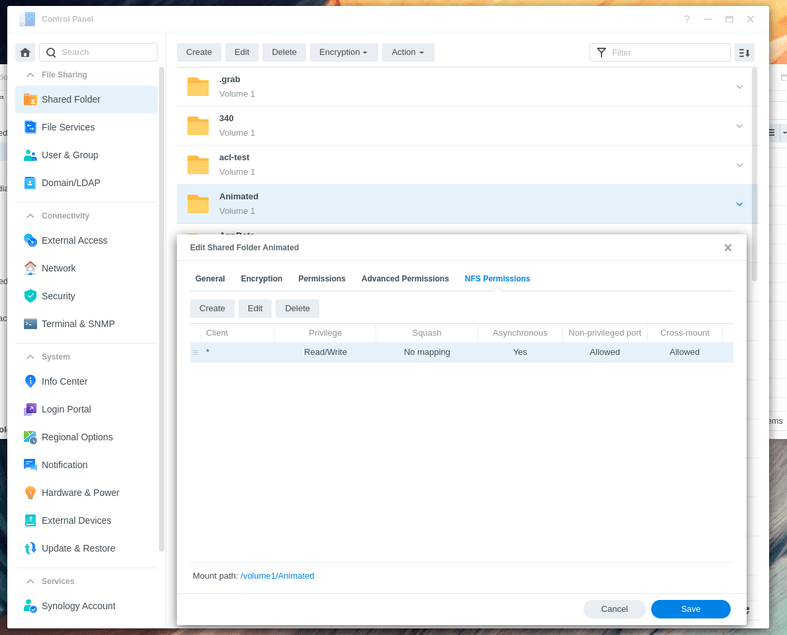
On the syno with the media, Create NFS ‘export’ rules so the media can be mounted
– Control Panel - Shared Folder - Highlight the shared folder - EDIT - NFS tab
That setup was pretty easy.
Everything seems to be good to go.
Thanks for taking the time for such a clear explanation of the process as well.
Now I have a NAS with a processor mostly hanging out. Wonder what I can find for it to do?
I am getting an error in the console about transcode sometimes. If you have time could you look at the logs here and see if it’s normal. Error should be real close to the bottom.
Streaming still works remotely so not sure if there really is a problem.