Yeah they should have had this in release notes.
They also should have put in something that would fix the issue for titles that were added while the bug was still happening—because all of THOSE are still blank! So fun.
Yeah they should have had this in release notes.
They also should have put in something that would fix the issue for titles that were added while the bug was still happening—because all of THOSE are still blank! So fun.
I am on " Version 1.16.3.1402" but don’t see Thumbnails for Chapters within the Extras being Generated?
@KaranMohadkar - You have to do the Plex Dance with your extras to get things working again.
Removed Movie Folder + Extras - > Scan Library - > Empty Trash - > Clean Bundles - > ReAdd - > Scan (Main Movie Chapters Thumbs Generated as soon as Added won’t do for Extras)
Though i noticed one thing even after multiple back and forth for some reason Plex still seemed to Remember the Last Timestamp of where i stopped playing the Extra
-> Not sure if i should wait for the
-> Generate chapter thumbnails (as a scheduled task and when media is added)
But i have it at when media is added … so it should pretty much generate thumbs the instance they are added
I have the Extras in Movie-Folder/Others not sure if that makes any difference?
… and if it doesn’t, Analyse again manually.
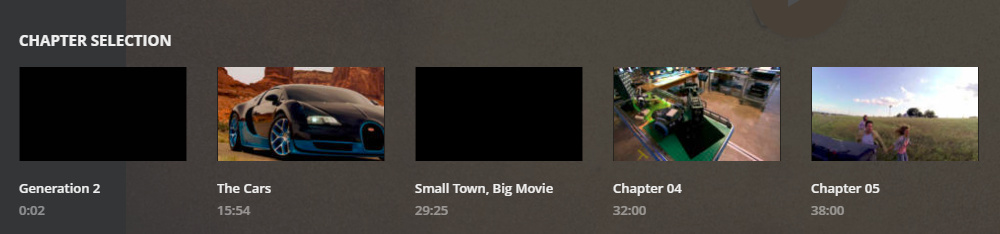
I have just added a Test-Extra.mkv to a Movie-Folder\Others and it has worked just fine, so I can confirm that it does still work…
However this particular file has a few chapters set at a location that is basically a blank black screen, and as you can see, the chapter generated for “Generation 2” and “Small town, Big Movie” are just black.
Is this what you are seeing, or do you see the grey placeholder?
Also, please do make sure that Settings > Library > Generate chapter thumbnails is set to "as a scheduled task and when media is added"
Grey Place Holder Only.
Though i tested this… out I had a Movie which already had Chapter Thumbnails Generated i copy/pasted it in Others Folder of another Movie and renamed it to “Test” and somehow for that it worked ?_? not sure if it recreated chapter thumbs for it or just picked up what were already created for the movie i copied*
@KaranMohadkar - If you have copied a movie to another extras location and it worked, then I would have to say it is currently working for you, and there may be something odd about the particular extras file in question. I would try running it through MKVToolNix which will Remux the file, and Plex Dancing it again.
Are you positive you tried with a “FileName.mkv” while you never added to your Plex Media Server as a Movie … As i Kinda DIYed it… I added the “FileName.mkv” which i never ever had on the server to Others Folder and it generated 0 Chapter Thumbnails…
Then i Renamed the same file “FileName.mkv” to “Blabla.mkv” and Just added it as a Movie in the main folder… Plex instantly generated Thumbnails for it… and I just deleted those… now even the “FileName.mkv” has Chapter Thumbnails… not sure if the Changelog states … anything about Chapter* Thumbnails being generated for the Extras 
My test file was another extras file, chopped into 2 parts, and additional chapters added via MKVToolNix, so yes, from the servers point of view, it’s a brand new file.
It certainly works for me each and every time.
Perhaps @OttoKerner might have some suggestions for you?
This topic was automatically closed 90 days after the last reply. New replies are no longer allowed.