I would like to see this apply to TV Shows aswell,
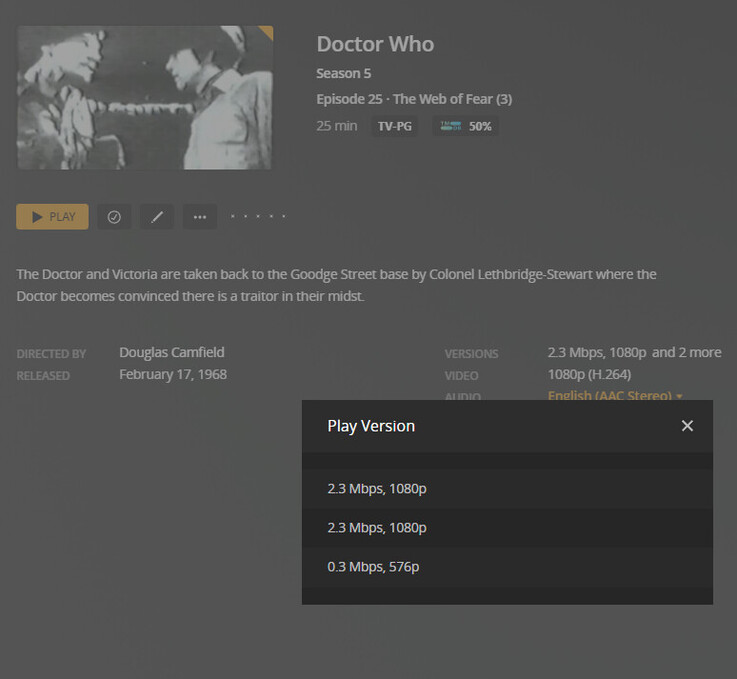
i.e I am aware this is a very niche use-case but I like My Doctor Who collection and with the animations I would love to see it so I can name the version. i.e On the Web of Fear episode 3 I have 3 versions. a Black & White Animation, Colour Animation & Reconstruction and it’s hard to tell the difference between the two animations, But would be 100% better just having a name
agreed!
Exactly the use case I was thinking of.
Some of the recent animated serials also come to mind now that they’ve also been animating the intact versions. You might have three versions of any given episode - original aired version, black and white animation, and color animation. And for the missing episodes, you might have the color and b&w animations plus the telesnap reconstruction.
Personally, aside from Web 3, I never add the telesnap recon for episodes that have been animated because aside from web 3, I think even the bad animations are better than telesnaps. But it would be nice to be able to have them all in one place. If episode-level special features were supported on more platforms, this would also be a suitable workaround - put in your favorite version as the main episode but have all the others as special features.
This is the use case for me as well. Hopefully Plex will add this feature soon. It’s now a guessing game which version gets selected. Plex should show any string added into end of the filename and use it as a version label.
some movie has different edition but shared one version of trailer. well. as me, i need to manually download trailer files because plex usually load trailers in English by default, but me and my friends are not native English speaker. Im happy that plex finally release “multi edition”, but there’s a terrible thing is seems like I have to duplicate all trailers files for different edition of media (well, as what I know, movies might have different edition, but theirs trailers usally shared same).
I think there’s good way to manage extra files for multi edition item:
- Keep different edition media files in same folder, and if extra files stored in subfolder such as “Trailers” “Behind The Scenes”, show them at both of edition’s page.
- If there’s extra file only for specific edition, rename it as specific edition media filename plus “-extra”.
Anyway, as my personal opinion, they don’t really cares us that much. so, any update including “bug fix” or “new feature” or “reply for help request”, all these r depends how lucky we are…
Another vote here for adding editions to TV shows. My example here is Red Dwarf, where the most amount of versions of a single episode is 4 I think, and that’s for two different episodes.
Yet another vote for adding editions to TV shows. I specifically want it for a) the various versions of the Stargate SG-1 pilot, and (more importantly) b) separating the original 1966 release of Star Trek from the later, CGI enhanced edition.
Plex’s addition of Editions was met with a lot of groans over its extremely underwhelming implementation after years of users begging for it. Namely, it was just a tag and fairly useless overall. There were multiple threads on this, but the promises in those by the employees never came to be, and many were eventually locked.
So, here we go… Take the 4K UHD release of Alien as an example.
It’s the 40th Anniversary Edition that includes both the Theatrical and Director’s Cuts of the movie. Yes Plex, Editions and Cuts are very different and not the same! But for the sake of their setup, let’s treat them as if they are the same. The logical Edition descriptors for this would be…
40th Anniversary Edition: Theatrical Cut
40th Anniversary Edition: Director’s Cut
Except to include it in the filename, which they define as {edition-[Edition Name]}, you can’t put a colon on Window’s systems. In fact, braces are technically frowned upon as an illegal character to avoid overall.
So, we’re back to changing the Edition tag for each movie manually. And overall Edition tags do… drumroll please… nothing but shows some text next to the movie. Seriously, can we get some properly layered Editions, Cuts, and Versions already? There should only be a single instance of a movie displayed in Plex (with maybe some indication that there are multiple files included within this instance). Clicking on this movie name would then take you to the movie’s screen where you could toggle through the Editions, Cuts, and maybe Versions as shown in the initial example pic in this thread.
Besides the things that have already been suggested (especially interested in merging all editions into one) I’d also like to have the ability to specify a short form edition name.
It would for example display “DC” in the library view and “Director’s Cut” in the movie view. The motivation being that “Director’s Cut” just shows up as “Director’s…” in my clients.
There are a few ways to make this available to the user:
- One tag in filename:
{edition-DC;Director's Cut} - Two tags in filename:
{edition-Director's Cut} {editionshort-DC} - Mapping in
Preferences.xml:<Preferences editions="DC:Director's Cut" />
I’ll do it manually for now (manually set short form in Edition and append long form to Title). I’d personally prefer it if it was just Movie [Director's Cut] (no edition prefix and square brackets) and then a mapping in Preferences.xml.
I don’t think that’s a bad idea, but I would prefer them to figure out a way to fix the layout so a single, longer Edition name is readable.
They could just put an overlay on the cover like this or put it next to the year (quick Photoshop mockup).
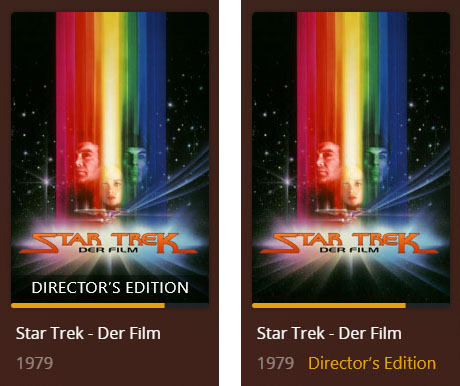
No, they shouldn’t just add an overlay. There are utilities for users to clutter cover art with overlays, Plex doesn’t need to do it as well. They just need to implement what users asked for 10 years ago.
What exactly do you refer to?
This?
IF so, pls see my initial post in this thread. 
Yes, the original feature request for proper multiple cut support was created more than 10 years ago. And we still only hit a thrown together solution.
That is sadly very true.
Currently “Other Editions of ____” is listed below Cast and Reviews.
The layout showing the “Other editions” should be higher/visible/selectable right away.
Both plex features using “versions” and “editions” are displayed poorly in the UI. They should be able to be displayed and selected for play on the movie description screen more easily.
Currently both are hidden to users behind either the three dots or you have to scroll down below cast and reviews to see the other editions available.
Reviews should be able to be disabled in the UI.
I also think the tag {edition-[Edition Name]} should be shortened to the universally accepted acronym for edition, {ed-[Edition Name]}. This is useful on movies with very long names. Take The Lord of the Rings movies.
The Lord of the Rings_ The Fellowship of the Ring (2001) {edition-Extended Edition}/The Lord of the Rings_ The Fellowship of the Ring (2001) {edition-Extended Edition}.ext
This is 171 characters and doesn’t include the library name or anything else in the filepath. Simply adding its IMDB tag to that folder and the filename pushes that to 205 characters and that’s really close to the 256 char limit in Windows. And yes, Plex recommends adding these to both folder and filename. Shortening to ed would save 10 characters in that example. Not much, but could be enough to some longer filenames.
The other thing is tackling illegal filename characters. For example, there’s no way to have something like Collector’s Edition: Director’s Cut in the filename that would then show up correctly in Plex. You’d end up with something like Collector’s Edition_ Director’s Cut. You could do as such in the filenames that equal something else in Plex.
- ; = :
- _ = /
- ’ = "
- ~ = ?
Or use the ASCII versions which would allow any standard character to display in Plex.
-
:= : -
/= /
etc
I’m just spitballing here really, someone might have a better idea for this implementation. Or create a user-defined character replacements in the settings.
Just catching up on this suggestion… is the 1st item of your “Suggestion A” still an issue?
It seems to me Plex is now showing available edition information across all apps – incl. the library view / poster wall.
Indeed, edition does now show up next to the year.
First post updated.
I am looking for this feature too
