I just joined specifically to add weight to this issue. I am almost obsessive when it comes to finding all the different versions of a movie, and so having each on a separate tile is cluttering my library page, in fact, there are roughly twice as many tiles as there would be if all the various editions were merged!
I like “Suggestion B” by @c_holzer above, but I wanted to put a bit of spin on it and offer a slightly different idea as I’m a little opposed to drop-down boxes and popup menus, which can be difficult to navigate with a basic remote control (on a smart TV) or on the tiny screen of a smartphone (with my fat fingers).
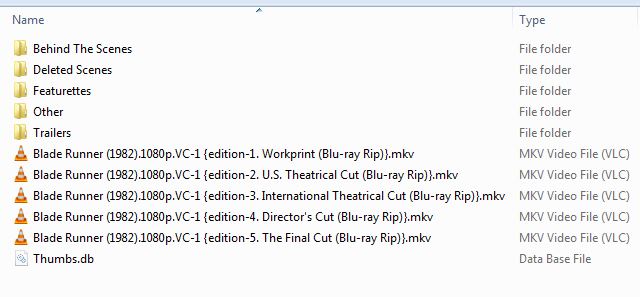
I’ll use Blade Runner as my example, and my file structure looks like this:
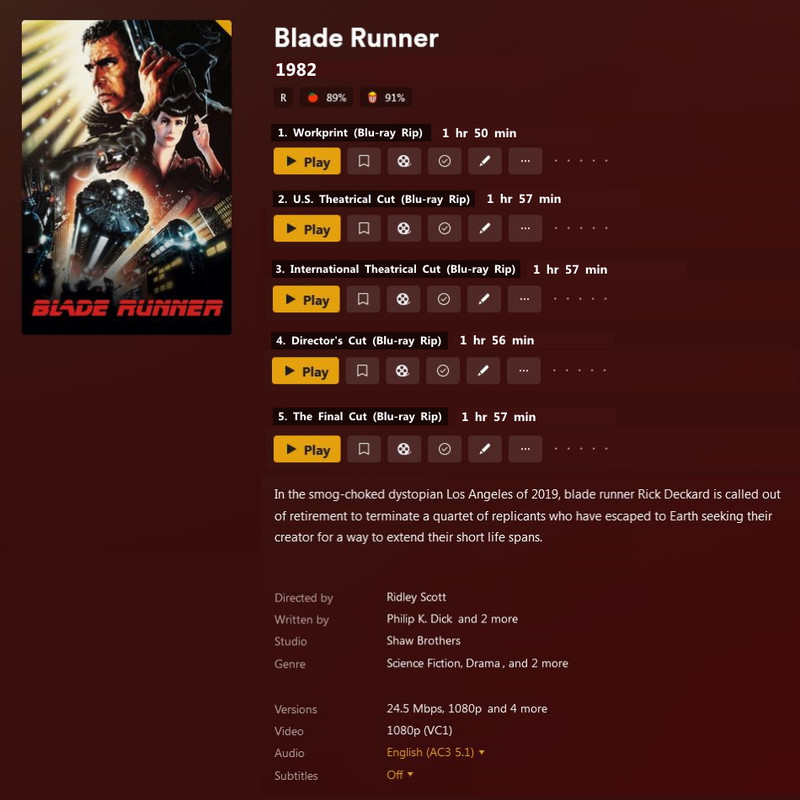
So instead of a row of titles across the top of the page, I propose adding a set of buttons for each edition as follows:
This has several advantages:
Firstly, you can have as many editions as you want and the player would just keep adding button sets for each, there’s no limit like there would be having titles across the page (eventually it would need to start a new line, which could get messy);
Secondly, every edition is treated as a separate entity, meaning each can be marked as watched, or added to a playlist, etc. independently of all the other editions;
And lastly, this is just so flexible, the end user can have editions with different languages set as default, subtitles displayed by default, and a big issue for me is Picture-In-Picture commentary/behind-the-scenes tracks, which I overlay on top of a separate video track, but it gets messy because the user has to select the corresponding audio track, whereas, if I could have an edition with these PiP tracks setup as default it would be a one-click option.
The same goes for episodes of a TV series, I really need the ability to display multiple editions of a single episode. This is just as important to me as it is for movies, and just as frustrating as it is now.
There are employees on this forum and I am sure they have some idea of what we are asking for… but they are under no obligation to give it to us. Still, the feature suggestions in this forum are the best way to be heard, unless you are able to take a Plex dev out to dinner and buy them a bottle of wine.
There is no secret email address that will get your ideas onto the top of the to-do list.
This only allows a single poster though. Having each as an entry across the screen with the “play” button on the poster and the other buttons and info below it makes more sense.
If you want an individual poster for each edition then just split the versions.
I’m trying to make things as simple and straight-forward as possible. My elderly mother (don’t tell her I called her that) gets very confused, especially when trying to choose between multiple editions of the same title.
Also, a lot of the time there isn’t a unique poster available for each edition, and I don’t have time to make custom artwork for all my multi-titles to identify which is which.
And how would Plex automatically assign different posters for each edition? I’d think it’s more likely to assign to same poster to all editions, which may be just as confusing.
You can currently assign a different poster to different editions with local metadata (which should be utilized by anyone using multiple versions). Why would you split versions when versions are 4k, 1080p, 720p, etc and have no bearing on editions?
All my editions have their Blu-Ray release cover as the main poster, just put the correct one in the correct folder. It’s super easy. So I think this mockup makes sense (please don’t judge, this is 3 minutes in MS Paint lol). I didn’t take the time to actually get good posters in my pic, just copied what you currently had and added the extras.
There would be a PLAY modal on each poster when selected, and the rest can be seen/done below. It’s quick, clean, and displays all relevant different info based on edition including cover art.
My apologies, I was mixing my “Editions” and “Versions” terminology, I’m only talking about “Editions” here, although you could label your different “Versions” as “Editions” to make them easier to select (not have to deal with dropdown/popup menus).
I do like your idea (in fact, I’d like any idea which allows me to merge all my editions), I just wonder how scalable it is?
For example, if I have a dozen different “Editions”, that would make for a very cluttered screen if I had a separate poster for each.
I forgot to mention… One other thing to bear in mind with these submissions is that (in a perfect world) they should also work seamlessly for “Editions” of TV episodes as well.
Yes, I know TV Series don’t have “Editions” yet, but hopefully they won’t be far behind as I need “Edition” support for TV episodes almost as much as for movies and we’d be far better off with a similar menu structure across both genres.
3am this morning I sat bolt upright in bed with an alternate idea…
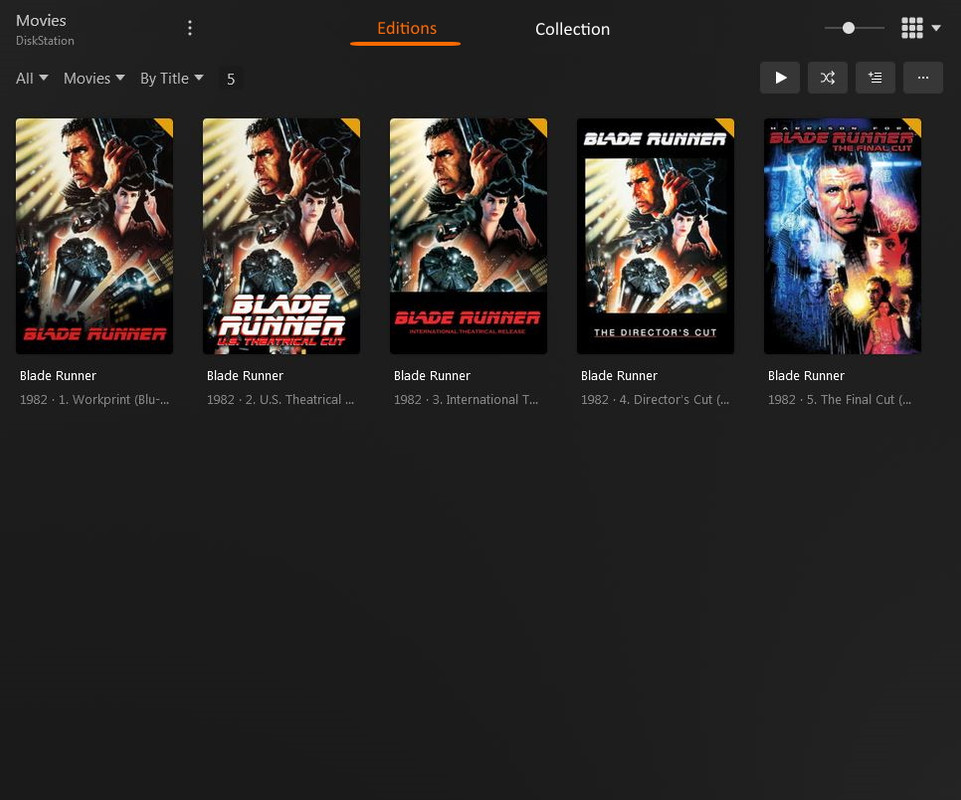
You could leave the current Library page and Title page (where the title’s details are displayed) as they are and instead insert a page in between, a kind-of “Mini Library” page.
So you would have all the “Editions” of the same movie merged within the main Library page, and when you clicked on a title that either has multiple “Editions” or is part of a “Collection”, a “Mini Library” page would appear showing the individual “Editions”…
…or if you arrow right to select “Collection”, this new page would display all the titles in the collection of which this title is a member.
(Sorry, didn’t do a mock up of a “Collection” Mini Library but you get the idea.)
After spending more hours than I care to admit messing around with this, I was able to achieve the “Mini Library” idea above using “Collections” (which I’ve never bothered with before this).
If I take all my “split” editions of a particular movie and add them to a new Collection, then edit that Collection, going to “Advanced” and changing “Collection Mode” to “Hide items in this collection”, after that only the one Collection tile appears in the Library instead of all the duplicate tiles for each edition.
I then further edited the Collection by changing the “Title”, “Summary” and “Poster” so it looks like a single movie tile in the main Library, but when you click on it you get an intermediate page as suggested above, displaying all the editions separately!
It’s not perfect, and it’s going to take me untold hours to create and customize a Collection for every single ‘multi-edition’ movie in my Library, but it looks like it should solve my problem of multiple identical tiles cluttering the main Library page.
And, of course, this won’t work for multiple editions of a TV episode, but it’s a start!
@AnotherAussie I’ll wait for when Plex finally does solve Multiple Editions and you come back to this thread with your indignation against their new process that overrides all your time consuming hard work. We haven’t even gotten a way to delete specific unused uploaded cover artwork yet either
If someone from Plex came out and said ‘Yes, you’ll have that feature in three months (or six months, or even twelve months)’ then okay, I might hold-out.
But you could well be waiting another decade for something that may never even happen, especially with the recent layoffs.
I think I’ll go with what I have now. At least it does what I need it to do, which is remove all the duplicate tiles from my movie library.
Sorry to wander off topic but, with regard to my creating a Collection for each multiple-edition movie, it is working, however…
For the life of me, I can’t figure out how to then add one of these new ‘single-movie’ Collections to another Collection?
Using the above example, I’ve created a Collection for the five editions of Blade Runner (1982), but now I want to create another Collection with all the Blade Runner movies (including the three short films & 2049), but it won’t allow me to add my first Collection to a second.
Another feedback\suggestion to maybe add - but maybe best to be it’s own request (this seemed like an active broader topic)… is that anything with an Editions tag is left out of Discover results such as clicking an a cast listing to see other titles in your library they are in. See my post here when I thought missing movies was a bug.
It’s a minor thing but it would be beneficial to not exclude “Editions” in that way.
I just noticed the editions tag a few days ago and thought, finally. Then I tried to do something with it and realized the same thing y’all did some time ago.
I came here and started following @AnotherAussie’s example from July 14:
If I take all my “split” editions of a particular movie and add them to a new Collection, then edit that Collection, going to “Advanced” and changing “Collection Mode” to “Hide items in this collection”, after that only the one Collection tile appears in the Library instead of all the duplicate tiles for each edition.
But some movies are in multiple collections and some should hide singular movies (Die Hard 2), some shouldn’t (AFI’s 100 Best Movies (1999)), so I can’t hide movies within collection properly. I’m not here offering solutions, just wallowing in the same misery. I love that idea of having headings for each version within a single movie, but I would take some sort of way to stack and an indicator within to show that there are multiple versions (aside from buried in play version) … but then again, I’m still waiting on them to stop changing my selected posters on me …
Even though this post has been modified to remove combining editions into one as that is already laid out in this feature request: Possibility to hide editions from grid I’m still casting my vote for this for fixed extras and to bring attention to a bit of an edition overhaul.