Server Version#: 1.40.0.7998
Player Version#: 4.123.2
<If providing server logs please do NOT turn on verbose logging, only debug logging should be enabled>
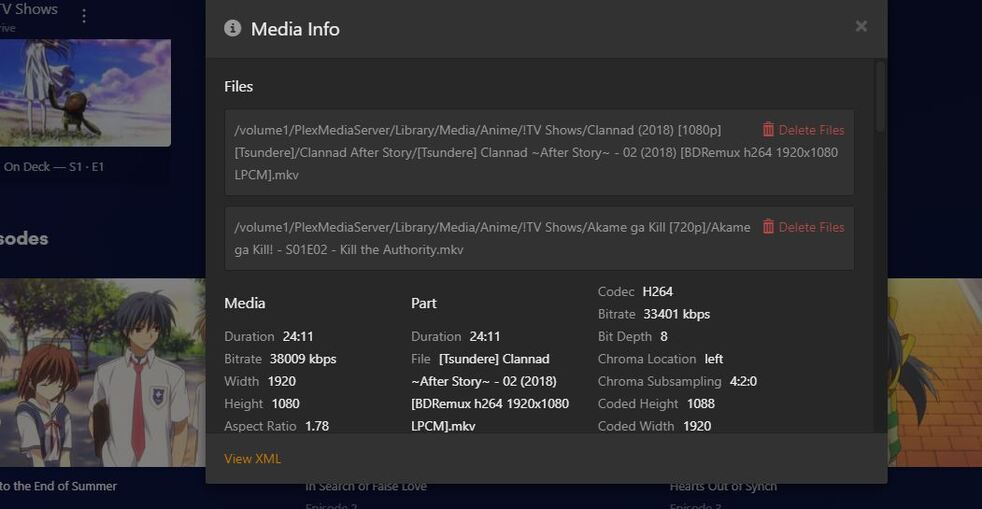
After adding in my anime tv show library in to plex some shows are showing multiple files in an episode and I’m not able to split the show up so the show up correctly.
Thank you @trumpy81 for the information. I’m in the process of moving the media folders and recreating the libraries, I’ll test and let you know the result
While you’re on it you might also want to review your file naming/organization in general.
Should e.g. be like this:
TV Shows   <- the folder linked to your tv-show library
  Clannad (2018)
    Season 02
      Clannad (2018) - s02e02.mkv
      [or]
      Clannad (2018) - s02e02 - In Search of False Love.mkv

  Akame ga Kill
    Season 01
      Akame ga Kill - s01e02 - Kill the Authority.mkv
Specifically… season folders should be named Season XX – not by season names (or at least have those only as a suffix to the official schema). Also, avoid from simply placing plain numbered files but (02) or repeating a season title in the episode name.
After making the changes the contents in one of the folders are now missing so that is now a new issue. There are still other folders that have the same issue as above so for the moment all I can do is to go through each folder and see if there is any content and skip them if I can’t split them.
@tom80H there is a lot of anime that are only single season shows so in general I don’t put them in a season folder. Those shows that have more than one season I have those separated by season based on AniDB since most of the shows I have are English subtitled instead dubbed so using the TVDB where the cast is the English might not work overall.
You really do need to follow @tom80H’s suggestion to correct your folder/file naming.
I recommend you use FileBot to automatically rename the files for you. The current cost is $6.00 USD for one year or $48.00 USD for a lifetime license.
You may install FileBot on the NAS or on your PC. Then simply drag/drop the files into a designated folder and it will name them and move them into appropriate folders once you set it up.
You can also set up FileBot to rename the files as soon as they are downloaded.
The missing files most likely do not have the correct permissions or file owner, or they have been misidentified and placed in another series.
Your correct folder/file naming will help prevent any misidentification of the files.
The folder and file format can’t be the only issue as there are movies and non anime TV shows that don’t follow the current file format and it is showing in the TV Show section without problems. ie * /volume1/Media/Library/Media/TV Shows/Criminal Minds/criminal.minds.901.hdtv-lol.mp4
As for the folder inherit permissions that was the first thing that I checked before the move of the Media folder and those have the PlexMediaServer account with R/W
I have filebot, TMM, The Renamer, and rename my TV Series. But as I replied in @tom80H response for single season shows I don’t create a season folder. Those that have more than 1 season are in separate folders.
Files that have been updated to the current format are not showing up in plex.
You can get lucky despite deviating from the official naming schema… until you don’t.
My point about the season folder was mostly regarding your use of season titles. The issue about the single-season (no-season) show was about the lack of a proper naming.
Bad naming can be bad enough.
Which exact path have you added to this library of yours? You could get that kind of mess if you’re adding individual show folders to the library (instead of pointing at the library folder).
Until four years ago when I moved the files and folders over to the NAS I used to be able to watch the anime shows via the folder view. I had to go into each episode manually but was able to see the contents.
I could see bad naming could be an issue depending on the scanner and agent, The ones i’m using seem to be resolving the shows that are showing and need to be ‘fix match’ and/or split its the ones it doesn’t find or can’t be split i have issues with.
For the library path it is the following /volume1/Media/Library/Media/Anime/!TV Shows.