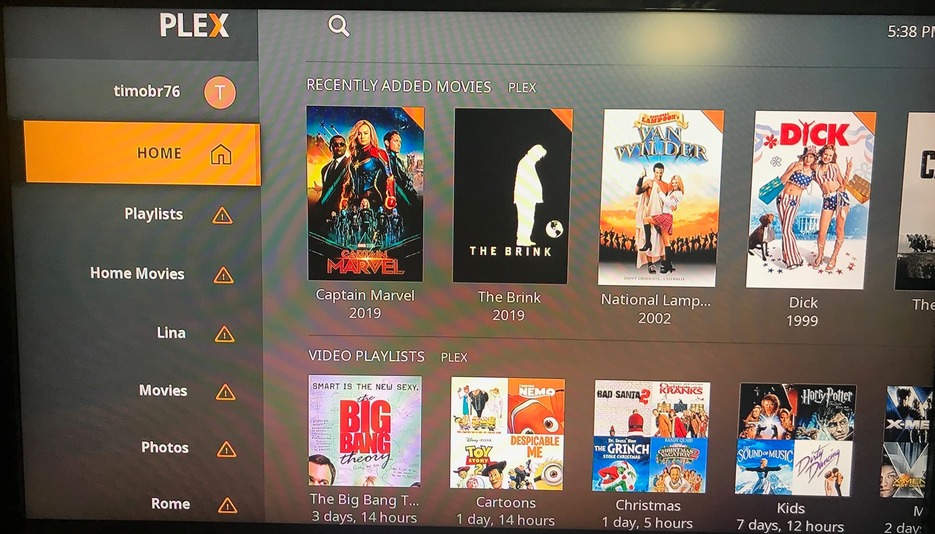
I have two homes with a plex server in each. “Plex” in my main home and “PlexAZ” for my home in Arizona. I have plex server running in each and each has their own movies, tv shows etc. I have one plex account and both servers are registered. So far, so good.
While at my main home, when I open plex on Roku I see “Home” on the left which shows “recently added” and “playlists” to the right without issue. For “Playlists”, “Home Movies”, “Movies”, etc on the left there is an explanation point in a little triangle and on the right it says “PlexAZ” is currently unavailable. This is clearly a problem.
There needs to be a way on the home screen to choose which plex server you want to connect to (if more than one).
So right now, on Roku at home, I cannot watch anything that is not to the right of the “Home” tab on the left.
I have also seen this similar behavior on plex for Samsung, but its not as severe and there is a way to somewhat get around the issue. I fear my wife will update the app at which point Plex and my plex pass will be useless until I delete one of my plex servers.
Bottom line - Apps need to be multi-plex server aware and give the option of choosing which one to connect to.
I run lets say a few servers…
I have no problem switching between them, also Plex will search them all if selected.
and I have remote users that use them without (major) issues…
Every dang time I back out to exit I’m nagged about switching servers - that I only have one of… but…
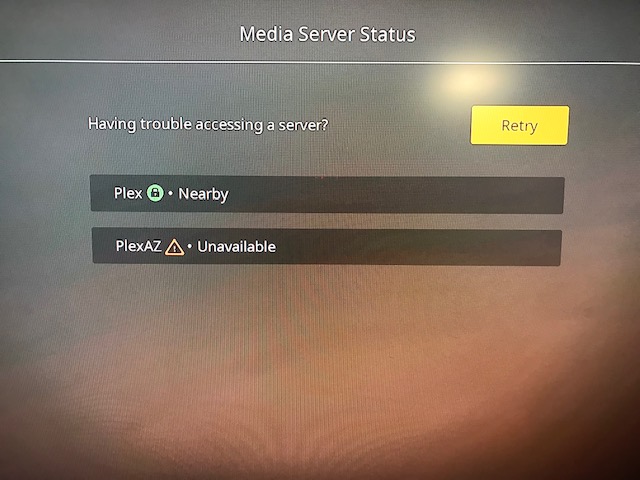
Under your User Letter you should see Media Server Status. Go in there and see if your other server is there to select. I have no way to test it, Bro.
It does seem a little convoluted and the way Plex was all up in your face about it only a short time ago, it’s odd that now it seems hidden. Is there no middle ground? What happened to the big server combination mess?
Media Server Status says “Plex” is nearby and “PlexAZ” is unavailable. Choosing the one nearby has no affect on the home screen. Attached pictures show what I see…
I don’t allow remote access. When at my home in Wisconsin I want to watch my local “Plex” server. When at my home in Arizona I want to see my local “PlexAZ” server there. Since I don’t allow remote access the other server will always be unavailable.
Correct, I’m in Wisconsin now and my plex in Arizona is not available. I suspect that plex sorts “PlexAZ” before “Plex” so that’s what I’m stuck with; a faulty Roku Plex app.
Unless there’s some obscure work-around - or neither one of us know how to get that unavailable server out of your line-up, which, frankly, should be as easy as falling off a log.
All I got is time - I’m in Prison for assault on a stubborn Plex Guest (that just wouldn’t listen!).
My parting shot is to try to sign out of PlexAZ (in case you haven’t tried that 100 times). From the Roku app and maybe the server via Plexweb and the hosted web app would be my guess if nothing good happens in cold country. You don’t need PlexAZ ATM. Try to nuke it.
I had an issue doing multiple servers. The way I did it was I used a different user name / email for each server and then I “invited” each server to the other one. Now both servers show up for both accounts. Hope this helps!
If the Roku Team wants a textbook example of a major failure in their design right here it is.
To have multiple servers polluting the interface with no way to ‘disable’ any of them is lazy design. That might be the way they work it at the office, but here at home (in Wisconsin for example) - it blows (almost sure he’d agree).
I’m certain there isn’t an overabundance of Users with a ‘Summer Home’ and of those, there probably aren’t many with a Plex Server in each home, but here we are with a situation not planned for - apparently.